Consolidate all your logins and passwords into a single account using LastPass

Over the last few years, I’ve had to create logins at well over 100 different websites.  Some of these I use heavily, like Google, Facebook, or Twitter, and others I use only rarely, like AAA or Consumer Reports.  Yet for each one, I have had to set up an account name and a password.

This leads to a common conundrum: how to keep track of all of those passwords?  One option is to use the same password everywhere, but different services have different restrictions on length, character combinations, etc., and if your password was ever compromised, every single service you use would be vulnerable.  Most people I know tend to have a couple of “go-to” passwords that they use for multiple sites, with perhaps separate passwords for the most heavily used and sensitive sites, like email or facebook.  Many people use a computer file or email message to store which password went with which site, and more sophisticated users use a more sophisticated password locker like SplashID or 1Password.

For a long time, I have been wishing that I could do away with all of these separate accounts and just have a single ID that was shared across sites.  You can already do this to some extent using oAuth – many sites will allow you to log in with your Facebook or Google or Amazon account.  However, the capability varies from site to site, and it has its own issues.  You are more or less locking yourself in to one of these providers, and you may not necessarily want services like Facebook integrating with these other accounts.

To my delight, my friend Meyer Potashman recently introduced me to a service called LastPass that allows me to consolidate all of my accounts but without surrendering the control to a third party.  At it’s core, it’s another password safe for maintaining all of your accounts, but it is so well implemented that you can more or less stop having to be aware of the details of your logins for each separate site.  All I need to do is remember my LastPass password, and it does the rest.

LastPass functions as a combined browser plugin and mobile phone application.  Whenever I navigate to a site that I want to log into, like pinterest.com:

I simply click the LastPass button and punch in my one password.

It checks for a match to “pinterest.com” in my LastPass database and then automatically fills it in:

The beauty here is that I actually have no idea what my password for pinterest is.  Instead of being a variant of the same password I use on other sites, I can set it to a random string of characters because I never have to actually see it.  LastPass even conveniently provides a random password generator:

For mobile devices, LastPass is almost as seamless.  On my iPhone, they don’t allow browser plugins, but the LastPass app makes it very easy to access my passwords.  Any time I need to grab a password, I switch to the app, type in a few letters of the site (e.g. “pin” will quickly filter the list down to “pinterest.com”), and then tapping on it immediately gives me a variety of options including copying it to the clipboard:
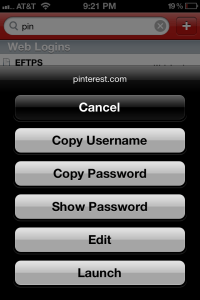
I then switch back to the original app I was using and paste it into the password field.  Done!

LastPass is a cloud-based service, so there is no need to worry about syncing data between your computer and your phone.  While the data itself is stored in the cloud, it is never unencrypted on their servers.  The plugin and mobile applications handle the encryption/decryption locally on your device.  And since you now only need to remember the LastPass password, it is easy to choose a much longer one than you might use normally (e.g. 20-30 characters) for added safety.

The only downside I see with LastPass is that while the browser version is free, you have to pay $12 a year to use the mobile versions.  I’m a notorious cheapskate and hate any and all recurring expenses no matter how small, but this one is useful enough that I am willing to pay it.


Posted in Uncategorized | Tagged , , , , | 1 Comment

Toddler Negotiation Strategy: The Neutral Third Party

My favorite quote about parenting is by John Wilmot:

Before I got married I had six theories about bringing up children; now I have six children and no theories.

Any time I hear or read about someone espousing the right way to handle a parenting challenge, such as sleep training or discipline, I get pretty skeptical.  Even a large family of four children is a pretty far cry from a statistically significant sample set.  I’m sure that the technique worked extremely well for that person, but if it doesn’t work for me and my kid, it’s not necessarily because I’m doing it wrong.

With my first child, we had a terrible experience with bedtime.  She just wouldn’t go to sleep, and she would be constantly wanting to get out of bed.  We were doing all of the things that parenting books recommended – a well established bedtime routine, rewards, reprimands, the works.  Nothing really worked.  It felt like the model for Go The F— To Sleep.

With my second child, it was completely different.  Bedtime takes about five minutes.  There really is not much of a bedtime routine at all (which is stressed so hard in parenting guides).  Plop him in his crib with his pacifier, sing a little bit, leave the room.  Done.  He’s asleep within minutes.

This isn’t a result of having learned from the first kid – we still have problems with our older child at bedtime periodically.  They are just different kids who are wired differently.  What works with one doesn’t work with the other.

I’ve come to think that parenting advice is like chess moves (at least, so I am told – I don’t really play chess).  The good players build up a library of moves for handling different situations.  As games progress, they look for moves that might suit their current situation.  Some are defensive moves, some are offensive, and they depend on the pieces on the board and the other player.  It’s not one size fits all.

Parenting advice is kind of similar.  A tactic is based on a certain type of parent and a certain type of kid, and while it is useful to pass on, your milage will vary.  For example, I tend to be more of a pushover.  No matter how effective a “because I say so” type of tactic might work for some parents, it will be of limited value for me, because I just don’t have the personality to pull it off convincingly.  My methods will be different.

So with that in mind, I thought I would share a tactic that has worked for me several times with my older child, on the off chance that it is useful for somebody else.  I call it the “Neutral Third Party” strategy of negotiation.  Rather than locking into a battle of wills with your child over some issue, realign the sides so that it is not you against them.

We used to have a problem with our older daughter coming into our bed in the middle of the night and then having a screaming fit when we said “no”.  It became a choice between sleeping poorly because you can’t fall back asleep after having a 30 minute battle over why the child can’t get into bed or sleeping poorly because you say “yes” and have a flip-flopping fish in bed.

Eventually, I hit upon the idea of putting a nightlight on a timer in her room that would turn on the light at 5am, signaling that it was okay for her to come out of her bed.  This is not a new technique of course, but for us, it wasn’t a signal of when it was “okay” to leave her room.  It was a neutral third party.  Now, when she came out at 3 am wanting to get into bed, it was not an issue of me saying “no”; it was me saying, “you can’t – the light’s not on yet”.  There is a subtext here – it’s not my fault that the morning light is not on.  I’m not the bad guy.  You can yell at the morning light, but all of us can agree that it is currently off.  Within a week, the middle of the night wake-ups mostly disappeared, and we stopped using the morning light a few months later.

The same technique has worked well for other situations, like getting ready for bedtime.  It used to take forever, as my daughter would horse around, refuse to cooperate or play with her toothbrush – anything to delay bedtime.  It would take forever, I would get frustrated, she would get frustrated, and bedtime would be very late (her ultimate goal, of course).  She likes reading a book at bedtime, so I would often threaten to take away bedtime book if she didn’t cooperate, but it just led to further battles about why I was “not being nice” by taking the book away.

Then I hit on a way to use the “neutral third party” technique.  I set a timer on my phone and told her that she had 15 minutes to do everything necessary for bedtime.  If the timer went off and she wasn’t done, no bedtime book.  Once again, it wasn’t a question of me being mean.  If the timer was going off, it was going off.  That was her responsibility.  It defused the bedtime situation while eliminating the argument.  It also allowed me to not get frustrated with any delay tactics she might try, since I knew we were locked in for a 15 minute window, maximum.

This technique works well for me and my daughter.  I have no idea yet if it will work well for my son, since he is such a different kid.  When he gets older, I will try it and see, but I am guessing I will have to try something different with him.

But who knows, someone else might find it works for them.

Posted in Uncategorized | Tagged , | Leave a comment

A powershell script for running reverse lookups on many IP addresses at once

I often find myself looking at web logs when researching anomalous traffic on our servers.  It’s not uncommon for a poorly written web scraper to come through the system and generate spurious errors, and I start looking at what IP addresses are generating the most hits to see if I can pinpoint who it is.

One of my first steps is run a reverse lookup on the IP to see if there is a PTR record registered in DNS that might identify them.  For example, Amazon’s EC2 servers have registered PTR records:

> nslookup 184.169.245.120

Name: ec2-184-169-245-120.us-west-1.compute.amazonaws.com
Address: 184.169.245.120

Running nslookup by hand is fine if I need to look up just one or two sites, but sometimes I found myself with a long list of addresses that I want to look up.  I could easily write a script around nslookup, but the output was too verbose (usually 5 or 6 lines per IP address) to easily scan through the results.

I also wanted to take it a step further than just a PTR lookup.  Many IPs have no PTR record, but over time I have accumulated a list of IPs that I have identified and recognize.  For example, I have a long list of Akamai servers that are frequently intermediate nodes for traffic on our Akamai urls.  I also have the IPs of proxy servers for several clients that have large numbers of users sharing a single address.  I wanted to combine the results of my home-grown list with the reverse lookup in easy-to-use command.

I ended up writing a powershell script to do just that.  It takes a list of IPs (or a single IP on a command line), and runs an nslookup.   Rather than spitting many lines of output, it parses the results to extract the part I am interested – the name record.  It then also checks the IP address against my known list of IPs, and then finally outputs it in a tab-delimited, easy-to-read format with one IP per line:

> ip_lookup.ps1 -k knownips.txt -f input_ips.txt
204.236.179.177   ec2-204-236-179-177.us-west-1.compute.amazonaws.com
204.236.188.194   ec2-204-236-188-194.us-west-1.compute.amazonaws.com
204.236.188.206   ec2-204-236-188-206.us-west-1.compute.amazonaws.com
209.170.118.215   NOT FOUND                Akamai
216.246.87.201    unknown.scnet.net        Akamai
50.18.0.118       ec2-50-18-0-118.us-west-1.compute.amazonaws.com

As I run the tool looking at different issues, I learn about new IPs and add them to my known IP list, saving me troubleshooting time in the future.

Here is the powershell script:


$stop = $args.Count
$inputIP = ""
$inputFile = ""
$knownIPFile = ""
$showUsage = 0
$verbose = 0
for ($i = 0; $i -lt $stop; $i++)
{
if ($args[$i] -eq "-f") {
if ( ($i + 1) -eq $stop) {
$showUsage = 1
}
else {
$i++
$inputFile = $args[$i]
}
}
elseif ($args[$i] -eq "-k") {
if ( ($i + 1) -eq $stop) {
$showUsage = 1
}
else {
$i++
$knownIPFile = $args[$i]
}
}
elseif ($args[$i] -eq "-verbose") {
$verbose = 1
}
else {
if ( ($i + 1) -eq $stop) {
$inputIP = $args[$i]
}
else {
$showUsage = 1
}
}
}
if ($stop -eq 0) {
$showUsage = 1
}
if ($showUsage) {
Write-Host "Usage: ip_lookup.ps1 [-multiline] [-k <KNOWN_IP_FILE] -f <FILENAME>"
Write-Host " ip_lookup.ps1 [-multiline] [-k <KNOWN_IP_FILE] <IP_ADDRESS>"
Write-Error "Bad Input"
exit
}
$knownIPs = @{}
function LoadKnownIPs($knownIPList)
{
# File should be IP<TAB>Description
$reader = [System.IO.File]::OpenText($knownIPList)
$line = $reader.ReadLine()
while( $line)
{
$result = $line.Split("`t")
if ($result.Count -le 2) {
$knownIPs[$result[0].Trim()] = $result[1]
}
else {
Write-Output ("-" + $result[0].Trim() + "-")
Write-Output "Error at $line with " + $result.Count
}
$line = $reader.ReadLine()
}
$reader.Close()
}
if ( $knownIPFile -ne "" ) {
LoadKnownIPs($knownIPFile)
}
function LookupIP($ip) {
$result = nslookup $ip 2> $null | select-string -pattern "Name:"
if ( ! $result ) { $result = "" }
$result = $result.ToString()
if ($result.StartsWith("Name:")) {
$result = $result.Split()
$result = $result[$result.Count -1 ]
}
else {
$result = "NOT FOUND"
}
$knownMatch = ""
if ($knownIPs.ContainsKey($ip)) {
$knownMatch = $knownIPs[$ip]
}
if ($verbose) {
Write-Output $ip
Write-Output $result
Write-Output $knownMatch
}
else {
Write-Output "$ip `t $result `t $knownMatch"
}
}
if ( $inputFile -ne "") {
$reader = [System.IO.File]::OpenText($inputFile)
$line = $reader.ReadLine()
while( $line)
{
LookupIP $line.Trim()
$line = $reader.ReadLine()
}
$reader.Close()
}
else {
LookupIP $inputIP
}

view raw

ip_lookup.ps1

hosted with ❤ by GitHub

Or you can download it directly from GitHub at https://gist.github.com/jrothmanshore/2656003.

Posted in Uncategorized | Tagged , , , , , , , | 18 Comments

If you never incur overage charges, you may be on the wrong mobile plan

Long ago, I did some research and switched us to a $15/month 200MB data plan from AT&T.  I had determined that neither of us ever exceeded 150MB (usually closer to 100MB), so it was an easy decision to switch from the $30 unlimited plan, thereby saving $360 a year (2 * 15 * 12).  My wife just generally just uses the phone for email and Facebook, and while I use much more data, it is generally on for free on wifi, hence the low usage.

However, last month, I received a notification from AT&T that my wife had exceeded her data usage of 200MB, triggering an extra $15 charge.  I was immediately puzzled – how can someone who uses so little data exceed her plan?  When I pulled up the usage on the AT&T app, I saw that she hadn’t gone over by just a little bit – she was already past 300MB, more than half way to the next charge.  Huh?

As I dug deeper, I saw that almost all the data usage came from a single day, which corresponded to a day where she stayed overnight at the hospital to be with a sick family member (everyone is okay now).  She wasn’t able to sleep, so she had downloaded a whole bunch of podcasts to listen to.  It hadn’t occurred to her to do this over the hospital’s wifi network, leading to the sudden surge in data usage, well over the cap.

Okay, no problem.  This didn’t represent a major shift in data usage; it was a one-time occurrence.  But the fact of the matter is that even if she exceeded her data usage more frequently, I still probably wouldn’t increase our plan size.

The trick in many data plans offered by the wireless companies is that they offer you a lot more data for a small amount of money, enticing you for the higher plan.  The rationale is if you go over, you just paid $30 for 400MB, but you could have paid just $25 for 2,000MB.  It’s a much better deal, right?

Not really.  If you were actually using anywhere close to 2GB, I would agree.  However, if you are on the lower end, you are much better off going over your plan occasionally.  Let’s say you are usually under 200 MB but go over once every three months.  That works out to four overage fees a year for a total data cost of $240 ($15*12 + $15*4).  If you went with the $25 a month plan, you would still be paying $300 ($25*12) a year.  Sure, you got a lot more data, but the fact of the matter is that you aren’t using it.  You would still have been better off incurring overage charges.

I go through the same thing with my texting plan.  I’ve become a regular texter, but I got rid of my $10 texting plan once Apple rolled out iMessage.  Most of my text messages are to other iPhone users anyways.  I still often text with non-iPhone users, but at $0.20 a message, I can send and receive 50 messages and pay no more $10.  I’ve learned to not worry about the usage charges I rack up.  If at the end of the month it’s under $10, I am clearly coming out ahead.  Even if I end up racking up charges over $10, it’s still a better deal, since I have to factor in the savings of all the previous months that I didn’t exceed $10.

There is of course a big counter-argument against this line of thinking: peace of mind.  Many people like the comfort of knowing that their bill will always be the same every month, and they find the idea of the overage charges stressful.  I understand that.

Just keep in mind that the cell phone companies understand that too.  Their costs are the same, regardless which plan you are on.  If they can scare you into paying extra for service you don’t actually use, so much the better for them.

Just remember that month after month, those costs are adding up.  How much is that peace of mind worth it to you on a yearly basis?

Posted in Uncategorized | Tagged , , , , | Leave a comment

Life-size Skype (or FaceTime) video chat using an HDTV, an iPad and Airplay Mirroring

One of the reasons I really wanted to upgrade to the new iPad was for ease of setting up video chats between my kids and my parents.  Whereas before we had to go through a lengthy laptop bootup and setup process, we can have a video conference running on the iPad in about 15 seconds.

What I hadn’t appreciated at the time is that the iPad’s versatility has really expanded what we can do over video conference.  Whereas before a video chat used to be a fairly static setup on the kitchen table or the living room, the iPad can go all kinds of places.  When my daughter and wife planted a flower pot out in the backyard, my daughter eagerly brought the iPad outside to show it to her grandparents over FaceTime.

While the iPad takes video chat more places, it does come with a tradeoff of a smaller screen.  Despite its crispness, it’s still a smaller surface area than even my 13″ laptop.  It makes for an intimate one-on-one chat, but when both my 2-year-old and 4-year-old are trying to chat at once with their grandparents, it’s a little tight.

Then it occurred to me that I could use the biggest screen in the house – the 46″ HDTV.  Since we have an Apple TV, I can mirror the iPad’s screen to the TV with just a few taps.  After starting a video chat with my father, I brought the kids into the den and initiated a mirror session.  Instantly, my father popped up on the big TV, in full life size.

Of course, my father needed to be able to see us and the kids as well, so I needed to place the iPad up by the TV.  In order to avoid creating a double-image, I flipped the iPad around and set it to use the “back” camera.  While it obscured a small part of the screen, it perfectly covered the “End Call” button in the bottom center.

My daughter thought the life-size camera was great.  It worked particularly well for when she wanted to show my father a toy or book.  On the iPad (or laptop), she is so close to the screen that what she is trying to show is often off camera, and she hasn’t gotten the hang of watching the box to make sure what she is showing is on screen.  However, since she was much further away from the TV, whatever she was holding was easy for my father to see.

My younger son wasn’t so taken with the experience.  He can be a little skittish, and the experience of suddenly seeing his grandfather in life size up on the TV was a little overwhelming for him at first.  Eventually he warmed up, but it took a while.

Posted in Uncategorized | Tagged , , , , , | Leave a comment

Solved: Bug in memcached client library .Net port causes inconsistent key distribution

Memcached is most popularly used in php and java applications, but it’s a great technology that can integrate with anything.  For those with programs in the .Net world, there is a .Net memcached client library, which is a port called of a java based memcached client create by a team led Greg Whalin.

When you are working with a network of memcached servers, there is no actual communication between the different nodes.  Each one simply accepts get/set requests independently from one another.  The only point that knows about the network is the actual client trying to use it, which has a list of all the nodes.  When it wants to access a value out, it hashes the key name against the list of nodes and selects a node to be the owner.  If will then check with that node for the value, and if it is missing, it will recreate the value and has hit there.

In a web farm, each server is independent, but as long as they have the same list of nodes and are using the same hashing algorithm, they will all act as a group select the same target node to hash any particular value.

At least this is how it is supposed to work in practice.  I think it’s a cool algorithm, and I wanted a way to see it in action, so I previously wrote a script that could query all the nodes in a memcached network and look for a particular value.  Everything looked good in my testing environment, but when we deployed the application, I noticed some very odd behavior – values were being duplicated all over the place.  In some cases, I was finding the same keys on half of the nodes in the network!

I was perplexed.  There were a couple of possible causes.  One would be that the clients weren’t operating off of a common list of servers, which would naturally throw off the hashing algorithm, but I quickly confirmed this wasn’t the case.  Everyone had the same identical list.

Another possibility would be node failures; since memcached is designed to be very robust, if a node goes down, the default behavior is to start looking at a different node to host it.  I started playing with individual servers, deleting values in the cache and then looking to see where they popped up.  What I saw is that it was very consistent – client A would always put its values on node 4 while client B would always put its values on node 7.  Since I knew my nodes were online, failures couldn’t explain the inconsistency.

I started debugging the .Net source code and soon found very behaviors.  I was passing in a list of 10 nodes to the client library, but when I would check the underlying list, there would be 16 nodes listed.  Some, but not all, of the nodes were duplicated, sometimes more than once.

After debugging for a while, I found the source of the problem.  When the client library initializes, it goes through the server list one-by-one creating connections and adding them to a pool.  Once the connection was created, it uses the code below associate it with the node:

if(_buckets.BinarySearch(host) < 0)
_buckets.Add(host);

The code is using binary search to try to find a value in the array, and if it isn’t found, it adds the value to the end.  If it is intending to use a binary search, the data needs to be sorted.  Adding values to the end is going to create an unsorted jumble of data, causing the binary search algorithm to fail.  This causes nodes to get added to the list multiple times.

As it turns out, there is a very simple work-around to this problem (aside from modifying the source code) – just sort the list of nodes before they are passed in to the library.  If the list of nodes is sorted, the “_budgets.Add(host)” line will actually manage to keep the array in a sorted order, because each new entry will always belong at the end.

This could be accomplished just by adjusting the configuration data that contains the list, but my preference was to add an “Array.Sort” call to the string[] of nodes before passing it into the memcached client.  This would ensure that if sysops person ever tweaked the node list, they wouldn’t need to know that it would have to be sorted.

After we implemented the sort, our memcached array started behaving properly – keys were no longer duplicated across the nodes, but hosted on a single node as expected.

Posted in Uncategorized | Tagged , , | Leave a comment

A Parenting Milestone: The No Mess Dinner

Parenting is filled with all sorts of milestones.  Some are big, like the first step, the first word, or the first full night’s sleep.  Others are small, like the first thank you or the first smile.  While we tend to record the big ones, we often forget how much a difference the small ones can make.

Tonight I experienced one of these smaller milestones: the first no mess dinner.

My wife was out tonight, and I had planned on having leftovers with my two kids.  However, as soon as I got home, my four-year-old daughter, Ayelet, immediately started imploring that we go get pizza like we often do when it’s just the three of us.  I’m a bit of a pushover, so off we went, to the delighted squeals of joy from both my daughter and my 22-month-old son, Rafael.

I often describe my son as an OCD wrecking ball.  In some parts of his life, he is adamantly organized – every door must be closed, and he will insist that I take off my shoes and coat as soon as I walk into the house.  Elsewhere, he is chaos incarnate – he loves dumping out all the bins of toys, and when he eats… it gets everywhere.  All over his shirt, the table, the chair, the floor.  Everywhere.  And of course, he absolutely refuses to wear a bib.

Of course, this means trips to the pizza parlor are a mess.  I try to tip well given how much cleanup the table, floor and chairs will all need, and I always bring a a bag of wet wipes to help control the damage.  Tonight looked like it was going to be particularly bad, since the pizza was very saucy and the cheese was dripping off.

I cut Rafael’s pizza into pieces since it was still too hot to eat, and I watched him alternate between half hearted attempts to eat it with the fork he insisted on holding and just picking up pieces with his hands and stuffing them into his mouth.  Over the course of the next 10 minutes, he wolfed down two slices.

Then I noticed something odd.  There was pizza on his hands, and his cheeks… and nowhere else.  Rather than half of it sliding onto the floor, it had all ended up in his mouth, and he kept using a napkin to wipe his hand.  The table and chair were clean as well.  The only mess was on his plate, where it belonged.

Over the past few months, Rafael has slowly been getting neater in his eating habits.  The piles of food on the floor have been slowly diminishing, and he can now wear pajamas more than once before getting his breakfast all over it.  However, it wasn’t until tonight that I realized just how far he had come.  I didn’t need to use a single wet wipe.

To non-parents, this probably doesn’t seem like a big deal, but to me, it’s huge.  Having kids involves lots of yelling, crying and frustration. The idea of going out for a nice, quiet dinner at a restaurant feels like a fantasy.

This isn’t to say that dinner was peaceful.  My daughter had fits about the air bubbles in the pizza, and at one point Rafael tipped his chair over.  But it gives me hope.

Posted in Uncategorized | Tagged , | 1 Comment

Rainy day home improvements: A hands-free storm door and carbon monoxide detectors

After a week of unseasonably warm weather, a cold-front moved into Boston over Saturday night, bringing cooler temperatures and rain. Faced with a rainy Sunday at home, I figured it was a good time for some home improvements.

A few months ago, we added a storm door to our Cambridge home.  Since we have young kids who take time to move in and out, the front door is often open for minutes at a time, wasting energy.  Also, the grit from the air was taking a toll on our door, requiring us to refinish it every few years.  We figured that a storm door would save energy and add some protection.

It works great, but it brings with it a new hassle.  We have a Phil & Ted’s stroller, and maneuvering it up and down the six steps to our door requires both hands.  Although the storm door can be propped open by adjusting a small letter slider on the hinge, it makes the proces much more arduous.  You now had to prop open the door, move the stroller out, then go back up and release the door.

I noticed once that some friends of ours had a self-propping storm door, and it occurred to me that I might be able to replace the original closer for our storm door with something similar. I went to the Home Depot with my 22-month-old in tow (which always makes for an interesting shopping experience) and managed to eventually steer him to the door aisle where we found a Wright Tap-N-Go closer for just $15.

I brought it home, and installation was a snap (even with some “help” from my 4-year-old).  The storm door closers are one-size-fits-all, so it was a simple matter of popping out the old screws to remove the old closer and swap in the new one.

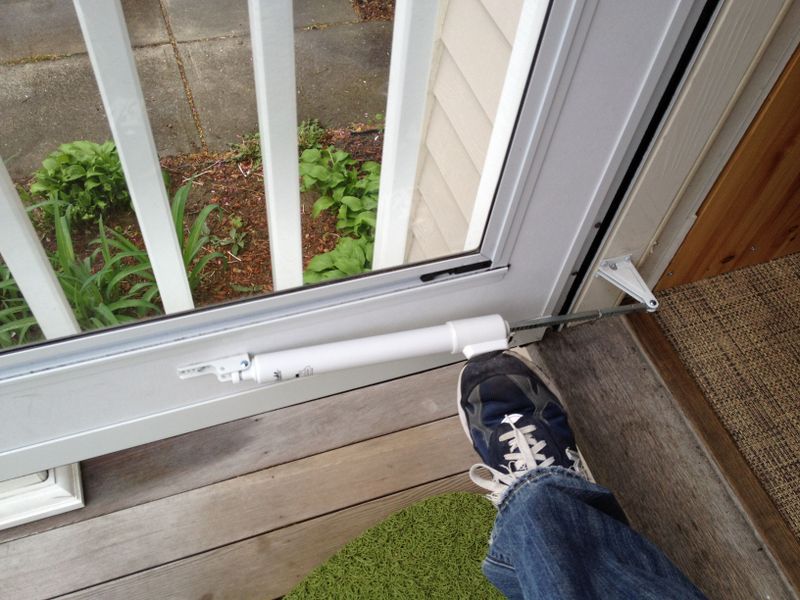
The new closer has a convenient “foot-button” that you just tap with your toe, and the door stays open.  Now, we could pop open the door, bring down the stroller, and close it again with our foot as we went, eliminating extra trips up and down.


Easy!

My second project for the day was to install new carbon monoxide detectors turned out to not be quite so simple, however.

A couple of years ago, Massachusetts regulations were changed to require a carbon monoxide detector on each finished floor of a home.  Our house was built a few years earlier, and while it had a modern, wired smoke detector system (the kind that draws AC power and links all detectors together so that if one goes off, they all go off), it did not have carbon monoxide detectors included.  We had installed a carbon monoxide detector in the basement when we moved it, but we didn’t have one on each floor as required by the new law.

For convenience, what I really wanted was to find a hybrid smoke detector / carbon-monoxide detector that was compatible with our existing system.  I figured I would be able to just pop some of old smoke detectors off and replace them with these new combination ones. At Home Depot, I managed to find exactly this type of hybrid model, and it was from FireX, the same company that made our current smoke detectors. A store worker confirmed that they would be compatible with our wired system.  They were painful $49 a pop, but given the important safety roll they play, I bit my lip and bought three (one for each floor).

I brought them home, but unfortunately, I discovered that replacing them would not be the simple swap that I expected.  Despite both being FireX, they had differently shaped connectors and mounting plates, meaning that I was going to have to completely rewire them.

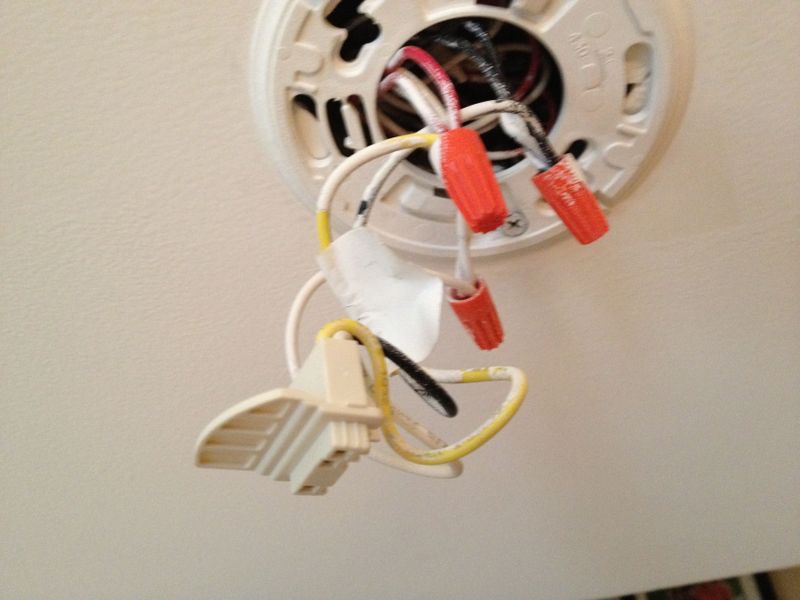
One nice thing about our home is that the contractors all did very jobs, and we have a clearly labeled circuit breaker board.  I found the one marked “Smoke” and switched it off to power down the smoke detector system and set about unscrewing all the wires, matching up the colors of, and replacing the mounting plate.

My son was very excited by this activity and brought his own tools to “help”:

With a minimal amount of swearing (don’t all home improvement projects require some light cursing?), I finally got all the caps on properly and the mounting plate installed.  I hooked up the new detector, and then hit the test button.  Somewhat disturbingly, I found that the smoke detector actually talks in English, indicating whether it is being tripped by smoke or carbon monoxide.  I also heard a satisfying chirp from the other smoke detectors in the house, indicating that it is successfully communicating.

I still have to install two more, but my son desperately needs a nap, so they will have to wait until later this afternoon.

Posted in Uncategorized | Tagged , | Leave a comment

Twitter has ruined Posterous, so I am migrating my blog to WordPress

Last month, Twitter announced that they had purchased Posterous, the site that I use to host my blog.  I found this a little alarming, since in the months after Twitter acquired another popular product, TweetDeck, they slowly gutted it of all of the useful features.  However, Posterous assured us that the site would continue to operate normally, and if any decision was made to change the service, there would be plenty of advanced notice.  Well, it seems that Posterous is rapidly headed for the same fate as TweetDeck.

My blog is mostly a hobby blog.  I originally started it as a place to post some thoughts that didn’t quite fit into a 140 character tweet, but it slowly evolved into a location to post commentary on technical problems I had solved, often at the intersection of technology and family.  It was also a place to post relatively deep technical solutions to problems I had solved that didn’t have clear solutions readily available on Google searches.

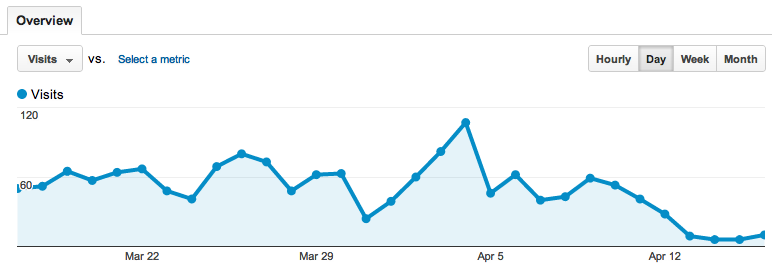
The majority of traffic to my blog comes from Google.  There are a couple of posts that generate a lot of traffic in particular (connecting iOS devices to a Bose wave radio and problems with DNS resolution for Akamai), and my post on babysitting over skype even led to my kids being featured in a New York Times article.  I use Google Analytics to track what posts are being found by various keywords, and starting last week, I noticed something very disturbing:

Image

Traffic had dropped off to close to 0.

I started googling around, and my blog had more less disappeared off of Google.  Even googling “Jeremy Rothman-Shore Blog” failed to bring it up.  On April 11, Posterous had run into some sort DNS issue, and anyone with a posterous.com site had been knocked out.

Okay, sure, technical issues happen.  But what is particularly disturbing is that Posterous was silent about it.  Many of us out on Twitter were complaining, but Posterous was not responding.  In the past few occasions that I had run into a technical issue, I always found posterous to be very responsive, but there has been nothing but silence for almost a week now.  They haven’t even acknowledged an issue.

Forced to take matters into my own hands, I started looking for an alternative site.  I experimented briefly with Tumblr, another up-and-coming blogging platform, but I found that it was just too limited and missing many of the customization and integration options that I had come to expect from Posterous.  Wordpress, on the other hand, was a much more full featured site with many of the features I was already using.  Best of all, it had an “Import from Posterous” option.  I pressed a button, and 15 minutes later, every single one of my posts had been imported from Posterous, complete with tags, images, code snipets, and videos.

I will continue to settle in over the next few weeks here at my new WordPress home.  My apologies for possible “noise” posts while I work out issues with autoposting to other services like Twitter and Facebook.

Posted in Uncategorized | Tagged , , | Leave a comment

A Root Cause Analysis for a child’s skinned knee

At various points in my career as a software architect at companies providing SaaS (software-as-a-service) offerings, I have found myself helping to write up a Root Cause Analysis (RCA) document in the event of an unexpected system issue, such as a server failure.  These documents tend to cover a couple of key areas, including the event date/duration, business impact (e.g. some users received errors), root cause (e.g. the server was out of disk space), intervention steps (e.g. web log files were archived) and steps to prevent a recurrence (e.g. an alarm has been set up to send a warning when the disk is 90% full).
When I came home from work this evening, I found that my daughter’s day care had sent an “Injury/Illness Report Form”.  It seems that my daughter had fallen while playing on the playground and skinned her knee.  The form was extensive, including the date/time of the injury, a description of what happened, first aid that was given (“a band aide, some TLC were applied”, according to the form).  In other words, they sent an RCA for my daughter’s skinned knee. 

Of particular amusement to me was the inclusion of a section for “Description of any corrective action taken to prevent similar occurrence”, as all good RCA documents will have.  In this section, they had written, “Remind children to run on the wood chips away from concrete path.” 

Anyone who has ever tried to remind an over-excited child to slow down and not run so fast on the concrete knows how futile this is until they fall down and bump themselves a few times. 

Every parent has to find their own style.  Some are more protective than others, but I personally lean towards trying to nurture independence.  If my children fall and bang themselves, my first reaction is not to swoop in, pick them up, and wipe away their tears.  I encourage them to get up, brush it off, and try again.  Sometimes that works, and sometimes they run to me and need me to pick them up and wipe their tears, and that’s okay too.  But fundamentally, I look at scraped knees and banged elbows as good things.  The child is developing dexterity, exploring their physical limits, and learning how to deal with problems.  Frankly, if they don’t come home with the occasional band aide, I’d be worried. 

I do recognize that I need to allow different levels of independence with each of my kids.  Both are very physically active, but my younger son has less caution than my daughter did when she was his age.  When my daughter was two, I knew that she was very aware of her limits and she could safely walk over to the top of the stairs unaccompanied, because she knew not to go over the edge (this would sometimes freak out other nearby adults who did not know her as well).  My son has more of a kamikaze nature to him, and I would never let him do the same thing.  He has done some very silly things in his day and could very well make a leap.  He’s just a different kid. 

If it were up to me, my school wouldn’t send an RCA for a silly little scrape that required nothing more than a band aide and TLC.  But I know it’s not up to me or them.  The RCA form appears to be some sort of state mandated document, and I am sure that this level of documentation has many important reasons, including protecting children in abusive situations and other horrible things I am lucky enough to not have to think about. 

But part of me still wishes that in the “corrective action taken to prevent similar occurrence”, the answer could have simply been, “Accidents happen.” 


Posted in Uncategorized | Tagged , , | Leave a comment