How Akamai routes traffic (hint: it’s not always dynamic)

I thought I had a full grasp of how Akamai routing works, but a recent dive into our web logs has taught me that world of high speed internet traffic routing is more nuanced.

One of the big selling points of using Akamai is their ability to route traffic around internet bottlenecks.  The public internet routes traffic using plain old Border Gateway Protocol (BGP), which is designed to find a path from point A to point B based on how networks are interconnected.  However, it is not concerned with throughput speeds for those networks, so if there is congestion at a particular node, BGP will continue to send traffic through it, effectively slowing everybody down.

In contrast, Akamai is constantly measuring throughput on various network segments, and they are able to identify alternate paths.  For example, when there is a cable break in Asia, BGP protocols will tend to overload certain nodes as they start using alternate paths for data.  Akamai is able to detect that those nodes are overloaded and choose other alternative paths for better performance.

All of Akamai’s edge servers around the world are able to communicate with each other using this proprietary routing protocol.  There are other enhancements to this edge server to edge server network: they use a data transmission protocol that avoids the TCP/IP slow start issues, and all content is compressed to minimize the number of packets sent.
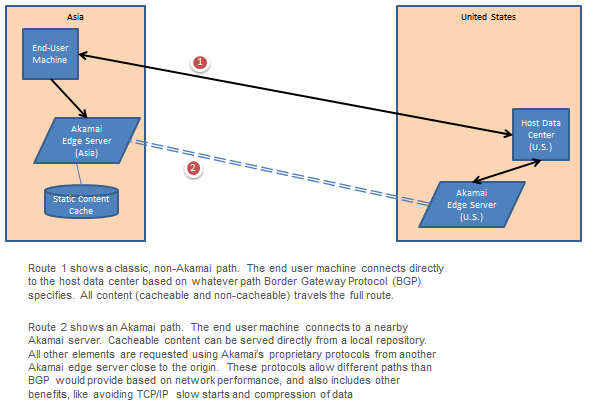
Image001

I had always understood the network to function like the diagram above.  Normal, non-Akamai traffic meant a direct connection from the end-user machine to the host data center (route 1).  Akamai traffic meant that the client connected to a nearby edge server, where static content was served out of its cache, and remaining content traveled over their high speed protocols (route 2) to another Akamai edge server near the host data center, at which point the traffic reverted back to normal protocols.  Of course, the diagram above assumes that the end user’s DNS is properly configured.

Shouldn’t All Requests Come From Nearby?

It turns out that the diagram above is not the only routing scenario.

I was recently researching some data in our web logs, and I came across something very surprising.  When I geolocated the IP address of one of the edge servers I saw connecting, I discovered that it was actually located in China, despite the fact that our origin servers for this site are in the United States.

As I dug deeper into our web logs, I found more than one thousand different Akamai edge servers connecting to our machines.  While the traffic was concentrated with servers in the United States close to the origin, I did find requests from servers on the far side of the country, Europe, and other parts of the world as well.

Based on my understanding shown in the diagram above, I couldn’t see a reason why I would ever get requests from so far away.  Shouldn’t  it all be routed over Akamai’s high speed network, with requests always coming from an edge server near our origin?  After talking to Akamai, I discovered that while this is usually the case, the reality is more nuanced.

Three Possible Routes

Akamai’s proprietary routing algorithm, dubbed “SureRoute”, is repeatedly measuring the transmission speed between an edge server and on origin for three possible routes.  Two of the routes are exactly as I described above – the Akamai edge server talks over their high speed protocols to another edge server near the origin.

However, the third route is a “classic” route, where the edge server talks over normal BGP / TCP/IP protocols directly back to the origin:

Image002

The Akamai edge server will use the third route when it finds that it is actually faster than the “dynamic” routes through other edge servers.  It could be that there is congestion along the other paths, or that the other edge servers are unavailable for some reason.

When this route is selected, the edge server is talking directly to the origin, and this is why we see such a long list of edge servers in our logs, and why occasionally those servers are very far away.

I traced a session from one of these far away edge servers, and I saw that the requests lasted only for a few minutes.  Soon after, requests for that session started coming from another edge server much closer.  Presumably, for a short period, the “traditional” route was determined to be faster than “dynamic” routes, so it started using good old BGP routing instead.

Impact of a Traditional Route

In general, Akamai’s decision to use the classic route makes sense; if that route is currently the fastest way to get to the origin, then it should be chosen.  Since the client is still connecting first to a nearby edge server, they still get the performance benefit of the static cache, and all remaining requests are traveling back to origin on the most optimal path available.

One downside, however, is that it loses the other two benefits of the Akamai network: TCP/IP slow start and data compression.  The edge server is now talking directly to the origin, and it needs to use TCP/IP to do it.  Furthermore, if the origin sends any data that was uncompressed, significantly more data ends up being transmitted over the internet than would have been transmitted using Akamai’s proprietary protocols.  This could in theory rapidly undo any benefit of the traditional path, since a route that is 20% faster will still be slower if you transmit 3x as much data.

Still, TCP/IP slow start is probably a small percentage of traffic time, and most data sites can be configured to compress content before transmission.

Posted in Uncategorized | Tagged , , , , | 1 Comment

HTML Shortcut: Dynamically switch to RTL mode based on the opener #localization #l10n

As we were working on adapting one of our applications to support right-to-left (RTL) languages like Hebrew and Arabic, we tripped over an issue with a static HTML document.

Changing a page to by RTL is pretty easy.  You can shift the web page over to RTL mode just by setting the “dir” attribute of the root HTML tag:


<html dir="rtl">

This does most of the heavy lifting by causing the HTML to layout from right to left, automatically flipping tables, text, etc., and it moves the scroll bars so that the page is horizontally scrolled to the right, and the vertical scroll bar is on the left hand side. 

Since most of the pages are dynamic, we just had to detect which type of language the user was in, and if it was RTL, we added the dir attribute.

However, we came across a page where an engineer had done something “clever.”  They had a dropdown that could contain a large number of elements, and they provided a pop-out link that would allow the user to see a bigger view of the data.  This would open up in a new window, allow them to make their selection, and then save it back.

Rather than write a separate page, they had written a static html page with javascript.  When opened, it would grab the options out of the list, allow the user to select what they wanted, and then save the selection back.  Since the HTML page was static, we didn’t have a server-side opportunity to change the html tag to activate the “dir” flag for RTL users.  As a result, while the main page was in an RTL mode, clicking the pop-out link would render in the default left-to-right mode.

Fortunately, there is an easy fix for this.  It is possible to change a page’s direction attribute on the fly, so we just edited the static html pop-out page to make an adjustment.  If its opener was in RTL mode, it would just shift to RTL mode as well:


if (opener.document.dir == "rtl") {
    document.dir = "rtl";
}

While the page would start to load in LTR mode, it would automatically shift to RTL, and the end user wouldn’t see an issue.

Update: I have discovered that Firefox always return “ltr”, even when the direction for the page is “rtl”.  However, it seems that there is a workaround by checking with the document element.  Instead, use:


if (opener.document.documentElement.dir == "rtl") {
    document.dir = "rtl";
}


Posted in Uncategorized | Tagged , , | Leave a comment

I wish I hadn’t thrown that old piece of technology away

On The Media had a fascinating piece this weekend about digital archaeologists.  These are people who are attempting to preserve technology that has long since passed into obsolescence in order for us to remember how technology used to work.  In one exhibit, they had unearthed an original NeXT cube, the computer on which the very first web browser and web page was constructed, and a copy of one of the very first web pages.

Sadly, the very first web page itself no longer exists.  Back in 1991, no one really realized its significance, and the file was discarded.  The closest the digital archaeologists were able to find was an early web page from 1992.

I know how they feel.  About ten years ago, my parents were cleaning out the attic, and they had rented a dumpster to haul away the junk.  My father proudly told me how he had finally thrown away that old Mac Plus that had been collecting dust with the other junk up there.  “You what?!” I exclaimed.  “You have to go get it back out.”  After arguing for a few minutes, my father finally agreed to back out to the dumpster and rescue it.

beige Macintosh Plus

That old Mac Plus was a true piece of history.  This was the days before hard drives were ubiquitous, and we had stacks and stacks of floppy disks that held only 800k each.  As a kid, I longed for a hard drive, and I saved up money for more than a year to buy one.  It was glorious – 20 megabytes, and it was the size and weight of a dictionary.  At the time, it felt like enough storage to last forever.  Nowadays, I send emails larger than its entire capacity.

I’ve since devoted a shelf in the basement to other obsolete technology that I think will be a novelty some day.  I have an old rotary phone (remember when you actually had to d-i-a-l?), a mouse that had a real roller ball rather than a laser eye, a VCR (“Be Kind, Rewind”), and even a small cathode ray tube television.  I look forward to showing them to my kids one day so that they can marvel at how backwards we were in the olden days.

What really makes me sad, however, is the technology that I just dumped without recognizing what a piece of history it was going to be.  If I could have just one of them back, it would be my first cell phone.  It was the size of a giant snickers bar and weighed more than a cantaloupe.  I remember marveling at how small and light it was when we first bought it.  I eventually handed it down to my sister-in-law, and when she was done with it, I told her to donate it.  What a shame!

I have other regrets, too.  That second generation 10GB ipod with the monochrome LCD display that was the size of a deck of cards and weighed five times as much… our old dot matrix printer… our 35mm film point and shoot camera.

I’m trying to do better.  When I upgraded to an iPhone 3GS a few years ago, I loaned my original iPhone 2G to my mom with strict instructions that she give it back to me, since I knew it would be a collectors item some day.

I do wonder what common place technology today will be fascinating curiosities in the future.  I try not to be a pack rat, but I have a feeling that I will be expanding my collection soon to include items like DVDs or even incandescent light bulbs.

Thus far, Aviva is very patient with my slowly expanding shelf in the basement, which is taking up useful storage space.  It’s a good thing, otherwise future generations will miss out on some real history!  Of course, I’m sure they will roll their eyes any time I try to bring it out, but I can dream.
Posted in Uncategorized | Tagged , | 3 Comments

I caved: we are abandoning Google Voice and signing up for a (gulp) paid text messaging plan from AT&T

As much as it pains me, we are about to start shelling out $20 a month for a text messaging plan for our phones.

My wife and I are in our mid 30’s, and we were just on the wrong side of the age barrier to be natural “texters”.  We got our first cell phones in our 20’s, and all we ever used them for were actual phone calls.  While we understood that you could send text messages, what was the point?  You could just call, and you didn’t have to pay extra.

Things changed quite a bit when we got our iPhones.  While we never aspired to having email on our phones (Aviva swore that she wouldn’t use the email feature, but that lasted about two weeks), we soon became attracted to the ability to communicate electronically on the go without the disruption of a phone call.  Phone calls were great when we needed to convey a lot of information or discuss options, but for less immediate or pressing concerns (like extra items to pick up at the grocery store), email was more convenient and less disruptive.

As we became accustomed to this new form of communication, we soon found ourselves wanting something more immediate than email but without the disruption of a phone call.  For example:
  1. Responding to (or asking) a quick question when we are in a meeting
  2. Strategizing how to handle a child that won’t go asleep when one parent is in the child’s room
  3. Letting one another know that we are on the way home so that the parent who is juggling the kids can plan accordingly
Sure, the emails would get through, but the phones only checked email every 30 minutes (in order to save battery life), and most of the emails are from other people on unimportant topics.  When Aviva sends me an electronic message, I want to know right away.  Text messaging was the perfect in between – the immediacy of a phone call but lack of disruption of email.

Of course, the very idea of paying for text messages upsets me.  I know that SMS messaging costs the phone company a tiny fraction of what a voice call costs, and they give me free mobile calling to any phone in the network.  Why on earth should I be paying for text messages?  It’s absurd.

Since we were both on iPhones, about a year ago we started using PingChat!, a free iphone-to-iphone messaging client using push notifications.  It was perfect, and we began to use it actively.  Pretty soon, it was hard to live without it.  Unfortunately, this turned out to be a double-edged sword.  It was frustrating to only be able to message with other people who were using PingChat, and the program was buggy.  It would often crash, or behave sluggishly, taking a long time to send a text message.

After seven or eight month using PingChat!, I decided to make the leap to Google Voice and its free text messaging service.  This would allow me to send a text message to anyone with a mobile phone, effectively letting me out of my walled garden.  And since it was Google, I could depend on a much better software experience, especially since Apple had finally allowed the native iPhone app for Google Voice into the App store… right?

Once again, it was a double-edged sword.  Now that I could text message anyone, I actually started to really use text messages.  They were perfect if I urgently needed to reach my boss or a coworker when they were in a meeting, and since I could send messages on the Google Voice website instead of having to thumb-key in messages, my usage ramped even higher.  It was really a service I couldn’t live without.

Unfortunately, this was my undoing.  Text messaging has now become a service neither I nor my wife can live without.  But as it turns out, Google cannot actually be relied on to build a good native app for the iPhone.  Their Google Voice application is a nightmare.  Every time you open it, there is a long hang while it starts talking to the server, and you can’t do anything with it.  When I want to send a text message, I want to do it now, dammit!  Not 15 seconds from now.  Now!

Even worse, I would occasionally have issues with push messages not working.  This had been intermittent, but it has become much more frequent.  Aviva would periodically say to me, “Didn’t you get my text?”  I would look at my phone and see no notifications, but if I opened the application, it would pop up.  Or I would get an accusing look about why I didn’t let her know I was going to be home late, only to discover she hadn’t received my text.

We’ve tried using another Google Voice client (GV Connect), and while this is more responsive to sending the texts, it seems to be triggering problems with push notifications back to the regular Google Voice application, making missed texts much more of a problem

All I want is text messaging that works.  Just works.  Is that so much to ask?

Well, there is one text messaging app that has been polished for years, and that’s the actual text messaging application built into the iPhone.  The one where you have to actually (good grief!) pay for messages with.

So, despite all my hard work to cut my phone bill and cable bill, I’m now going in the opposite direction and increasing my bill by $20 a month.  I added a 1000-messages-for-$10 plan to each of our phones.  In other words, I am paying $240 a year now for the privilege of sending 140 character messages directly to people’s phones.

I can’t believe I’m doing this.  Damned slippery slope.

Posted in Uncategorized | Tagged , , , , , , | Leave a comment

In the amusing world of off-the-mark Twitter adver-followers, I’m caught by surprise: a well-targeted one

People who spend any time on twitter are familiar with the adver-followers.  You see with delight that you have a new follower, only to realize that the account now following you isn’t really a person at all.  Instead, it’s a company, and the only reason they are following you is in order to make you aware of their product.  It’s a new form of advertising – adver-following.

The concept itself is brilliant, at least for the advertiser.  Since twitter profile bios are public, they provides a great opportunity for free, targeted advertising.  Run keyword searches on bios or streams that seem relevant to your product, and then start following these people.  It doesn’t matter whether they follow you back or not.  Most people will be excited to see that someone is following them and take a moment to look at who the new follower is, which means that they will actually read the ad.  Even the very best google ads are completely ignored by most people, so this is truly a marketing gold mine.

I find a real mixture in the targeting success of the adver-followers who latch on to my profile.  There seem to be thousands of “social media experts” just waiting to tell me how I can expand my business using social meda if I purchase their services; I guess anyone on twitter would be a candidate.  Others are more relevant, picking up on my tweets about DNS, SQL Server, and other web technologies and pitching me about their services in software and content delivery.  Definitely the right demographic, but nothing I have been interested in thus far.

The ones I really love are the near misses – the ones that have clearly attempted to target but misinterpreted my profile.  I am frequently followed by construction workers, landscapers, and other housing related companies.  They see the word “architect” in my profile and assume that their services must be relevant, not understanding the difference between a “software architect” and someone who designs buildings.

Another category of mis-targeted followers are the ones in UK, specifically around Cambridge, England.  They are hawking restaurants, real estate, and other location specific services.  They see the word “Cambridge” in my profile, and don’t pay attention to the fact that it is followed by the letters “MA”, indicating Massachusetts, not England.  Oh well.

To my amazement, I found myself clicking through to an adver-follower’s websites for the first time last week.  Shortly after my post about my difficulties wrestling my iPad out of the hands of my three-year-old daughter, I found myself being followed by @papercliprobot.  They make covers for the home buttons on iPhones and iPad’s that make it very difficult for young children to press, but still possible for adults, kind of like a child safety cap on a bottle of medicine.  This makes it possible to keep a child in the application you start them in and not wandering off to other applications, like YouTube.

This was a big part of what I was writing the post about, so they were dead on with the targeting.  I’m guessing they search for posts that contain “toddler” and “iPad” (and many other relevant combinations as well), and then follow anyone who uses the terms in a tweet.

Alas for them, I still didn’t buy it, but I have never been so tempted, mostly because I am worried about damaging the surface of my phone if I don’t like it and try to remove it.  Perhaps they just need to tweak their landing page to address these concerns 😉

I can’t imagine that the adver-following marketing goldmine will last long.  It will only be a matter of time before people develop adver-follower-detectors and mark them as junk, just like SPAM detection.  Hmmm, might be a good idea for a startup.

Posted in Uncategorized | Tagged , | Leave a comment

Just whose iPad is this? How YouTube helpded my toddler steal my iPad

I remember April 2010 so clearly.  The anticipation – the excitement – the iPad!

The moment the iPad was announced, I knew it was the perfect device for us.  We live in a fairly typical urban Cambridge house – small footprint, very narrow.  The first floor has a living room and kitchen/dining room, the second floor has two bedrooms, and the third floor has a third bedroom and a study.  There’s no real place for a computer on the first floor, so the laptop lived on the dining room table during the week. 

The table laptop was our main access point for casual browsing.  We would often read news on it while eating breakfast, check out the comics online, and use it for email in the evenings.  It occupied one of the six seats at the table, fighting for table space against breakfast dishes, mail that was dumped dropped down when we walked in the door, and our daughter’s art projects.

I had been interested in something more streamlined long before the iPad was announced.  When I heard that the kindle had an experimental web browser, I thought it might be a good alternative.  It was a small, sturdy, compact device that wouldn’t take up so much space and would allow casual internet access.  However, after playing with a coworker’s kindle for just a few minutes, it became immediately clear that the browser was too crude and slow for the kind of sites I wanted to visit.

That’s why when the iPad was announced, I knew it would be perfect.  It was a small form factor device with a big screen geared towards casual media consumption, and since we both had iPhones, there wouldn’t be a learning curve.  I pre-ordered one the day it came out, and I found myself watching out the window on the delivery date like a little kid waiting for a new toy.

The first couple of weeks were great.  It was exactly what I wanted.  We used it for reading the news in the morning, checking out the comics, sending email, just about anything. 

Here Comes Trouble

My daughter, Ayelet, was two years old at the time and fascinated by the iPad.  She would watch me read the news and the comics as we ate breakfast and would express preferences about what comics she liked (she always wanted to see the comic with the dog).  I went ahead and installed a couple of kid-friendly apps like a drawing application, a letter game, and The Cat In The Hat.  As many people have documented, the touch interface was so intuitive that Ayelet could operate it with ease, whereas a computer’s mouse and keyboard were too confusing. 

I didn’t know it at the time, but trouble started on Memorial Day weekend.  We were taking a trip to Portland, Maine, and I decided to load a video on the iPad so that Ayelet could amuse herself in the car.  I purchased a Blue’s Clues episode, having learned from Malcolm Gladwell how much thought went into the educational content of the show.  Ayelet loved it.

That was okay, but then I made the mistake of showing her a few videos on YouTube.  It started innocently enough; there was a song she liked, so I showed her a YouTube video of it.  However, every clip ends with a list of related clips, and all you have to do is tap on them, easily pivoting from one video to the next.

The iPad interface was so easy to use that Ayelet quickly figured out how to exit out of any app that she happened to be using (press the home button), tap the YouTube icon, and then start watching videos.  A session that might start with an educational application would quickly devolve into whining for watching a video, and if my back was turned, she might start up YouTube on her own.

Treating an Addict

Things became worse when Ayelet developed a full-on Blue’s Clues addiction.  We would periodically let her watch an episode while we cooked dinner or got her new baby brother ready for bed, but it turned into a devil’s bargain.  We bought ourselves 24 minutes of quiet, followed by a screaming fit when we said “no” to her demands to watch another episode after that.

Pretty soon, any appearance of the iPad turned into whining from Ayelet that she wanted to watch a video.  Our casual device had become anything but.  There were no more educational applications or peaceful reading of the news.  It was just, “I want to watch a video!”

In the end, we had to put the iPad away.  We put it on a bookshelf out of reach, where it quickly blended in with the other books.  It only came out on very special occasions.  Ayelet soon stopped asking for it, but it meant that we started to forget about it too.

So much for the iPad.

A New Hope

After sitting idle for months, I’ve been cautiously experimenting with the iPad again.

Ayelet is a year older now, and as a three year old, she has a much better attention span.  She is able to more fully engage in many of the applications, and we have added a few new ones like a memory card game and some new interactive electronic books.  I’m not sure whether she has gotten the videos out of her system or if the interactive applications hold her attention better.  Perhaps she is just more mature.

Each morning over the last few weeks, I’ve taken out the iPad at breakfast and read the New York Times (we have a weekend subscription that gives us free weekday electronic access).  Ayelet does ask for a turn, but she accepts my explanation that “I’m reading the news right now”.  She sometimes wants to see the pictures, but in general she is patient.  I will often, but not always, give her a few minutes after breakfast to use the iPad, but this means playing a memory game, a letter sounds game, or using an interactive book.  The demands for videos have stopped.  And the screaming when it is time to put it away have stopped, at least for now.

I continue to proceed cautiously and use it just for small periods.  It sits in the background playing music over Pandora through the Bose, and we use it in the evening, but the rest of the time it still sits on the bookshelf.

So perhaps I have my iPad back.

Except…

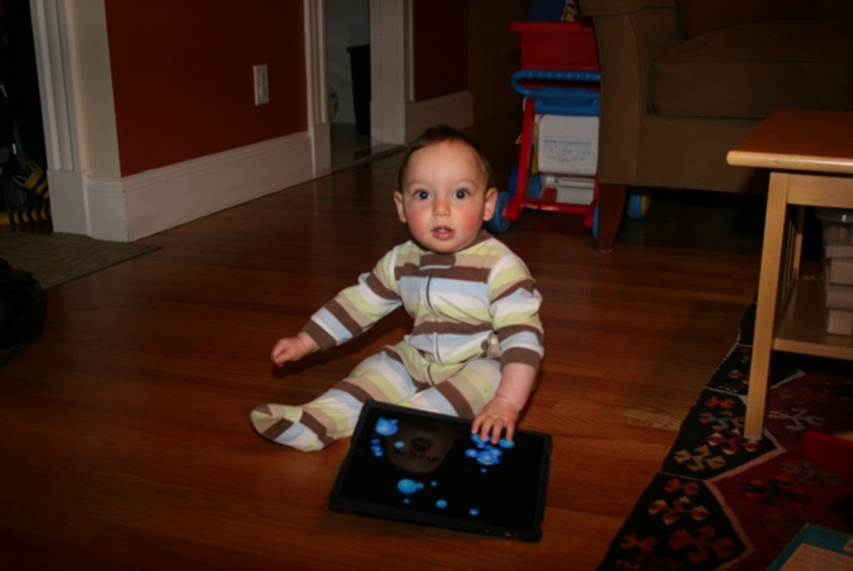
Ayelet’s little brother Rafael is now almost one year old.  While he used to just ignore it, that seems to be changing…

Image001

Here we go again.

Posted in Uncategorized | Tagged , , , , , | 1 Comment

Using an iPad and AirPlay to bring Pandora to a Bose Wave Radio

Given that today was Mother’s Day, it seemed particularly important that Aviva get to sleep in when the kids woke up early (I usually handle wake-ups in the first half of the night, and she handles the second half).  Sure enough, the baby woke up at 6am, and the three-year-old came down not long after, so I brought them downstairs and tried to keep the noise level down to a dull roar.

I find being up at 6am much more manageable if I am drinking coffee and listening to music (quietly), but unfortunately my phone and all of its music was charging next to my bed upstairs.  Not wanting to risk waking up my wife, I started to cast about for something else to listen to.

6 am is a bit of a wasteland in Boston radio, at least according to my limited tastes.  NPR is playing talk radio programs I don’t enjoy until 8 am, and the music stations are stuck on infomercials.  The situation improves around 7am, when 104.1 starts playing Acoustic Sunrise, a program featuring unplugged rock and pop music.  However, that wasn’t for another hour, and I wasn’t interested in waiting that long.

Then I remembered Pandora Radio.  Most people are well aware of Pandora, but for those uninitiated, it’s an internet radio station with no set playlist.  They have taken on the very challenging job of tagging music based on hundreds of different characteristics, enabling them to take an artist or song that you like and create an entire radio station based on comparable music.  Since they are streaming music without allowing you to permanently download a copy, they fall under radio licensing terms, and they use advertising to cover the costs.  It’s a completely free internet radio station perfectly customized to your interests.

I had created a Pandora account years ago when they were still relatively new.  At the time I was working at a company that specialized in content personalization, and I was more interested in learning about what Pandora was doing than actually finding music.  I was amazed at how I put in a single artist (Brandi Carlisle), and it started playing song after song that was squarely in my musical tastes.  While I was impressed, I never used it much afterwards since most of the time I prefer to listen to NPR podcasts or books, and when I do want to listen to music, I have plenty on my phone.

This seemed like the perfect time to dust off Pandora and give it a try.  Our iPad lives in the kitchen, and it took just a few seconds to download the Pandora application for iOS.  My old experimental “stations” were still there, but I created a new one based on Regina Spektor.  After playing one of her songs, Pandora treated me to a wide variety of other artists, including Fiona Apple, Kimya Dawson, and Lily Allen.  Wonderful!

Just one problem – the music was playing out of the iPad’s speakers.

The iPad’s speakers are decent enough, but we have a Bose Wave Radio in the kitchen, and there is just no comparison.  I wanted the full featured sound that would really fill the space (or at least fill it enough that it wouldn’t wake up my wife upstairs).  A few months ago, I purchased an Airport Express and hooked it up to the Bose, allowing us to use Airplay to stream music and podcasts from our phones over the wireless network to the stereo.  However, there  was no Airplay icon in Pandora to tell it to stream the music instead of playing out the speakers:

Photo_2

Just normal song controls to play/pause and skip around.

Then, I remembered that with the upgrade to 4.2, the iPad now had an additional set of music player controls to the “left” of the fast-app switching bar.  I double tapped the home button, pulling up the list of recently accessed applications at the bottom of the page.  I then swiped from left to right to access the hidden controls.  Since Pandora was using Apple’s built-in music API’s, these controls now applied to the Pandora, and there was the Airplay icon:

Photo_1-1

Tapping the Airplay icon let me choose the Airport Express attached the Bose, and immediately the Pandora music started streaming through the Bose stereo.

I spent the next several hours playing with the kids and enjoying a better radio station than any in Boston.  It was a great mix of music I knew and artists I had never heard of.  The only downside was that the iPad consumed a lot of power streaming music down from Pandora and then re-streaming it over Airplay.  Over the course of about two hours, it burned through 20% of battery.

Still, the quality and content of the music was worth it.  I think stream Pandora through the iPad over the Bose will be a regular activity now.

Posted in Uncategorized | Tagged , | 2 Comments

Solved: Printing using CTRL+P stops working in IE8 on Windows 7 after modifying security settings

Many of our customers are large, global organizations with hundreds of thousands of employees and thousands of locations.  With such a vast infrastructure, their IT organizations take great pains to keep their computers stable and secure.  While in theory only 2.4% of the United States is using IE6 (see http://www.theie6countdown.com), large corporations are keeping it alive and well because it is so complicated for them to upgrade.

Part of what makes upgrades take so long is that the corporations need to test out their customized desktop configurations with all of their applications.  While Windows 7 and IE8 work great out of the box, many large companies will adjust the security policies to restrict what employees can do.  Windows 7 and IE8 have a whole new set of security settings, and this leads to a whole new potential for bugs.

One client came to us saying that their users were no longer able to print using CTRL+P when they were running Windows 7 and IE8.  I run Windows 7 and IE8 myself, and we weren’t having any issues, so we set up a live desktop share so that we could observe what they were seeing.

Their security settings had disabled many settings like the menus and toolbars, so unless a screen offered a specific “print” icon in the page, CTRL+P was the only option.  On some screens, CTRL+P worked fine, but on others nothing happened; the print dialog wouldn’t appear.  For me, on my normal installation, it was working fine.

I took control and tried poking around.  I found that if I clicked around enough times, eventually the CTRL+P would start working, although it wasn’t clear why.  Finally, I figured out that if the focus changed from the page itself to an element on the page, like an anchor, it would work.  A simple workaround was to just hit “tab” to change the focus to an element, but we needed to find the root cause.  I used the developer tools built into IE8 to check where the focus was at page load (go to the script tab, and enter document.activeElement), and found that the focus was on the BODY element, just like you would expect, and just like mine.  What was different?

As an experiment, we asked the client to create a blank instance without the modified security policies, and they confirmed that CTRL+P worked fine.  That at least supported the theory that a security policy was the culprit.  However, in reviewing all of the policies they had altered, none seemed like a good candidate.  We asked them to start activating security policies in groups until the right one could be found.

The first surprise was even with all of the IE8 security policies back in place, CTRL+P still worked fine.  The cause wasn’t one of the IE8 policies itself; it was therefore one of the ones for Windows 7.

In the end, the culprit was found to be “Remove File Menu in Windows Explorer”.  Really?

While I would never have guessed it would be the source of the problem, in retrospect, it does make a certain sort of sense.  The “CTRL+P” option lives inside of the File menu, so I figure that when the file menu was removed, the default accelerator was no longer available.  When the focus was changed, there must have been some other “path” to a CTRL+P option.

Why did it affect Internet Explorer, given that the setting is supposed to affect just Windows Explorer?  Also not clear, although I am guessing that it goes back to the deep connection between Windows Explorer and Internet Explorer when IE was first released.  Remember the Netscape lawsuits?  They must still share some settings.

At any rate, problem solved.

Posted in Uncategorized | Tagged , , , | Leave a comment

Skip the stereo connection, and use sun visor as an improvised iPhone car mount for $0

There are a numerous ways to connect your iPhone to your car stereo – speaker cable for cars with an auxiliary input, FM transmitter, Bluetooth, tape cassette adapter, and many more.  And for the car you drive every day, it’s worth investing in a good setup.

But what about the car you drive only rarely?  If you are renting a car, you have no idea what type of connection options will be available until you are sitting in it.  Or perhaps you are borrowing a friend’s station wagon for a few hours.  You aren’t going to haul your connection and mounting cables around for these trips, but it sure would be nice to listen to your podcasts or music rather than trying to channel surf on the temporary car’s radio for something worth listening to.

The obvious choice is to just use the iPhone’s built-in speaker.  Sadly, you will find that it isn’t quite up to the job of car stereo.  It does well enough in a quiet room, but if you are driving on a highway, there is so much road noise that the little speaker will be drowned out every time you pass a truck.  You could hold the phone up to your ear, but this is uncomfortable to do for more than a few minutes, and most of the time you want to be able to have two hands on the wheel.

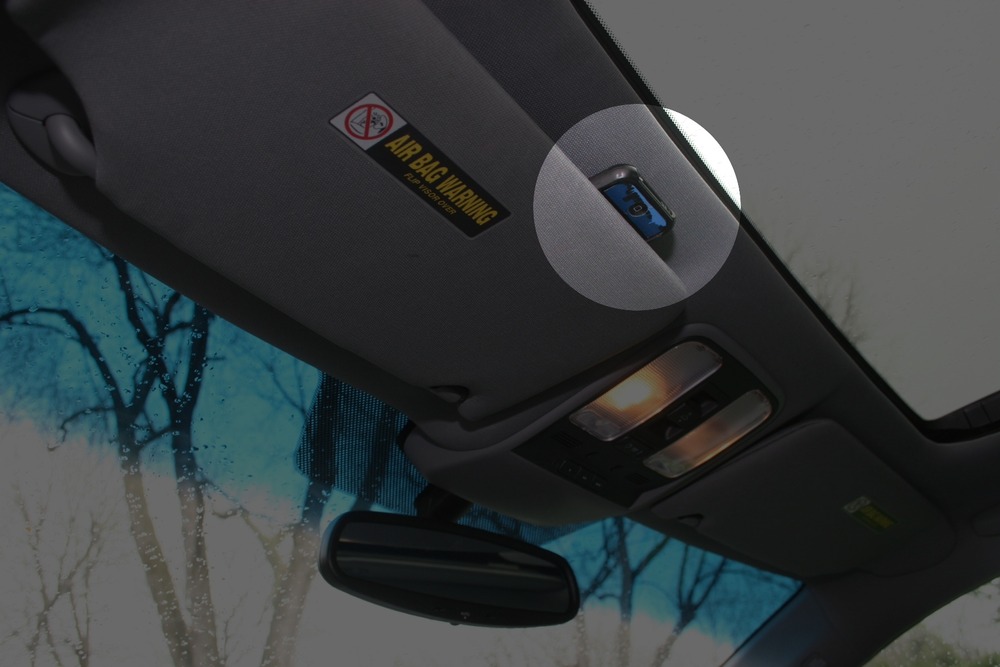
On a trip to California last year, I stumbled on a simple solution – the car’s sun visor.  Just slip your phone between the visor and the roof of the car:

Car_visor_iphone_mount

The phone is now just over your head, a couple of inches from your ear.  This distance is small enough that road noise and loud trucks are no longer an issue, and even quiet, spoken word podcasts can be heard just fine.  You will find that it is held tightly enough for even the sharpest turns without slipping.  You can’t see what’s on the screen, but hey, this is just a temporary setup.

Granted, this is no solution for an audiophile, and other people in the car won’t be able to hear very well.  It’s a no cost, nothing to pack solution that works perfectly in a pinch – like a rental car.

Posted in Uncategorized | Tagged , , , | Leave a comment

Performance: Yes, time-taken in IIS includes network time

I’ve written previously about many of the useful types of analysis you can perform using the time-taken field in your web logs.  However, I would be remiss for not pointing out some limitations of the data it provides.

When poring over my web log files, I would occasionally come across truly bizarre entries.  I would see a static javascript file that listed as taken 7 seconds.  How could the web server take that long to process a static file?

Time-taken measures how long it took to process a request, but when does processing start, and when does it end?  Before the web application can actually start to generate a response, it has to receive all of the request headers and form variables from the client.  Then, when the response is generated, it needs to be transmitted back to the client.  The server can only send back data as fast as the client is able to accept it, so there is time spent after the response is generated waiting for transmit to complete.  Only once the client acknowledges that it has all of the data can the connection be closed.

So, is this time included in the time-taken value?  Unfortunately, the answer is yes.

Normally, the time necessary to upload request data and download response data the client is pretty trivial, and it doesn’t impact the analysis.  However, there are a couple of cases where these times become significant:

·         Uploading a large amount of data during a post-back or file upload

·         Downloading a large response or file attachment

·         A client with a very slow connection speed

·         A client from very far away

If you combine a slow connection with a large file transfer, you can end up seeing some high times in your log files.  Don’t worry; you don’t have a major bug in your application somewhere.  It’s just that a lot of time was spent before real processing could start or after it had ended.

Network time is not factored in 100% of the time.  Microsoft documents this in IIS 6 and IIS 7, stating that when using TCP Buffering or sending back very small responses (under 2k) in certain conditions, the network time will not be a factor.

I haven’t been able to find as clear an answer on whether time-taken is an issue in Tomcat or Apache.  There is some interesting chatter about it on the web, but I didn’t manage turn up anything as definitive as the Microsoft article.  However, the conventional wisdom seems to imply that it does incorporate network time in those applications as well.

So what to do?  Does this invalidate using time-taken data for performance tuning?

No, but you need to interpret the results more carefully.  Here are a couple of tips:

1.       Pay attention to request and response size (these are other fields you can turn on in web logs).  Do you see a correlation between request/response size and response time?  If you do, you may just be seeing network effects and not an actual performance problem in your servers themselves.

2.       Look at the IP address.  Do particularly large response times seem to come from far away (see geolocating an ip address)?

3.       Do you have pages that are known to large response sizes, like file downloads?  Consider excluding them when generating 95th percentile response times to get a more accurate number.

One more thing to keep in mind: while the numbers may not reflect actual host processing time, they still do translate to real time experienced by a user.  While some of these may feel like things beyond your control, like a user with a slow connection or far away, there is more you can do:

·         Use HTTP compression to reduce response sizes

·         Use appropriate image file formats and image color palettes to keep image file sizes small

·         Use Expires and cache-control headers to avoid unneeded refreshes of static content

·         Use a minifier or comment stripper to squeeze unneeded weight out of javascript and css files

·         Use a CDN like Akamai to cache content closer to end users (okay, that one costs big $$$)


Posted in Uncategorized | Tagged , , , | 1 Comment