Solved: ASP.NET Web Services using POST only work on localhost by default

This information isn’t exactly secret, but it took a bit of googling around to piece the answer together, so I wanted to share it in a more condensed form.


We are in the process of migrating some legacy ASP code over to .NET, and we are doing it in stages.  As an intermediate step, we are switching the back end of the application to talk to newer .NET code that maintains a very similar interface.  We are routing the communication to the new back end using web services.


It’s not hard to make a web service call from ASP.  There is a good starting point reference out on the Code Project, Call XML Web service from ASP, and it will be the top hit if you Google something obvious like “call web service from ASP”.  If you try the code out, it will work well enough, but there are a couple of serious gotchas that it doesn’t address.


ASP.Net Restrictions on POST to localhost

The first major issue is that the ASP code is using a POST protocol to pass data to the web service.  Most engineers do their development on a single box, so for multi-tiered applications, they are hosting both the web and application tiers on a single server.  When it is actually deployed, the code will be separated out with web logic on one machine and application logic on another, but it makes development and debugging much simpler to do it on a single box.


In theory it shouldn’t matter, but it turns out that ASP.NET treats web service calls coming from a local box as different from calls from a remote box.  Code that works fine on a developer’s box will fail when it is actually deployed in a real test environment with truly separate tiers.  The issue is that by default, ASP.NET will only allow web service calls to receive SOAP requests.  A POST of the same data is automatically rejected, unless it is originating from the local machine, which is presumed to be trusted.  As a result, POST from the local box works just fine, but it starts failing as soon as it is taken to another environment.  It fails with an unhelpful message about “Request format is unrecognized for URL…”.


Microsoft outlines more details here, but the gist of it is that HttpSoap and HttpPostLocalhost are on by default, while HttpGet and HttpPost are off by default.  These can be re-enabled in the web.config file.  Since our application servers are in a restricted zone that can only be contacted from specific internal machines, we can enable this option.


XMLHTTP vs. ServerXMLHttp

The need to address the HttpPost is not the only problem with the example from the Code Project.  One very nasty one is that they are making their request using XMLHTTP.  This is a nice, useful object for making web service calls – if you are running from a browser.  On a server-side component, it’s a big problem.


The problem is that HTTP has all kinds of restrictions baked into it, like a default limit of two connections to a server object at a time.  XMLHTTP inherits those restrictions, which means that if more than two requests are trying to call webservices concurrently using this object, all other requests will hang until a connection is freed up.  I rigged up a test page where I had a webservice that would just wait for some specified chunk of time, like 30 seconds.  I started up two pages hitting it in two separate browsers, and then opened a third one that was supposed to wait just 3 seconds.  Sure enough, the third page hung for 33 seconds – the 30 seconds it spent waiting for one of the other processes to finish, and then 3 seconds for its own execution.


The correct approach is to use ServerXMLHttp.  This is very similar to XMLHTTP, but it is designed to be executed in server contexts, and it doesn’t suffer from the two request limitation.  I tried the same test as above but using ServerXMLHTTP, and this time it worked as expected; the 3 second request completed in 3 seconds, despite the fact that the two other 30 second requests were executing simultaneously.


Encoding

One last problem with the Code Project example is the way it passes variables to the web service.  They show a simple calculator example, and so they are able post data in a very simple “parameter=value” structure.  That works fine for simple data like numbers, but if you need to pass rich text data in an argument, it will start failing.  The values need to be URL encoded before they are sent across using Server.URLEncode.

 

Posted in Uncategorized | Tagged , , , , | 2 Comments

Applied physics on the playground

Aviva had an all day meeting with an organization she does volunteer work for, so I spent the day as a single dad with two kids.  The weather has finally started to warm up in the Boston area, so I took them to one of the neighborhood playgrounds.  Ayelet, the three year old, has alway been very active, so traditionally a playground visit has meant keeping an eye on her as she went between various climbing structures, playground toys, and interactions with other kids.  In general, she takes care of herself, and I can relax, unless she needs some encouragement on a particularly challenging structure or help settling a dispute with another child.

Today was very different, however, since Rafael is no longer just a little baby in a stroller.  While just nine months, he is working hard on walking and wants to put everything in his mouth.  There was plenty to keep him entertained, but it was much more challenging to keep a general eye on Ayelet while making sure that Rafael was not trying to swallow fist-fulls of sand.  Clearly, this is the new normal.

When I put Rafael in a swing, Ayelet decided that she wanted ride in the swing too.  There were two swings next to each other, and I was trying to push them both at the same time.

Photo_1

This turned out to be more difficult than I thought.  Ayelet wanted to go “higher than the sky”, but that meant swinging faster than I thought Rafael was quite ready for.  Since different speeds required standing at different points to push, I was left straddled in the middle.

Fortunately, there is a simple solution.  My favorite subject in high school was physics, and one of the things that fascinated me about about it was the behavior of pendulums.  The amazing thing is that the period (the time it takes the pendulum to make a full cycle of forwards and backwards) is not affected by the weight of the bob at the end or the how fast it is swinging; it is a function of the length of the string.  In other words, two kids of different weights will take the same amount of time to go back and forth, no matter how fast or slow either one of them is going.  From wikipedia:

I adjusted the kids motion so that one was traveling forwards when the other was traveling backwards.  This gave me enough time to adjust my own position so that I was closer to the center for Rafael’s shorter swings and further away for Ayelet’s longer swings.  Since the periods were the same, they would stay synchronized.

Well, that’s the theory you learn in high school, at any rate.  In the real world, there were several things that affect this – the string has actual mass, there is friction in the wing, and I am pushing both kids, so gravity is no longer the only force affecting motion.  Pretty soon, the kids motion started to shift, and they would end up swinging in the same direction at the same time.  But it was fun to try the theory out.

Rafael had other opportunities to learn about physics as well.  He is trying hard to walk – he has got the one handed walk down, and has even taken a few steps on his own when I trick him into it – so friction and gravity are pretty big. But he also had a chance to enjoy resonance:

Photo_2

He discovered that the bars on the bench had a nice, satisfying twang when he banged them with his hand.  The physics of resonance are a little more complicated:

File:Resonance.PNG

but he enjoyed it nonetheless.

Later in the afternoon, we went to the science museum, where they had an entire exhibit devoted to the behavior of swings and pendulums.  Someday I will try to explain all of this to the kids.  But, if there is any cosmic justice in this world, I’m sure they will be as uninterested in it as I was in my father’s attempts to teach me about dinosaurs and biology.

For now, they can just enjoy the experience.

Photo_4
Posted in Uncategorized | Tagged | 1 Comment

Performance: speed up creation of ASP.NET DataSet objects

During some recent performance tuning work, I took a look at a method
that was taking around 450 ms. The primary task of the function was to
build a relatively large DataSet object, with around 350 rows and over
110 columns. Sure, that’s over 38,500 cells, but 450 ms seemed extreme.

As a first step, I tried commenting out the actual logic that decided
what went into each and every cell and just sticking in the word “hello”
38,500 times. To my surprise, it hardly made a dent in the performance.
So, I took it a step further, and tried not putting in any data at all.
Sure enough, time fell down to close to zero!

How could copying the same string in over eat so much performance time?
Googling around didn’t turn up much, but I started poking around in the
DataSet object and discovered that it had a lot of power that I had
never used. It’s able to keep track of what rows have been modified,
what needed to be updated back in a database, etc. Clearly there was a
significant amount of logic behind it. With this in mind, I looked back
at exactly how we were creating the rows, and I spotted something
suspicious:

DataRow newRow = dataTable.NewRow();
dataTable.Rows.Add(newRow);

newRow[col1] = value1;
newRow[col2] = value2;
...

We were creating the row, adding it to the table, and then putting in
the values. When I was thinking of the DataSet as a glorified,
serializable hashtable, this shouldn’t matter much. However, since it
was clearly doing some sophisticated state management, could modifying a
row after it was in the table be much more expensive than before it was
in the table? Perhaps the DataSet was working hard to keep track of all
the modifications we were doing on the theory that we might need it.

I tried making the simple change of moving step of adding the row until
after it was populated with data:

DataRow newRow = dataTable.NewRow();

newRow[col1] = value1;
newRow[col2] = value2;

...

dataTable.Rows.Add(newRow);

Boom! Construction time dropped down to close to zero. Clearly, that
small detail really mattered.

So, lesson learned: don’t add the row to a DataSet until it is
populated.

Posted in Uncategorized | Tagged , , | 1 Comment

Purim 2011: We dress up as the Apple product line

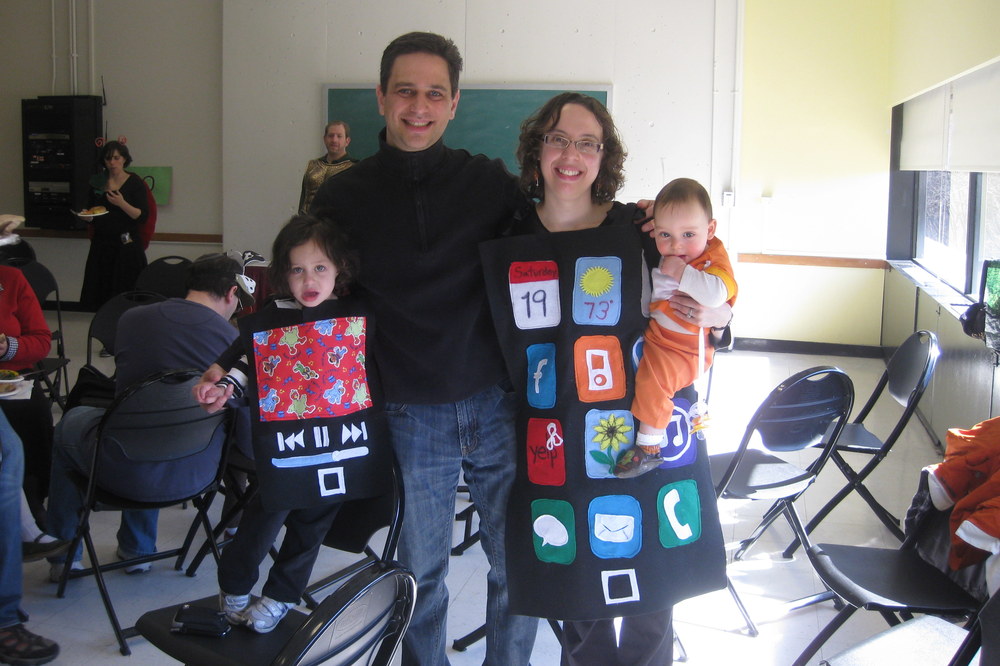
This Sunday was the Jewish holiday of Purim, which celebrates the Jews’ escape from a plot to kill them in Ancient Persia.  Similar to Halloween, it is customary to dress up in costumes, although both kids and adults often dress up.  We like to pick a family theme, generally drawing inspiration from the younger members of the family.  When Ayelet was one year old and a big fan of eating, we were a three course meal.  When she was two and very taken with blue footed boobies (my father is an evolutionary biologist and Galapagos expert), we went with a Galapagos theme of Charles Darwin, a giant tortoise, and a blue footed boobie.

This year, we looked at Ayelet’s fascination with the iPad and the invasion of multiple new Apple products into the house and decided to pay tribute (all the money we spent wasn’t enough?).  We are fortunate to have a very talented and creative famly member in the form of Aviva’s Aunt Rachel, who is one of a handful of people in this country who still know how to sew.

I must say, she really outdid herself:

Img_2905

Aviva is an iPhone.  You have to admire the attention to detail Rachel paid on creating the icons of each of the individual applications:

Img_2975

Although Ayelet is much smaller, she went as the iPad, which she uses it more than the rest of us.  Since she uses it primarily to watch videos, her screen is in video playback mode.  It’s hard to tell, but the image is of Sesame Street characters:

Img_2916

Rafael, as the littlest member of the family, went as an iPod Nano, of course.  Rachel chose the Orange version from the previous generation.  Note the “earbuds” hanging off his shirt (he is being paraded around by his cousin, dressed up as Tinkerbell):

Img_2958

The costumes were even complete with Apple logos on the backs:

If you haven’t figured out my costume, here’s a closer look:

Img_2906

Yes, I’m dressed up as Steve Jobs.  No delusions of grandeur should be inferred.

Posted in Uncategorized | Tagged , | 1 Comment

Learning to read on the iPad versus the old fashioned way


As many people can attest, iPads make wondeful computing devices for young children.  Whereas a computer’s mouse or trackpad is difficult for a toddler to maneuver, the iPad’s intuitive touch interface is easy for them.  Not surprisingly, there are thousands of games and educational apps targeted at the under six crowd.

One type of app I thought would be a good fit for my daughter is the “learn to read” category.  Ayelet had learned to recognized all of the letters of the alphabet before age two, and we had spent several months working on letter sounds.  However, she hadn’t made much progress beyond that.  I haven’t been worried, since she is well ahead of where I would have expected her to be, but a game that would help her work on her sounds seemed like a good idea.  Besides, it would be a much better activity than her preferred application – YouTube.

One app that I found that I really like is abc Pocket Phonics: Letter Sounds & Writing.  It shows a bunch of letters, and a voice makes a letter sound.  The player needs to tap the letter that makes the right sound.  After a couple of letters, a word is formed, and the voice helpfully sounds it out.

This is just the right level for Ayelet – she basically knows the sounds, but she needs reinforcement, and she needs to learn about putting them together.  And while she enjoys it, I quickly noticed that unless I monitor her, she runs into a problem:

It’s so easy to press the letters, she just starts pressing letters for the fun of it.  Eventually she will hit the right one, and the game will continue.  Even if it’s a letter she knows well, she gets tempted to press away.  In the example above, you can see that even when she finds the “N” in the firstword, she makes no effort to apply that to the next word.

I suspected that she could do better, so I tried to do it the old fashioned way.  I grabbed a bunch of letter blocks, dumped them on the table, and played the same game.  I would make a sound, and she would pick the letter:

Without the instant gratification of letters vanishing as she touches them, Ayelet is forced to actually think about each letter, and she really shows off what she knows.  It also provides some teachable moments – when I ask her which letter makes the “Aaaa” sound, she claims there are two letters that make the sound, holding up the “E”.  To her, the distinction between the two sounds is very subtle, and it provides an opportunity to emphasize the difference.

Of course, there are the downsides.  Ayelet’s three-year-old mind easily wanders (in the video, she starts talking about her favorite color), and without the instant feedback, it requires some effort to keep her on task.  Clearly it’s not easy to be the teacher.

The iPad clearly has some advantages; it has rich media, it can keep the child engaged, and it will have patience to work with her endlessly, versus the half hour I might spend after work.  It’s great for reinforcing lessons that the child already knows but needs to practice.

But when it comes to real learning, it won’t replace the patience and attention of a real teacher.


Posted in Uncategorized | Tagged , , | Leave a comment

Hoping for good Car-ma after a fender-bender

While picking up groceries on my lunch break today, I had a minor fender-bender.  I was backing out, and it turns out another car on the opposite side a few spaces down started backing out shortly after I did.  I had just stopped reversing and turned my head to look forward again when I saw the back of a car headed straight at me.  I beeped the horn, but not before there was a crunch as the back of the other car collided with my driver’s side door.


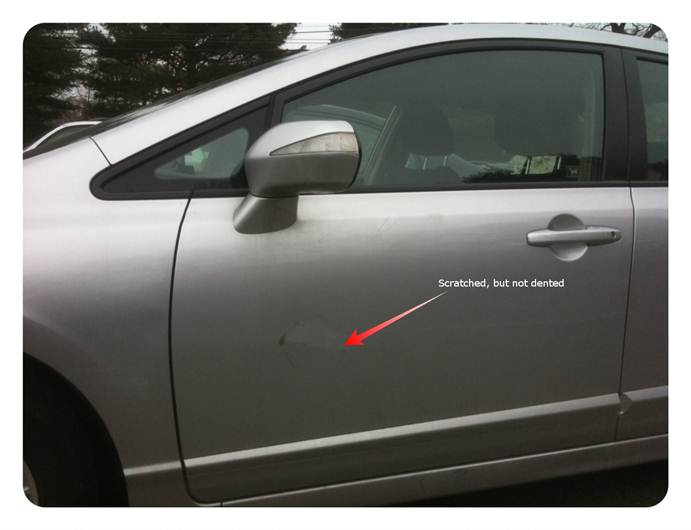
I pulled back into my space and hopped out, as did the other driver, who looked aghast.  After confirming she was okay, we inspected the damage to my car.  The driver-side mirror was folded in (many thank you’s to the genius who designed side-mirrors that fold instead of breaking), and there was a big round circular scratch where her bumper had hit the door, as well as some other scratches.  Surprisingly, there was no dent; I’m guessing the door must have bounced back when the car pulled away, leaving a circular scratch but no permanent deformation.


Image002


I turned to the woman and said, “It’s just a scratch, just cosmetic.  It’s fine.  Don’t worry about it.”


She was immediately relieved.  She had apparently just walked off her job after an argument with her boss, and she had been praying that nothing else went wrong that day, at which point she backed into me.  I told her I hoped her day improved from there, and we went on our way.


Living in an urban world, I long since came to accept that scratches, dings, and even dents were just a normal part of doing business.  I’m driving a 2008 Honda Civic Hybrid, not a Lexus.  As long as it does not affect the functionality of the car and is not likely to lead to future problems like rust, what do I care?  On the flipside, filling out an accident report, filing a claim, getting a damage estimate, and getting it repaired are going to just create a lot of headaches and time lost for both me and the other driver.


Besides, this is nothing compared to the damage from when I ripped off the side of my bumper after I clipped a fire hydrant while turning around in a parking lot.  That did need to get repaired, but before I had a chance to bring it into the shop, the guy painting my house looked at it and said it was an easy fix (he was a former mechanic).  One day, he just screwed it back in for me, and it has held up just fine for the last year and a half.


So perhaps sending this woman on her way was my repayment of my karmic debt for the free bumper repair.  Hopefully she will pass along the favor to someone else down the road.


And, hopefully, when it is my turn to make the stupid mistake, someone will take pity on me.  Of course, I probably won’t get that lucky.


Posted in Uncategorized | Tagged , | Leave a comment

Camera+ makes a fantastic replacement for the built-in iPhone camera application

The built-in camera and camcorder have truly been one of the best parts of having an iPhone.  Like many parents with young children, I often find myself stumbling over “aw, isn’t that cute” moments that I want to share on Facebook or email to grandparents.  Having a camera right there in my pocket means I can grab the shot and send it off without missing the moment.  Our regular point-and-shoot camera is starting to feel downright lonely.  Aviva likes it so much she is desperate to get a newer phone just for the better camera.

Despite all of those benefits, I find the Camera application that ships with the iPhone really annoying.  The problem is that it is a fire-and-forget camera – you snap the shot, and then it is automatically exiled to the camera roll, regardless of whether it is worth saving or not.  The camera roll soon becomes cluttered with hundreds of useless photos, making it very hard to find photos you generally want to save forever. It fills up primarily with three types of junk:

1.       A slew of nearly identical bad shots: in these cases, I am trying to capture my kids doing something cute, but they are not looking at the camera, or in mid-jump, or have their eyes closed, etc.  I was just snapping shots until I got the one that I wanted, and I’m left with all these bad ones.

2.       Accidental videos: the camera leaves itself on either camcorder or camera, depending on how you last used it, and unless you look closely at the slider, it’s hard to tell which.  Many times I want to snap a photo quickly, only to discover that it was last on video, and I am recording a movie by accident.  I stop it a few seconds later and switch it, but it leaves a 3-4 second movie floating in the camera roll.

3.       One-Use Photos: a lot of times I want to take a photo of something quickly just so I can email it, like when I write a check but don’t want to take the time to open up Quicken and enter the check.  I just snap a photo of the check and email it to myself so I can record it later.  I have no need to hold onto the image in the camera roll.

Sure, you can go into the camera roll and delete these, but it’s a pain.  If you are in the camera app itself, you have to hit the icon to switch to the photo viewer, then hit the delete button, then confirm the delete, and then switch back.  I’m in the middle of trying to take a photo, and I don’t want to take the 10 seconds.  And who ever remembers to go back into the camera roll and clean it up?

I have recently discovered Camera+ (currently just $0.99) and discovered that it is a huge improvement over the built-in Camera application.  The key improvement is that it does not assume every photo is a keeper.  As you snap photos, it just accumulates them in a local roll, leaving you free to focus on getting the shot you want.

Image001

When you finally get the one you want, you have the option to:

·         Save it to the “real” camera roll for permanent storage

·         Email it

·         Share it on a social media site

Image002

A few taps can save them all or dump the remainder.

It also has some nice features for taking the photos themselves.  When you snap a photo, rather than holding it on screen for a few seconds, it just moves on and is immediately ready to take the next one.  This makes it much easier if you are trying to grab just the right smile or moment.  It also provides grid lines for artistic framing.

Image004

Lastly, since it only takes photos (not video), I no longer have problems with accidentally taking a video when I wanted a photo or vice-versa.  I use Camera+ for photos, and the built-in Camera application for video.  Since I’m no longer switching the setting, it’s always on video, right where I want it.

Posted in Uncategorized | Tagged , , | Leave a comment

Bose Wave Radio + Apple Airport Express + iPhone + iOS 4.2 = wireless music happiness

We have an old Bose Wave Radio sitting in our kitchen.  We used to have a CD player hooked up to it, but that has long since broken, and who listens to CD’s anymore, anyways?  These days, the Bose is mostly used to play NPR.

With increasing frequency, however, we find ourselves wanting to play content on our iPhones in the kitchen.  Sometimes this is because our three year old wants to dance to music, or I am doing dishes and would like to continue to listen to my NPR podcasts rather than whatever random call-in show is currently playing on NPR.

While we have an auxiliary cable that allows us to hook our iPhones up to the Bose, it doesn’t get used very much.  The plug is too wide for the headphone jack hole in the phone’s protective case, which means that we have to take it out of the case to use it.  More importantly, once we do this, our phone is tethered to that corner of the room.  It becomes a pain to go back to send an email, look something up on the web, or answer a phone call.  Instead we tend to just crank up the volume on the phone to the max and listen to the comparably tinny speaker.

With iOS 4.2, Apple released AirPlay support, which allows iPhones, iPads, and iPod Touches to stream music and video over the wireless network to another device.  This is most often discussed in the context of Apple TV, which is not much use to us.  Our television is up on the 3rd floor, far from the kitchen, and it’s still an old, standard definition set that doesn’t support the Apple TV’s HDMI output (To learn more about why we are one of the last families in America with a standard definition TV, you can read about my over-the-air TiVo setup).

What I recently learned is that Apple TV is not the only device that supports AirPlay.  The Airport Express, Apple’s stripped down wireless station, also supports AirPlay with iOS devices.  While the Airport Express can act as a wireless router, it can also function as a node on an existing network.  It provides an auxiliary jack that can hook it into a stereo, thereby allowing it bring music from anywhere in the house to a stereo system, all without wires.

I decided to pick one up for my birthday (as my father always says, the best thing about a birthday present you buy yourself is that you get what you want, and you know the person who got it really cares) and see if it would work.  While it should have been pretty straightforward to get it working, I did have to work through a couple of issues.

The biggest problem was getting it to attach to our wireless network.  While it should be simple, it turns out I had problems because we are still on the old WEP security model.  I know we can switch to something higher, but I have never bothered since I’m not too worried about protecting my network from anything beyond the casual passerby or neighbor trying to steal wifi.  The Airport configuration utility recognized the network as WEP but kept trying to set it up as a WEP 128 bit device.  After this failed multiple times, I looked at other options and saw that there was a WEP 40 bit.  I was never aware there were multiple versions of WEP, but I tried this instead, and it started working instantly.

The second problem was that my phone did not initially “see” the Airport Express.  I gave it a reboot, and then it started working.

Now, when I play music on the iPhone, it somehow magically becomes aware that there is an Airport Express on the wireless network and shows an Airplay icon in the iPod controls:

Image001

When I press it, it gives me options for playing the audio through the “iPhone” or through the “Kitchen Airport Express”, which is what I named the device when I set it up.  Music starts streaming through the Bose Wave Radio, giving me the full Bose quality of sound, but leaving me free to walk around the house with my phone and do other tasks on it.

Part of the beauty is also that anyone in the house with an iPhone can use it.  My wife is already getting more use out of it than I am.

Posted in Uncategorized | Tagged , , | 4 Comments

When parents sleep in separate bedrooms

For the last week, when my three year old daughter Ayelet has woken up in the morning, she has come into our bedroom to find that only her mother is there. Asking where Daddy is, she is told to go up to the third floor to the guest room to find me. This doesn’t faze her in the slightest; she clambers up the stairs to urge me to get up out of bed and come downstairs.

In older kids, this change in sleeping arrangements might be cause for alarm, but for Ayelet this is just another seemingly normal turn of events. And this is good, because there is no need for alarm. I haven’t been kicked out to the couch, and we’re not going through a rocky period. Believe it or not, it’s actually a sign of a good marital partnership.

The cause of our temporary separation is actually our eight month old son, Rafael, who has been sick all week. He has come down with one of the colds that is making its way though the neighborhood and just won’t seem to let go. He is in relatively good shape during the day, but at night he gets more congested and prone to sneezing and coughing fits. Up until recently we had been making some major progress on his sleeping and had even moved him into his sister’s bedroom (which also did not faze her). Now that he is sick, he still goes down without a problem on his own, but he has taken to waking up around 10:30 and unable to settle back down on his own unless we bring him into our bed.

Under normal circumstances, we would have moved him back to the guest room and let him cry it out until he settles himself on his own. But, he’s so miserable and pathetic, we just don’t have it in us to let him wail hoarsely for what feels like ages on end. If he is in bed with us, he is able to fall asleep, waking up every 45 minutes or hour or so to cough and sneeze until we settle him back down. While he sleeps this way, it’s not exactly restful for us to have him in the bed flopping around waking up so frequently.

It’s not the best timing for this. Aviva is finishing up a major RFP due next week and has been working around the clock. While I haven’t been under deadline pressure, each day is filled with small fires, and we both feel like we are on treadmill. Not a good time for being sleep deprived for days on end.

In situations like this, Aviva and I rally to take care of each other. Early in our relationship, we struggled with the fact that Aviva is a morning person and I am a night owl. Now, we play it to our advantage. Aviva’s deepest, most restful sleep is in the early part of the night, from around 10:30 to 1:30, while I get my best sleep from 2:00 to 5:00. So, when Rafael wakes up around 10:30, I take him up to the guest room. This gives Aviva some solid sleep when she most needs it, and I am able to grab some sleep off and on with our little jumping bean. When he wakes up sometime around 2:00 needing to nurse, I bring him down and we trade off. I go back upstairs to get some solid sleep at the hours when I most need it, and she takes the jumping bean.

Hopefully, this arrangement will soon be over. Aviva’s RFP is almost done, and Rafael is on the mend. The last two nights were better than the ones before. I know we have taken a major backslide in getting Rafael onto a normal sleeping schedule, but this is just part of the roller coaster of being parents. We’ll work on getting him back on track soon.

In the meantime, Aviva and I are both taking a bit of a hit sleepwise, but we are both taking care of each other. While the sleeping arrangements are far from ideal, it’s still a sign of a good partnership.

Posted in Uncategorized | Tagged | Leave a comment

Troubleshooting Akamai: How to geolocate an IP Address

Akamai provides enormous value by accelerating content delivery around
the world. However, as I described a few months back, Akamai relies on
the DNS server
 that processes the request to determine where to
accelerate traffic. Large, global corporations often have complex DNS
configurations that can cause Akamai to accelerate content to the wrong
location. For example, they may have users that are located in Europe
but resolve DNS in the United States.

When troubleshooting these issues, it is often necessary to geolocate an
IP address to figure out whether there is a DNS configuration problem.
End users generally don’t know the details of how they access the
internet, and the IT personnel who would know are often hard to reach or
may not know exactly how a specific end user is set up. In these cases,
it’s very helpful to take information about the user’s IP address, their
DNS server, and the IP address of the Akamai edge server they are
hitting and geolocate them to see if there is a mismatch.

Take geolocation databases with a big grain of salt

Geolocating is more art than science. There are many databases that
will attempt to geolocate an IP address, but they can often be error
prone. For example, many of them are based on who registered the IP
address or block and have no bearing on the real physical location.

Let’s take an example: 60.254.175.30. If I use a geolocation service
like www.maxmind.com to look up the location
of this IP address, it will tell me that it is in Cambridge,
Massachusetts. Well, that is very nice of Maxmind to tell us this, but
one thing I can tell you is that this server is very, very far from
Cambridge.

However, using a combination of techniques, it is often possible to get
a pretty good sense of where the IP address is. Let’s give it a try.

Start with a traceroute

The first step is to run a traceroute. For example:

C:Usersjrothmanshore>tracert 60.254.175.30

Tracing route to 60.254.175.30 over a maximum of 30 hops:

  1    <1 ms    <1 ms    <1 ms  172.29.0.5
  2    <1 ms    <1 ms    <1 ms  172.29.0.2
  3     1 ms    <1 ms    <1 ms  216.52.51.1
  4     1 ms     1 ms     2 ms  69.25.73.93
  5     1 ms     1 ms     2 ms  core2.po2-bbnet2.bsn.pnap.net [63.251.128.82]
  6     6 ms     6 ms     6 ms  ge11-0-1d0.mcr1.cambridge-ma.us.xo.net [216.55.4.9]
  7    16 ms    14 ms    14 ms  vb1020.rar3.nyc-ny.us.xo.net [216.156.0.25]
  8    16 ms    15 ms    15 ms  te-3-0-0.rar3.washington-dc.us.xo.net [207.88.12.74]
  9     *       14 ms    13 ms  207.88.14.165.ptr.us.xo.net [207.88.14.165]
 10     *        *        *     Request timed out.
 11    92 ms    91 ms    89 ms  ae-5.r21.sttlwa01.us.bb.gin.ntt.net [129.250.4.182]
 12   272 ms   251 ms   248 ms  as-2.r21.osakjp01.jp.bb.gin.ntt.net [129.250.3.86]
 13   249 ms   239 ms   265 ms  as-1.r21.newthk02.hk.bb.gin.ntt.net [129.250.2.149]
 14   229 ms   274 ms   244 ms  xe-3-2.r00.newthk02.hk.bb.gin.ntt.net [129.250.3.167]
 15   323 ms   343 ms   321 ms  203.131.245.110
 16   317 ms   326 ms   321 ms  60.254.175.30

Trace complete.

Look at hostnames

One very convenient thing about many ISP’s and backbone providers is
that they tend to name machines based on where the machines actually
are. While the first several IP addresses in the list above don’t tell
me much, at the 6th hop, we hit a machine that indicates that it is in
Cambridge. The 7th hop implies New York City, and the 8th is Washington
DC.

If you use a little creativity and imagine routes through the world, you
can make some good guesses about the next couple of hops. I’m pretty
confident that the “sttlwa” in #11 is Seattle Washington. From there, I
would guess that the “osakjp” in #12 is Osaka, Japan. Knowing I am now
in the Asia would lead me to conclude that the “.hk.” in hops #13 and #14 are Hong Kong.

Looks like we are in China. Indeed, very far from Cambridge, MA.

Look at the latencies

Another clue in reading the hostnames is the latency at each of the
hops. I am working out of the Boston area, and in general, I find
latency from traceroutes to different parts of the world to be pretty
consistent:

  1. Eastern US takes 15-30 milliseconds
  2. Western US takes 40-70 milliseconds
  3. Europe takes 80-100 milliseconds
  4. Asia takes 200-300 milliseconds

If I compare this with my guesses based on the host names above, I will
see that they work out pretty well. Washington, DC was 16 milliseconds,
which matches my experience for East coast locations. Seattle was 91
milliseconds, a little higher than I normally expect from the west
coast, but not too far off. When I see that latency than jumps up into
the 200 millisecond range at hop #12, it’s a good bet we are in Asia,
and that matches my guess of Osaka, Japan based on the host name.

Check geolocation databases for the last few hops

While the geolocation databases are often pretty far off for the end IP
address, they are much more accurate when used for the nodes of the last
mile ISP’s themselves, which tend to be regional entities.

My preferred sites for lookups is
www.maxmind.com, which provides 25 free
lookups a day. If I try looking up hop #15 (203.131.245.110) in MaxMind
– the one just before my target – I see that it is in Hong Kong and is
managed by the HKNet Company Limited.

All Sources Agree

In this case I now have confirmation from three separate sources that my
target IP address is in China, probably Hong Kong. The hostnames of my
path indicate that we crossed the United States, went over the Pacific
through Japan, and into China. Latency matches my past experience for
an IP address in China. And my geolocation database shows one of my
last few hops in China.

So remember, when geolocating an IP address, don’t just trust what a
database says about last hop. Make sure that the latency numbers and
host names support the theory, and check the last few hops which tend to
be more accurate.

Posted in Uncategorized | Tagged , , , , , | 3 Comments