Home science experiment: crystal clear ice

Last weekend, thanks to some inspired planning on the part of my wife, we got a baby sitter and met up with some friends of ours at a bar in Somerville.

To most people who know me, the very idea of me going to a bar is rather humorous, but rest assured that this was not a local drinking hole.  It was a relatively hip (perhaps a bit less so now that they have had a customer like me) bar called Backbar attached to another high end restaurant.  It’s the sort of place with interesting appetizers and fancy cocktails.

One of the things I noticed about their cocktails was the exquisite presentation, including the ice itself.  Rather than just regular ice cubes, these were large, perfectly square, perfectly clear blocks.

I tried to photograph one, but the reflections of the flash don’t quite do it justice:

I was immediately curious about the ice; whenever I make ice, it comes out cloudy due to the  trapped air bubbles and impurities.  This ice, on the other hand, was completely clear, like a beautiful crystal.

I flagged down our server to ask, and he was very excited to tell me how it was delivered in large 20 pound blocks from an ice vendor, and then he and the other staff used extremely sharp knives to chop it up into smaller cubes for serving in the drinks (this apparently takes a great deal of skill not to injure yourself in the process).  However, since the ice already arrived in these crystal blocks, he had no idea how it was done.

Determined to find out, I did some research on the internet the next day.  The reason most regularly ice comes out so cloudy is that the outer edges of the cube freeze first, trapping the water with the air bubbles at the center.  Once the center gets cold enough to freeze, it expands, causing small fractures throughout the ice, which give it the cloudy look.

To get crystal clear ice, you need to get it to freeze on just one side using an insulated container.  As the ice forms, it pushes the air bubbles deeper into the container.  Eventually, it will form a cloudy chunk when the other end freezes, but if you remove it before freezing is complete,  you end up with a nice clear sheet.

I decided it was time for another one of our home experiments.  My past experiments have been around teaching my kids some principle, like the three states of matter, but honestly I was doing this purely for my own curiosity and hoping to entertain my kids in the process.

We filled a medium-sized lunch cooler (the kind of thing you would take to the beach) about 3/4 full with water and then put in the freezer with the lid open:
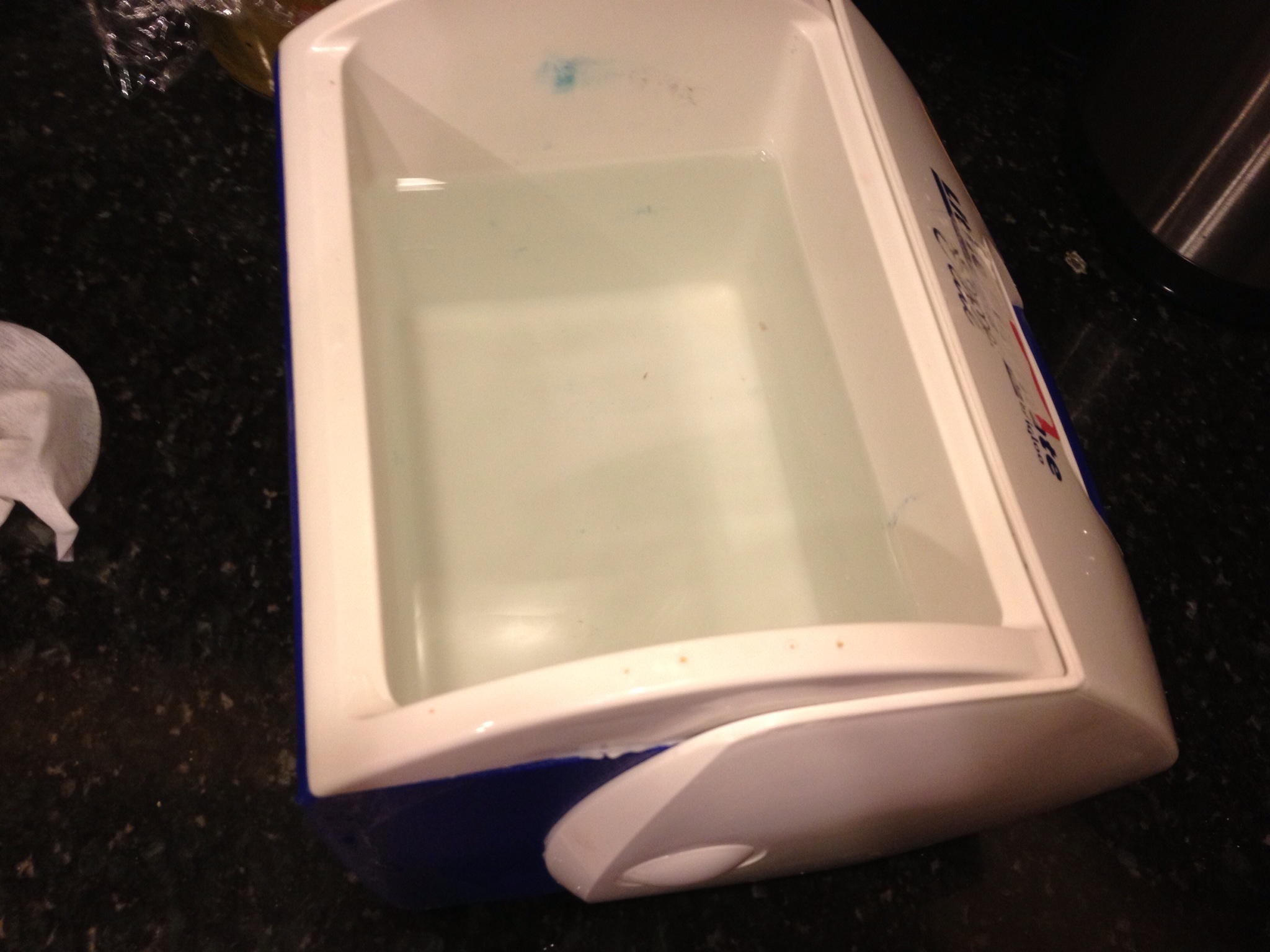
We then left it in the freezer overnight.  The cooler turns out to be a pretty good insulator, so only about a half inch on the top had actually frozen.  If we left it in for another day or two, we could have gotten a thicker sheet.  However, for the purposes of my experiment, it was good enough.

I dumped it upside down, and eventually there was enough give for the water to leak out, allowing the the sheet of ice to pop out.  Sure enough, it was crystal clear:

This experiment was much less educational than past ones, but my daughter was particularly very excited.  She asked if we could do it again tonight.  She went on to say that she loved experiments and wanted to do more of them.

Oh, the joys of parenting a four year old!  Some day I know that she will roll her eyes at the very idea of me trying to teach her anything (just as I did as a teenager), but right now she still has the excitement of a young kid.

I told her I would try to think of some other experiments we could try, and she asked if we could do one with scarves.  I explained the difference between science and fashion, but I think the distinction went a little over her head.

I’m excited that I created my crystal clear ice.  But I’m more excited that my kids are perhaps learning to see some of the wonder in the world that surrounds them, just like I do.


Posted in Uncategorized | Tagged , , , | 1 Comment

Answered: How long does it take an Apple Store order to move from “Preparing for Shipment” to “Shipped”?

At last!  My iPad Mini has been shipped!

A few weeks ago I ordered an iPad Mini.  We already have two iPads, but we also have two kids, so I hardly ever get to use them – this one will be just for me.  I ordered it on launch day, but rather than getting up at 3am to do it, I waited until noon.  Since I ordered the most popular model (WiFi, 16GB, white), initial supplies were gone, so there would be a fulfillment delay.

It was project to ship in two weeks, but some accessories that I ordered to go with it (a smart cover and an extra charging cable) shipped immediately and arrived within days.  That told me that once it finally did ship, it shouldn’t be too long a wait to receive it.

On Monday evening, I checked my order status and discovered that the iPad had shifted from “Processing Items” to “Preparing for Shipment”.  Hope began to rise…depending on how long “Preparing for Shipment” took, perhaps my iPad would arrive early!

The question was, how long would it take to move from “Preparing for Shipment” to “Shipped”?  I tried googling around on this a bit, but I was never able to find any answer.

For the next several days, I found myself repeatedly (obsessively?) checking the status of my order, but it has stubbornly remained in “Preparing for Shipment”.  Today (Friday), it finally made the leap to “Shipped”.  Based on the projected shipping time, it will arrive one day ahead of the original estimate when I ordered.

So, the answer to the question of “how long does it take an Apple Store order to move from ‘Preparing for Shipment’ to ‘Shipped'” is “four days”.  I’m writing this post so that other people trying to google search an answer might be able to use my experience as a data point.

A couple of details about my order that might potentially have affected how long it took to make the shift:

  • I chose to have the iPad engraved, since it didn’t affect shipping time when I ordered.  It’s possible that an item that isn’t engraved would move through faster.
  • This is a Wi-Fi only device, so there is no SIM card that needs to be registered or installed.
  • This is a brand new device that had already exhausted initial stock, so it is presumably coming hot off the assembly line.

UPDATED: The iPad took less than 72 hours to actually make it from China to my home in Cambridge, MA.  This was actually four days ahead of the original estimate and three days ahead of the the projected timeline when it first entered FedEx’s systems.

Posted in Uncategorized | Tagged , , , , | 13 Comments

From herding cats to chasing rabbits: kids on scooters make all the difference

In theory, I have a perfect morning drop-off setup for my kids.  My four-year-old daughter Ayelet’s junior kindergarden opens at 8:10, and my two-year-old son Rafael’s preschool is just two blocks away and opens at 8:30.  I have just the right amount of time to get my daughter settled in at school and then walk my son the 5-10 minutes to his school.  From there, I should be able to drop him off and then get to work a little past 9:00.

That’s the theory.  Have you ever tried to walk somewhere with a two year old when you really had to get there?

When a kid reaches two, they have all of the potential to really walk places.  They can move reasonably quickly, and their stamina has built up to the point that they can go at least a couple of blocks.  And if they want to go where you are going, it all works.

Most of the time, they seem to want to go somewhere else.

I quickly discovered that Rafael’s favorite game was “stop”.  He would spread his legs, announce “stop”, and then look at me with a devilish grin, refusing to go forward.  I would then try to cajole him to get moving, which played right into his hands.  He wanted me to react, and I was doing exactly that.  As soon as I realized this was his goal, I tried starting walking off without him.  At first he got upset and came running after me, but he soon figured out what was up.  Instead, he just stood there and waited, even if I walked around a corner.

When he wasn’t playing the stop game, he became obsessed with picking up leaves and other debris we would find on the street.  In the Fall, there are a lot of leaves to pick up.

Most of the time, I found myself just picking him up and carrying him the two blocks.  It got us where we were going, but it was a little more weight lifting than I quite had in mind, and it wasn’t sustainable.

And then, I hit on the idea of the scooter.


Earlier in the summer, my parents had gotten Rafael a scooter.  My daughter is naturally athletic and had long ago mastered a two-wheel razor scooter we received as a hand-me-down, and Rafael would watch her on it longingly.  So, my parents got him a three-wheel scooter of his own.

Unfortunately, he had a hard time figuring it out.  The steering mechanism required tilting your body to the right or left, but he didn’t undertand this.  He would always lean a little too far to the right and end up running off the sidewalk.

However, in late September, it suddenly clicked for him one day.  In the morning he was bumping into buildings, and by the afternoon he was as graceful as a speed skater, kicking one leg in the air and shifting his body to zip around a tight corner.

Once I realized how good he was, and how much he enjoyed it, I decided to try bringing his scooter on the trip to school.

The transformation was instantaneous.  He could hardly wait to climb aboard and start riding.  My problem was no longer carrying him or trying to herd him along.  Now, it’s a problem of trying to keep up.  He goes very fast.

I find myself doing a bit of jogging to keep pace, which feels like just the right amount of exercise to me.  He’s also learning some important lessons, like stopping at the one (quiet) intersection between the two schools all on his own.

My daughter, not wanting to be left out, insists on taking her scooter to school as well, so both kids are getting a nice dose of morning activity.

If you have the patience, you can see in the video below just how capable and graceful they are on their scooters.

The only downside is that winter is coming, and when the snow and ice comes, the scooter will have to stay home.  I’m hoping that Rafael will have gotten so used to zipping along to school that he will forget all about dawdling on the way.

Posted in Uncategorized | Tagged , , | 2 Comments

Why I switched to an AT&T mobile share plan

After having spent the past two years optimizing my AT&T plan for the lowest cost, I bit the bullet and switched us over to a mobile share plan.  I’m not saving the money I had been, but I’ve picked up a few new features that made it worthwhile in my mind.

The mobile share plans change the pricing model around for phone service.  They give unlimited minutes and text messages (finally!), and then they give you a shared pool of data to use for all devices.  You pay a base fee, then an additional fee for each phone or tablet.  Plans start at 1GB, and then go to 4GB, 6GB, 10GB, and so on.

My wife and I are low data users in general, since we spend most of our time in wifi range.  This has allowed us to stay on the old 200MB for $15 plans for months and save tons of money.  I calculated that it was okay to trigger overage charges one out of every three months and still come out ahead in costs, so this has been a good deal.

So why switch now?

First, my wife has traveled multiple times in the last few months, and in the process she has repeatedly tripped the overage charges due to the combination of unusually high need for data and a lack of wifi.  If this were the only issue, we could probably just move her to the 300MB for $20 plan.

Second, the way I am using my phone has shifted, and I have found myself several times wanting to use more data than I do normally.  The radio broke in one of our cars, and I’m not so inclined to pay the hundreds of dollars to fix it since I usually listen to podcasts on my phone.  However, I have found myself eating into my data more heavily than normal when I opted to stream music from pandora.

I’ve also become a big fan of the new Apple turn-by-turn directions.  Mapping mistakes aside, I really like the interface and the fact that it integrates with everything else on the phone.  However, since it does require data, I find myself worrying as I use it that I will start tripping overage charges too often.

The third benefit is that the mobile share plan comes with personal hotspot service included.  Granted, we don’t need this very often, but there have been several times where it would have been really useful.  For example, briefly connecting one of our iPads to the internet for a more comfortable browsing experience or putting my wife’s pc on wifi for just a few minutes so that she can update dropbox to grab a file.

I went with the cheapest plan (1GB), which should still be more than enough for our data needs, and with overages being only $15 for each additional gigabyte, this should be a good fit.

The bill will probably go up by about $40 or so a month, so the savings are definitely wiped out.  However, we are getting three things in return:

  1. Peace of mind (no more worrying about overages)
  2. Broader use of my capabilities of my phone
  3. Personal hotspot

None of these individually are worth it enough for me to shell out the money, but as a total package, I decided it was worth it.

Well, the savings were good while they lasted.  I’ll have to find something else to be cheap about.

Posted in Uncategorized | Tagged , , , , , , , | Leave a comment

My examination of an Apple mapping mistake shows that the fault lies with TomTom

In the midst of the media frenzy surrounding the flaws in Apple’s new Maps released in iOS 6, there has been a lot of finger pointing going on.  Apple has been quick to state that the problems are a result of issues with the data from their partners, but TomTom, their primary mapping provider, has responded that they stand by their maps and the fault is in the application:

“There is a difference between a map and an app. We don’t develop the app. We license the map data, which is like a foundation. The customer can build on top of that, but we license the same mapping data to all our customers,” said TomTom media manager Cem Cohen.

I had my first real run-in with a glitch in Apple Maps this past weekend, and I decided to try to follow back the trail of data to figure out where it comes from.  The verdict: it’s TomTom’s fault.

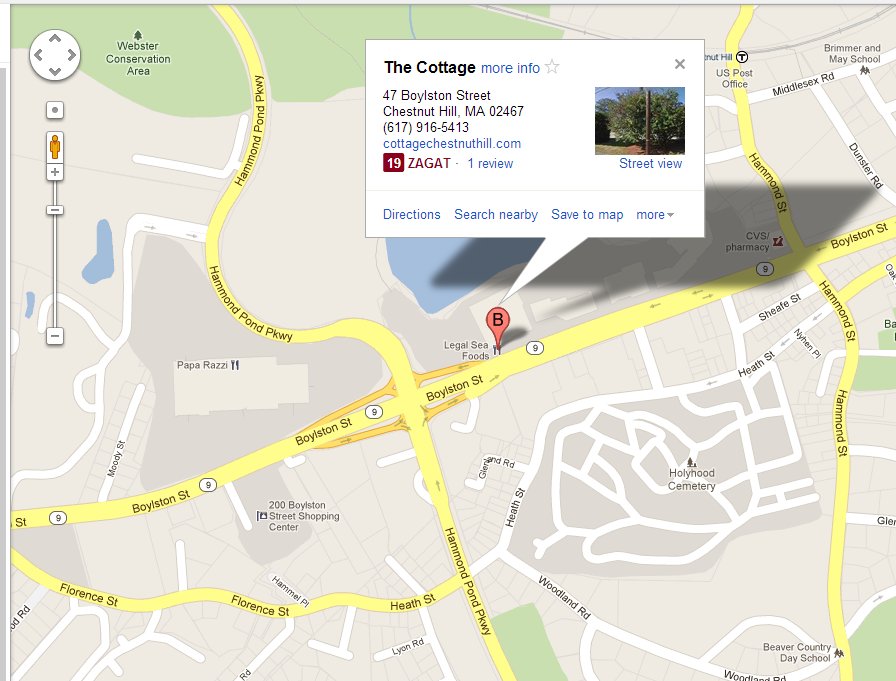
Here’s what happened: we were attending a surprise anniversary party for some close family friends, and we needed to arrive at the restaurant well ahead of the guests of honor.  I looked up the address for the restaurant (The Cottage in Newton, MA) on my phone, and it showed that it was in the Chestnut Hill Mall.

The Chestnut Hill mall is a relatively upscale shopping center with several restaurants (and an Apple store!), so I wasn’t surprised that the restaurant was in there.  I already knew how to get to the mall, so I just drove to the location from memory.  We got a little bit of a late start, but I knew where I was going and was confident we would still get there in time.

As we pulled in to the mall, I decided to take a swing by one side of the mall where I expected the restaurant to be before parking… only none of the restaurants was The Cottage.  So, I drove around to the far side of the mall, and it wasn’t there either.

About this time, my wife’s aunt called to ask where the heck we were.  We explained that we were at the mall, trying to find the restaurant, and she informed us that we were  in the wrong place.  The restaurant was in the “Lower Mall”, which is on the other side of the parkway.  We were close, but still another 5 minutes of driving away.

In the end, we still made it ahead of the guests of honor and didn’t spoil the surprise.  When we got home, I decided to look up what Google thought.  Sure enough, Google placed The Cottage on the other side of the parkway, where the restaurant really was:

Yes, I had found my first Apple Maps bug.

In general, I had felt that people were over-blowing the problems with Apple Maps, and the 3D flyovers are absolutely stunning.  However, faced with almost ruining a surprise party, I did find myself grumbling a bit.  My wife was none too pleased either.

I decided to dig a little deeper about where the problems come from.  It’s been reported that Apple has more than 20 separate data providers and that the problems are mostly with points-of-interest locations.  Was this a problem with TomTom, or some other provider?

It occurred to me that I had a way to answer.  Long before Apple rolled out turn-by-turn directions with iOS6, I had bought TomTom’s GPS application.  This would be data that was exclusively from TomTom, and it was an application written by TomTom.  If there was a problem, there was no one else to blame.

I punched the address for The Cottage (47 Boylston Street, Newton, MA) and looked at where the TomTom application thought it was:

Sure enough, TomTom put it in the same location that Apple did – “Upper Mall”.  This is an error in TomTom’s data, not in Apple’s implementation.

Posted in Uncategorized | Tagged , , , , , | 1 Comment

Why does everyone feel the need to create a mobile app? Costco, I’m looking at you…

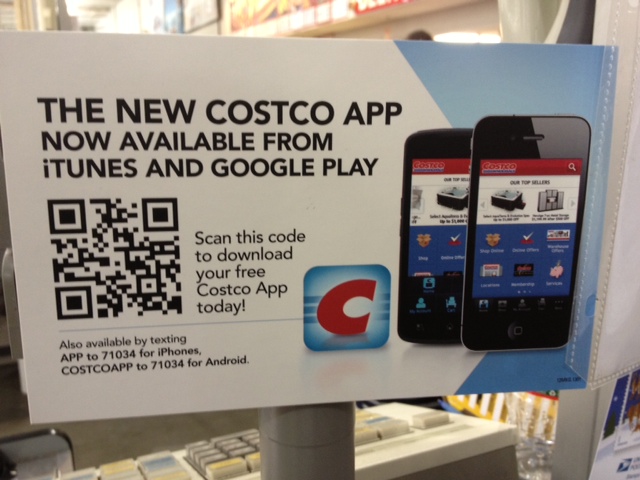
A few days ago I was picking up a couple of items from Costco (conveniently located around the corner from my office) when I noticed the most curious sign posted next to the register:

Now, I’m not a marketer, but something seems missing from this ad.  Let’s see… they tell me what it is (a mobile Costco app), they have the call to action (download today)… Oh, I know what’s missing: the value proposition.

Why would I want it?  What does it do, exactly?

The ad doesn’t give any indication of why I might actually want a mobile Costco application.  It just assumes that having a mobile app is reason enough.

I decided to download it to see if there was any point of this application’s existence.  In the app store, I could see some possibly useful icons.  There was a section for membership information (perhaps I wouldn’t have to carry around my card!) and a section for the monthly deals (perhaps I wouldn’t have to remember to bring the coupon book!).

Downloading the application showed the the application was in fact useless.

You could enter your membership information, but it was only so you could purchase items through the application from the online store.  You couldn’t use it to enter costco and authorize you to check out, so you still have to carry the card.

And the monthly offers?  All they seem to have done was scan in the monthly flier, and at a very low resolution.  It even explicitly says you can’t use it at checkout:

So I guess the ad was accurate after all.  There was no value proposition… because there was no value.

Why does every company feel the need to go out and build a mobile app?  Getting a mobile app takes some effort.  I have to go find it in the app store, enter my password, download it, and then stick it somewhere that doesn’t cause too much clutter in 100+ apps on my phone.  If I’m going to do that, it needs to be worthwhile.

I don’t install an application on my computer every time I want to interact with a store.  I just go to their website.

Mobile web speeds are improving rapidly.  Perhaps when 4G is widespread, we will see an end to this proliferation of mobile apps?

Posted in Uncategorized | Tagged , , , | 1 Comment

Solved: browser cookies vanish in IE8 when opening a new window to a different sub-domain

I’ve been working with a user at one of our clients who was encountering a most puzzling issue.  They would be logged into one of our applications, and then they would invoke some functionality that was hosted off of another subdomain.  Cookies in the browser that are shared by the two sub-domains were supposed to allow the user to access both apps, but when they would open the window to the other subdomain, they would receive an authentication error.

The engineering team spent a while looking at it, but everything appeared to be happening correctly, so they asked me to lend a hand and see if I could puzzle out what was happening.

After gathering some data using HttpWatch from the end user, I could see that when they reached the other domain, the browser was simply not sending the cookies.  The main application had the cookies set correctly (e.g. mainapp.mydomain.com had a cookie set  for “.mydomain.com”), but when they switched over to the second site (e.g. sideapp.mydomain.com), the browser was simply refusing to send the cookie, even though the domain was correct.

We couldn’t reproduce the issue on our side, and I even watched the user demonstrate the problem live over a webex.  It worked fine for other browsers like Chrome, but in IE8 it was consistent – the requests to the second domain just didn’t include the domain-wide cookies originally set by the first subdomain.  The cookies were being properly set to be shared across the whole domain, but on this user’s machine, they just wouldn’t be sent for the second site.

After multiple sessions with the client, we finally discovered that the problem was related to IE’s trusted sites functionality.  The first site was set in the user’s trusted site list, but the second site was not.

As I finally found in an article on MSDN:

For security reasons, each Integrity level maintains its own isolated cookie store. This is problematic when two servers expect to share cookies but cannot because they are running at different Integrity levels.

Once the browser shifted from one subdomain to another, it was using a different storage system for the cookies.  Even though the cookies were set to properly be shared, IE was refusing to do so.

If both domains were trusted, or if both domains were untrusted, the user would have been fine.  The cookies would be in the same security zone, and Internet Explorer would send them to both subdomains as it was supposed to.  However, once the trust zones were mixed, we ran into issues.

Once the user added the second site to their trusted site list, it started working properly.

On a side note, this functionality seems to be at least partially tied to IE’s new process model introduced in IE8, where different tabs or windows may be served by different processes with session merging underneath to share cookies.  When we used the registry entry to force IE back into the single process model used by IE7, the browser sent the proper cookies to both sites despite the separate security zones.  However, we needed to understand why the problem was occurring in the standard multi-process model, so we couldn’t use this as our solution.  Eventually, we found the trusted site problem.

Posted in Uncategorized | Tagged , , , | 1 Comment

Avoiding a tedious repair job by using my doorbell’s backup bell

Did you know that most doorbells have two chimes in them?  I didn’t until today, and it just saved me an hour and a half and $20.

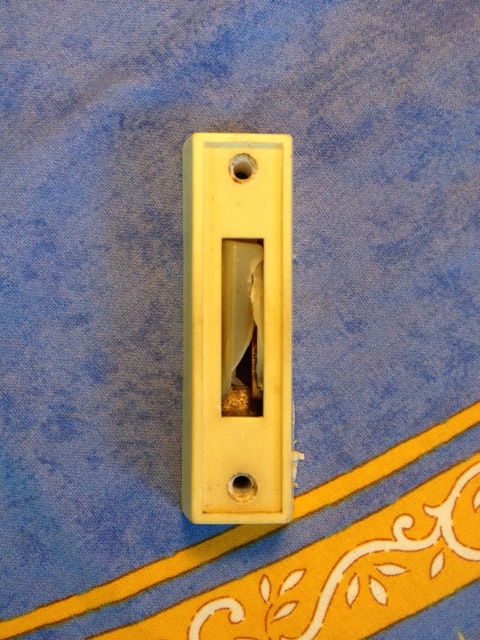
A couple of months ago, the button to our doorbell broke.  The button mechanism completely crumpled in:

I was able to use a pair of pliers to pull out some of the broken pieces, allowing the mechanism to move again, but it wasn’t working quite right.  Rather than making a nice chiming sound, it just made a loud buzz.

While annoying, it was still sufficient to tell me someone was at the door, so we have just left it for the last couple of months.  Today, I finally decided to fix it.  I swung by the hardware store and picked up a five dollar replacement doorbell button (thankfully, these things are one size fits all).

With a screwdriver I swapped out the buttons, and then with great anticipation pressed the button to hear… the same loud buzzing sound I was hoping to fix.  It would seem that whatever the problem was, it wasn’t the button itself.

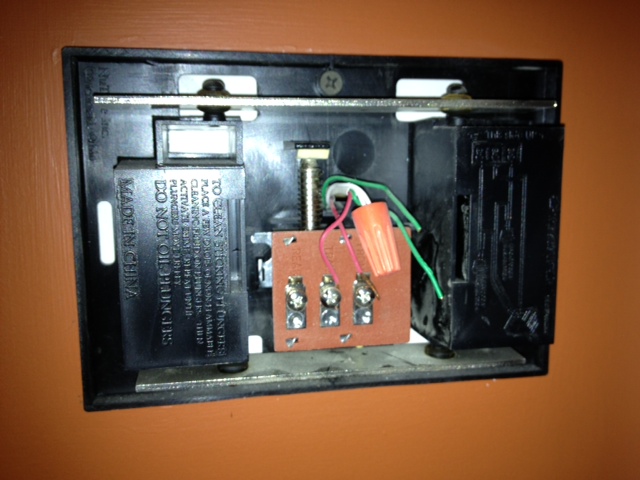
I retreated into the house and stood up on a ladder to pry the cover off the doorbell chime itself.  Having never looked inside one, I saw that there were two chimes, and two sets of wires.  One was for a front door and one was for a back door, but we only have a front door, so only half of it was wired.

After having my four-year-old daughter helpfully try pressing the button a few times, I could see that the plunger that should be ringing the chime was stuck in place.  The buzzing sound was coming from it trying to move.  Upon closer examination, I realized that the plastic around the plunger was melted and fused.  I’m guessing that when the button first broke, it was stuck on and heated up and melted the plastic.

My heart sank, since I would now have to replace the whole chime.  This would mean another trip back to the hardware store and remounting and rewiring the chime.  While not complex, it was a lot more work than just swapping the buzzer.  This was no longer a five minute project.

Then, I had an inspiration.  Why not just reconnect the doorbell wires for our non-existent backdoor buzzer to our actual front door?  It was just sitting there, unused.  With a screwdriver, I swapped a wire and then asked my daughter to press the button.

Chime!


Posted in Uncategorized | Tagged , , | 5 Comments

Abandoning my networking rolodex and relying entirely on LinkedIn

My company is in the process of being acquired by IBM, and while this has many positives, it means that we will all be switching from Microsoft Outlook over to Lotus Notes.  This feels a little bit like switching from driving a car to using a horse and buggy.

Now to be fair, I’ve never actually used Lotus Notes, so all of my negative associations are based purely on hearsay.  I always try to go with solutions that on the “main road” that everyone else is using, and when it comes to desktop software for email, contacts and calendars, that is most definitely Microsoft Outlook.  I can think of maybe two or three clients I have worked with that use Lotus Notes, and I figure here must be a reason.  It also means that any methods for syncing with my iPhone are likely to be primitive at best.  Not enough people deal with the problem to require Apple to build a really good technical solution.

The biggest pain point I foresee is my contact database, which started its life as a Palm address book over a decade ago but currently lives on my office’s Exchange server.  I depend on it to sync wirelessly sync to my phone using ActiveSync so that I have the phone numbers I need at my finger tips.  Rather than wait around to see what a Lotus Notes solution would look like, I figure my best option is to just bite the bullet and migrate the database over to my gmail account so that I no longer have a dependence on my work’s software.

Over the years, I’ve amassed a large pile of contacts in my electronic address book.  There are the basic entries with phone numbers and email addresses of friends and family, but it also has large numbers of business associates, vendors, restaurants, and former colleagues.  It’s quite a mish-mash.

I figure that if I am going to migrate my contact database, it’s time for a little bit of spring cleaning.  Do I really need all of these addresses?

Some were out-of-date phone numbers for friends who had moved out of the community, so I deleted them right away.  Others were restaurants that I had loaded in because I had a reservation and wanted to be able to quickly call or locate if I was lost; I had forgotten they were even in there, and if I needed to look them up again, I would just google it.  They went into the trash too.

Where I found myself hesitating, however, was over the contact information from old colleagues.  They made it into my database because at some point I needed to be able to call them, but that date has long passed.  However, having been through multiple jobs over the last 15 years, I didn’t want to just throw them away.  These are people I had forged a relationship with and might want to reach out to again in the future.

After thinking about it for another minute, I realized that the better location for these contacts was LinkedIn.  The fact of the matter is that any time I do need to go networking, I just start with LinkedIn by default; I forgot that many of these contacts were in my address book in the first place.

So, before I deleted each contact, I made sure they we were already connected on LinkedIn, or else I issued an invitation.  If I couldn’t find them on LinkedIn, or they don’t respond to my invitation, well, they probably weren’t going to be such a valuable networking contact anyways.

My address book is now a lot cleaner, but it does raise one concern – I am now placing my trust entirely in LinkedIn to maintain my networking rolodex.  If they ever had a data loss, or someone maliciously wiped out my data, I would no longer have any way to jog my memory of all of my contacts.  I have to trust LinkedIn.

After considering it, I’m okay with this.  LinkedIn is a publicly traded company with a strong reputation, so I’m not worried about them just suddenly shutting down overnight.  If they did cease operations, I would expect that I would have enough time to export my contacts out.  I can’t completely eliminate the risk of the malicious hacker, but I do try to follow best practices on security (I don’t actually know what my LinkedIn password is, but it is a randomly generated string).  I can also take a backup of my connections onto my laptop so that it wouldn’t be a total loss.

My life has been a lot more convenient since I have migrated most of my data to the cloud.  Eliminating the data from my address book is just another step in that direction.

Posted in Uncategorized | Tagged , , , , | 2 Comments

School form hell…please, create a standard emergency contact sheet form!

My older daughter just started junior kindergarden, which is an exciting but difficult time for the family.  My wife and I have divided up different aspects of managing the enrollments and transitions, and we have agreed that filling out all of the forms is on my list of responsibilities (it now takes its place with vomit, broken glass, and holding kids still during x-rays).

I have to say, there a lot of forms.  I had no idea.

There have been at least a dozen different ones for the kindergarden classroom, another set for the Jewish after-school program she goes to two days a week, and just this evening I had to fill out another six forms to sign her up for a one-hour-a-week dance class run by the school.

What’s really driving me bananas about these forms is that they are so repetitive!  I have lost count of how many times I have had to provide the names, addresses, phone numbers and email addresses of me, my wife, and three emergency contacts.  The school’s office needs it, and the class teachers need it, and the people who handle the busing need it.  I keep entering the same information, over, and over, and over…

Heck, this latest one-hour-a-week program needed it repeated on three separate forms!  My hand is starting to cramp up.

In the image above, you can see one of them.  This is one side of a double-sided card, and it has 42 separate fields.  I had to provide two copies of these.

Now, I understand the school’s perspective… they could just keep one copy on file somewhere, but in an emergency, the people involved need to act independently.  They can’t call the central office every time they need to phone a parent, I guess.  But surely there is a better way.

As a technologist, my first thought was that they could computerize it.  Just have us fill out all of the data once online, and then each program that needs it can grab the data they need.  Within a minute I realized that this would be a disaster, of course.  In this type of bureaucracy, there would impossible to agree on the forms that were necessary, and there would be all kinds of implementation problems where certain programs couldn’t get the right access to the right forms… not to mention that while it is easy for me to just go online and fill in information, this is a public school, and there are large portions of the community without easy internet access.

Then, I thought of something simpler… couldn’t the school just create a standard “emergency contact” form?  I could fill it out once, and then print or photocopy 20 extras.  Every time someone needed the emergency contact information, they could just accept the standard form.  Non-affiliated organizations could still adopt the “standard” form, saving both themselves and the parents a major headache.

Please?

Posted in Uncategorized | Tagged , | Leave a comment