My pre-schooler leads me to an Ah-ha moment about location-based services

As much as I enjoy gadgets and playing with new technology, I always find myself a little behind the curve on the latest trends.  When blogs first became popular four or five years ago, I was skeptical.  I remember the VP of product management at the start-up I had helped found had created a blog for the company, and he wanted everyone to post.  I just couldn’t wrap my brain around why anyone would want to post, or why anyone would bother to read it.  Later, in an effort to understand them better, I tried keeping my own personal blog as an experiment for a few months.  While it didn’t hold my interest at the time long enough for me to stick with it, it helped me “get it” as a new communication medium.  I’ve spent the last four years trying to convince my father to start a Galapagos blog.

Experimentation has been my general approach to any new trend or technology that I don’t understand.  My twitter posting started as a way to try to understand why so many people, including some of our clients, were so excited by the idea of broadcasting 140 character statements to the world.  After a few days of tweeting I quickly grasped the power of a platform to casually share and receive links of interest with a broad audience, and I was quickly hooked.  Facebook, my return to the Macintosh, graphic editing with GIMP, and many others have followed a similar pattern.

The latest trend that has baffled me is the concept of location-basd services like FourSquare and Facebook Places.  While I have been feeling like I should try experimenting with them, I just haven’t figured out how to get going.  I don’t frequent many coffee shops, and with two young children, we aren’t going out to many concerts or bars.

Thus my surprise when my almost three-year-old daughter led me to an epiphany today.  It was pouring rain this afternoon, and after a napping failure, I needed some sort of diversion.  Leaving my wife and baby at home, I took her to the Boston Museum of Science.  She had a blast; while she is too young to understand the exhibits, she loved looking at the dinosaurs, pressing all of the buttons, and running around the exhibits.

While it might arguably make me a bad father, she was entertaining herself enough for me to take a peek at Facebook on my phone.  To my amazement, right there in the news feed was a location check-in at the Boston Museum of Science from some friends of ours (@meyerpotashman) who have a son almost exactly the same age as my daughter.  A few quick phone calls later, and our kids were jumping in and out of an Apollo 11 capsule.  We soon stumbled upon another friend whose son is in the same preschool as my daughter, and before we knew it, a whole group of kids were running around and entertaining each other.

Img_0947

While I don’t understand the value of becoming the “mayor” of a coffee shop, I see the benefits of location-based services for the toddler crowd.  On many random sunday mornings we have expressed delight to unexpectedly find ourselves at the same playground as friends or disappointment when another family is not available for a play date on a rainy day.  How convenient it would be to be able to say, “who is playing in the neighborhood”?

This is a location-based service that I get.
Posted in Uncategorized | Tagged , , | Leave a comment

Comcast, I think it’s time we started seeing other people…

My quest for cutting utility expenses didn’t actually start with AT&T, it started with Comcast.

We are at the extreme low end of tv watching in our household.  It is pretty rare that we have the energy for more than a half hour a night, and the only half hour show we actually like is Modern Family.  I think on a good week, we watch about four hours.

Aviva and I made a list of the shows we TiVo that one or both of us watch on a semi-regular basis:

  • Modern Family
  • Fringe
  • NCIS
  • Bones
  • Lie to Me
  • Top Chef
  • The Closer
  • Star Wars
  • Sesame Street 

To get this content, we are paying around $60 a month, or $720 a year.  However, more than half of these shows are broadcast for free over the air (OTA).  The ones that don’t could be downloaded from iTunes or streamed for free.  Even if I had to pay the current $1.99 iTunes price, based on the number of episodes a year, it would still be less than $100.

So why do we need to pay $60 for cable?

Actually, I know the reason why.  We are one of the few families that have yet to upgrade to HDTV, and I have no way to pull in the television signals.  Given how little TV we watch, it just doesn’t seem worth paying $1000+ to upgrade the TV, plus a few hundred dollars more for a HiDef TiVo, since I’m not going back to actual live television.

Then it occurred to me – can I do this without the TV?  I’m fine without high-def, so if I can get OTA into my existing setup, I could cut the cable.  My first thought was to just hook up a digital converter to my existing TiVo and pull in signals that way.  Unfortunately, my Series 2 Dual Tuner has no ability to tune the channels, so I am stuck.

However, It turns out that the new TiVo’s can pull in over OTA channels, provided you hook up a digital antenna.  And, it has a composite out, so I could still use my old TV, just without the high def, which isn’t my goal.  Even better, as a current TiVo subscriber, I am eligible for 33% off a new TiVo, bringing the price to $200.  Based on that math, I would break even after four months of not paying for cable.

The big unknown in my plan is that I have no idea what digital reception is like in my house.  I live in Cambridge, MA, so I should be pretty close to the base stations.  However, since I don’t actually have an HDTV, I don’t have a way to test reception.  I could end up buying the TiVo and discovering that it doesn’t work at all.

TiVo gave me a 30-day money-back guarantee, so last night I decided to take the plunge and order it.  In a few days, I will find out of the reception and composite out work the way I am hoping.  If so, it will be bad news for Comcast.

Ask not for whom the bell tolls, Comcast.  The bell tolls for thee…

Posted in Uncategorized | Tagged , , , | Leave a comment

Chrome App Store has potential, but feels like the right product at the wrong time

Having spent some time playing around with Google’s new Chrome web store, I can see what they are going for, but I’m still not sure that there is a need for it.  At least not yet.

Apple has already proven the value of having an App Store.  When I think back to the fishing expeditions I used to do to find applications for my old Palm Treo, the App Store strikes me as an inspired idea.  It met three needs:

  1. Discover – all applications for my phone are collected in one place, by category, allowing me to easily browse, search, and compare
  2. Reviews – feedback from users is available side-by-side with the application, so I don’t have to run separate searches once I found an application of interest just to see what people thought about it
  3. Monetization – engineers can focus their time on creating applications, and Apple handled the billing side of things.  Furthermore, having a marketplace helps keep prices down, since it is easy to find other, competing applications

So why does Google think we need an App Store for the web?  When I look at my own Chrome browser, I can see what they are going for.  I currently have 23 tabs open, and while some of them are web pages, many of them are really applications that happen to be running in a web browser:

  • Yahoo! Mail
  • Google Voice
  • iGoogle home page, with all of my RSS feeds
  • Posterous
  • Akamai Control Center
  • an internal site that I use to monitor production systems

Why do I use that specific mix?  Well, some of them are mandated by the nature of my job, but others, like Posterous and Google Voice, are just applications that I stumbled upon through word of mouth.  Wouldn’t they benefit from the same sorts of discovery and review options?  An App Store seems like a reasonable solution.

The problem is that while I acutely felt the difficulty of finding good apps for my Treo, I don’t feel like I have a problem with web applications.  When I am sitting at my desk, I have the whole web at my disposal.  In general, I don’t need that perfect little application that will be two taps on my phone as I run from the car into the supermarket.  Word of mouth to find great applications is meeting my needs just fine.  Back when web apps were starting to become popular, there might have been some real value in a store like this, but that time has passed.

I do see two areas of real potential in a web app store.  The first is in monetization.  Right now, if you want to start a business, figuring out our monetization model is a royal pain.  Everyone is used to the web being free, so there is already a barrier to getting people to type in their credit card number.  Furthermore, putting in the billing infrastructure is time that could be better spent on putting an application together, so having a centralized marketplace to handle billing certainly could help with monetization and pay walls.

The other big area of potential is the Chrome OS, of course.  Since this OS targets the netbook marketplace, it really is looking for those perfect little applications that I can use while I am out and about.  Once Chrome OS is truly launched and competing with the iPad, I think the Chrome Web Store will become a much more useful application for users of that platform.


Posted in Uncategorized | Tagged , | Leave a comment

Performance Tuning: Visualize your web log performance data using Excel scatter plots

I’ve written previously about how to turn on time-taken values in web logs for IIS, Tomcat, and Apache.  Armed with time-taken data, you can identify which are the slow pages in your system and decide where to focus your performance tuning efforts.

Slow pages fall into two basic categories – pages that are inherently slow, and pages that are vulnerable to being slow.  If a page is inherently slow, performance will drag no matter how heavily loaded the system is or what time of day it is accessed.  If it is vulnerable to being slow, it means that certain conditions can lead to slowness, such as low memory on a database, high CPU utilization on a server, etc.  In this case, while there might be opportunities to make the page less vulnerable, like query tuning, the actual problem may lie elsewhere.

Visualizing the Data

Graphing your performance data is great to visually learn about your performance issues.  If a page is inherently slow, you would expect to see slow page response times spread relatively evenly throughout the day.  If your page’s performance is being affected by external factors, like database utilization, you would expect page response times to increase with load or cluster around a specific point in time.

The best place to start is to load your data up into excel and create a chart.  Excel’s charts are limited to 32,000 data points, so it is very possible that you will not be able to load as much data as you want.  In this case, you can just grab a percentage of your data.  While I’m sure there is a way to do this in excel, I find it much easier to use a quick awk script to grab every nth row.  For example, to grab every 3rd row, you would run:

  • cat ex101201.log | awk ‘// { n++; if ((n % 3) == 0) { print $0 } }’ > ex101201_sampled.txt

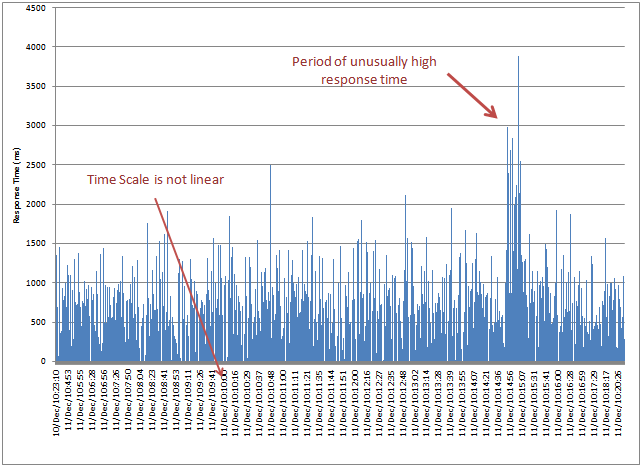
Once you get it into excel, select a bar chart, and voila:

Linear_response_time

You can quickly get a sense of what your page response time looks like – in this example, response times of between 500 ms and 1500 ms are “normal”.  You also immediately see that there was a period where response times shot up much higher than “normal”.

The limitation of this graph is that the x-axis of the graph has no actual correspondence to time.  While many sites have low request volumes during the wee hours and heavier volumes during business hours, these types of graphs just plot one point right after the other.  All sense of request volume over time is lost, and the duration of events is distorted.

Building a Scatter Plot

Excel is smart enough to properly interpret time data, provided you give it to it in a format it understands.  Sadly, most web log files record their date stamps in ways that Excel just doesn’t interpret correctly.  For example, Tomcat will generate date-times like this: 

  • [11/Dec/2010:00:17:16 -0500]

If you use a copy/replace or sed script or other technique to reformat them into a more standard “mm/dd/yyyy hh:mm:ss” type of format, Excel will automatically re-interpret them as date-time values.

Once you do this, you can insert the data as a scatter plot, with event time on the x-axis and response time on the y-axis.

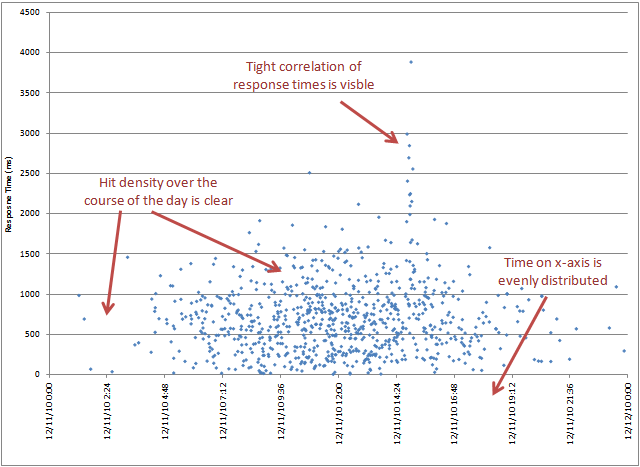
Even_response_time

Now a number of things jump out.  First, you can see the density of responses.  Traffic is clearly very light outside of business hours, but during this period, it still stays within the 500-1500 ms range, so there is not a strong correlation between load and performance.  You can also see that the “burst” of slower performance in the afternoon was extremely tightly bound to a very short time window.

Zoom In

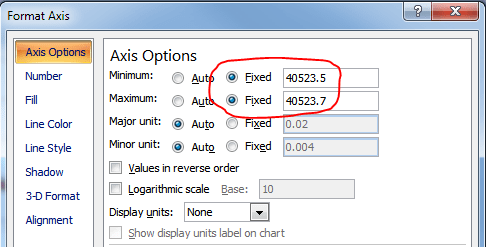
With the x-axis now evenly spread across time, you can change the settings on the x-axis to zoom in on particularly times of interest.  To do this, right click on the x-axis and choose “Format Axis…”

Format_axis

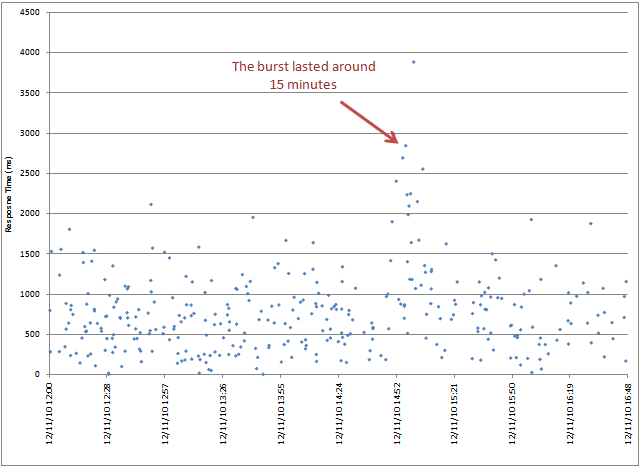
Change the Minimum and Maximum from “Auto” to “Fixed”, and then adjust the values.  Internally, Excel represents each day as a number, with the time of day as the value after the decimal point.  So, the period between 0.5 and 0.7 is essentially from noon until a little before 5:00 pm.

Zoomin_graph

You can now see fine details for this chunk of time.

Posted in Uncategorized | Tagged , , , , | 1 Comment

My mission: cut my AT&T phone bill by 30% (farewell unlimited iPhone data plans!)

Ever since my decision to pay to download two tv shows to my phone that I already had sitting on my TiVo, I’ve been thinking a lot about whether we are getting the full value for the money we are spending on some of our electronic services.  Now that we have two kids, money is tighter than ever, and given that there have been no raises in two and a half years, even some small savings would make a difference.

One area that has come under scrutiny lately is our mobile phone bill.  We both have iPhones, and while we have a relatively low minute plan (700 anytime minutes) and no text messaging, our phone bill still weighs in at around $145 every month, or a little over $1700 a year.

We bought our iPhone’s before AT&T rolled out limited data usage plans, so we have been paying $30 each.  We are not heavy data users, since I download podcasts once a day at work, and I find trying to stream YouTube or NetFlix over 3G too choppy to be worth it.  Any heavy data transfers can be done at home over our wireless network.  Even though I know our data usage is low, the very fact that we could never go back if we switched has always kept me from seriously looking at switching to a cheaper limited plan.  

I knew there were two cheaper options – 200MB for $15 or 2GB for $25.  Would it be worth it?  I went to AT&T’s website to see how much we are really using.  Here’s how to find it:

  1. Log into the AT&T website
  2. Click “Bill & Payments” near the top
  3. On the list of links on the left, choose “Billing Reports”
  4. Choose “Data Usage Trend” from the report options

My data usage pattern shows this is a pretty easy decision:

Screen_shot_2010-12-05_at_8

In the last year, the closest I have gotten the lowest data usage limit (200MB) is around 160MB.  I am throwing money away on theory that some day my data consumption habits might change drastically.  Aviva’s graph looks similar, so switching both of us to the $15 plan is a no brainer.  $15 x 2 phones x 12 months = $360 a year savings.

Whether we could go to a lower minute plan is a harder decision.  AT&T does everything they can to show you how much data you are using, since they want to limit the amount of data on their network.  However, it’s not so easy to see how many minutes you are rolling over.  While there is a “Breakdown of Rollover” report, it shows all zeros, which I know is not correct.

I’m a bit of a pack rat when it comes to bills, so I have folder with all of my AT&T bills over the last year.  A quick look showed me that most months we use between 300 and 400 minutes rollover minutes, once you factor out the in network phone calls.  There were two months where we hit the low six hundreds (around when our second child was born), but this seems to be the anomaly.  

Looking at the available plans, there was another plan for 550 minutes, saving us $10 a month.  This would have been enough to cover most months in the last year, and with rollover, we would have easily had enough spare minutes from previous months to cover the overages.  So, time to switch.  $10 x 12 months = $120 a year savings.

As I made the switch, we got hit by one catch.  We have thousands of rollover minutes from having many more minutes than we were using.  When I went about switching plans, AT&T warned me that I would only be able to save the number of minutes equal to one month of my new plan, i.e. 550. I’m guessing they do this to keep people from periodically dropping their phone plan down to a very low level to save money and use minutes that were going to expire.  Annoying, but I clearly have not been using these minutes anyways.  550 it is.

In the end, we will cut our bill from $145 a month to around $105 – a savings of 28%.  We may save a little more due to paying lower taxes on a lower bill, so I am considering this mission accomplished.

Best of all, we don’t need to make any changes to how we are using our phones – we are just optimizing our plans to our behavior.

Posted in Uncategorized | Tagged , | Leave a comment

Hell must have frozen over. My wife is pining to upgrade her iPhone!

In our marriage, I have always been the geek, and Aviva has always been the technophobe.  While she is perfectly capable of using ATM’s and gas station pumps, she much prefers to have me do it for her.  She knows how to play back shows recorded on the TiVo, but I don’t think she knows what is actually involved in getting them to record in the first place. 

So, when Aviva casually mentioned as we were going to sleep that she would really like to upgrade from her iPhone 3GS to the latest model, I nearly fell out of the bed.

The fact that she has an iPhone at all represents tremendous progress for her.  When we married twelve years ago, I was very excited about my new PalmPilot, and she was very excited about her Franklin Covey organization system with its separate page for each day.  She was particularly excited about how she could use different color pens for different categories of tasks and events.  Each year, she enjoyed the process of buying the next year’s pages and loading them in.

Then, about five years ago, she made a surprising request – she wanted a Palm.  While she loved her Franklin Covey organizer, the fact of the matter was that it was really heavy to lug around.  Palm pilots were color now, so if it could still show her separate colors for separate categories, that would be just perfect.

I was skeptical.  I’d lost count of the number of times she’d asked me to come look at “some message” on the computer.  Now she was going to replace her Franklin Covey with… a computer?  She depended on her organizer to function, and I could just see the disaster waiting to happen when “some message” would appear on it at the wrong time.

Aviva surprised me, however.  She made the transition relatively smoothly, and while I was called in for occasional tech support, she embraced the technology in a way I had never seen before.  She quickly mastered graffiti, and she loved having all her address book so easily accessible.

In the meantime, I had upgraded to an iPhone, and Aviva looked at it like it was some alien technology that might zap her.  She would be very reluctant to touch it if I asked her to call someone on it while we were driving, and she would frequently make mocking “swoosh” noises when she would see its inertial scrolling in action.

Then, a year ago, Aviva surprised me again.  She announced that for her birthday, she wanted an iPhone.  It had been years since Palm technology was updated, and she was really getting frustrated with unfixed bugs when trying to sync with Outlook.  She was also starting to agree that it was silly to have both a cell phone and a PDA.  When I asked her about how much she disliked using my iPhone, she explained that  all of the innovation and updates were happening on the iPhone, so clearly it was the place to be.  Besides, if she used Google calendar, she could still have her different colors for each event category!

So, we got her an iPhone 3GS, just like mine (hey, I’m supposed to be the one in the family with the most advanced technology!).  Her main goal was to have her calendar syncing in the cloud automatically and not have to carry two devices, and she loved this part of it.  On the flip side, she didn’t really see the need for email or web access, but it came as part of the package.  Within two weeks, however, she was converted and evangelizes the benefits of having email on the go.  I’ve seen her emailing in bed as she is turning out the lights and reading comics on the web when she wakes up.

Given that she has made the leap from paper to Palm to iPhone, you wouldn’t think that I would be so surprised about her wanting a new iPhone.  But this really is different.  In each of those technology upgrades, there were specific problems with her existing system, and she was looking for a solution.

Why does she want to upgrade now?  Because the new iPhones take better photographs.

This is just not the kind of thing my wife says.

Posted in Uncategorized | Tagged , , | 3 Comments

Comcast / Level 3 network peering dispute exposes failures in a private market internet

Comcast is threatening to cut off Netflix streaming unless an Internet backbone provider, Level 3, agrees to pay it money.  Comcast is quickly turning into the poster boy for Network Neutrality, and in the process, it is highlighting the inefficiencies and pitfalls of solely relying on markets to self-regulate.

The Highway System

A common analogy for the internet is that it is like the highway system.  Computers are the houses, and each house has a street address, aka an IP address.  Your internet service provider (ISP) is analogous to the roads that you drive on.  If your destination is far away, you may find yourself leaving the roads of your ISP to travel along highways, or Internet backbone providers, that link to other ISP’s.  It’s a good analogy, and pretty easy to understand.

The highway system analogy breaks down when you get into peering issues like Comcast and Level 3 are currently experiencing.  Our road system is essentially owned and run by the government.  No one can tell you which roads you can and cannot drive down.  The roads are for everyone.

You Can’t Get There From Here

The internet doesn’t work like a government managed network of roads.  Each ISP owns its own roads, and no one actually requires them to talk to each other.  In order to reach sites hosted by other ISP’s, you are relying on your ISP to have peering relationships with other network providers.  If you are lucky, your ISP will have a direct peering relationship with the place that you are trying to go, and your route will take you just a few short hops.  If not, you will have to travel through one or more intermediate ISP’s in order to get to your destination.

These kinds of peering relationships between ISP’s can have significant performance impacts.  Two servers in the same local region could require a very long, circuitous route to talk to each other.  If the ISPs are not peered, you need to follow a trail of peers’ peers, or peers’ peers’ peers, etc., to find a path, and this might be half a world away.  I once encountered an ISP in Singapore and an ISP in Australia, and the fastest path between their networks was to go via Los Angeles.

Is the Market Failing the Consumer?

Many people point to the internet peering system as an example of private market solutions providing more efficient solutions than the government could.  No one is forcing the ISP’s to peer with each other.  But if their users cannot access the internet, the ISP won’t have any customers, so they do it on their own.  Consumers win.

In the case of Comcast and Layer 3, the market shows signs of needing some regulation.  Comcast isn’t trying to reject all Level 3 traffic, just the video traffic.  While in theory it should be in Comcast’s self interest to carry all of the internet traffic that its customers want, video traffic shifts the equation.  Comcast’s main business is selling video content through cable television and video on demand (VOD).  Any time Comcast’s customers are watching video on the internet, it means that customers are not consuming Comcast’s video services.  This means a loss of VOD revenue and potentially a loss of cable television subscriptions altogether.  Charging extra for video traffic becomes a counterbalance to the potential loss of revenue.

Returning to the highway analogy for a moment, you don’t really have the right to travel on any road you want.  Some highways are toll highways, and you have to pay to use them.  Some roads are restricted to certain vehicle types (e.g. “No Trucks”).  If you don’t want to pay or you are the wrong type of vehicle, find a different route.  Why isn’t Comcast’s decision just like restricted roads?

The difference is that Comcast controls the only road to your house.  Changing ISP’s is a major hassle, and in many communities, there are only one or two high speed internet providers available.  If Comcast shuts off Level 3 video traffic, consumers cannot just click a button to take their business elsewhere.  

Net Neutrality

If ever there was an argument for Net Neutrality, this is it.  When Comcast was going after bit torrent, a lot of people got hot and bothered.  However, bit torrent is not a mainstream technology, and much of the content being transferred over it is of, um, questionable origin.  Netflix content reflects legitimately licensed content that consumers are paying for.

Someone needs to be looking out for us.  Clearly, Comcast interests are not aligned with those of its customers.

Posted in Uncategorized | Tagged , , , | 2 Comments

Transfer from the TiVo or download on iTunes? Convenience is winning out

Steve Jobs is taking more of my money than is really necessary. He is winning the convenience war, and it may spell longer term trouble for my TiVo.

With two kids under the age of three in the house, our tv watching has dropped to a minimum. I watch about four hours a week, if I’m lucky, which puts us on the extremely low end of the national average. Aviva generally refuses to watch science fiction, so this means that any attempts to squeeze the two scifi shows I try to keep up with – Fringe or Star Wars: The Clone Wars (I admit it; go ahead and laugh) – into those four hours is a challenge.

When we were traveling over the holiday, I saw the opportunity to catch up on some missed shows by transferring them to my phone. Between the flights, children napping in cars, and general downtime from grandparents spending time with the kids, this might be my opportunity.

The episodes were sitting on my TiVo, just waiting to be watched. I just needed to get them onto my phone. I’ve done this before. I own the software. It’s as easy as 1-2-3:

  1. Decide you want to do is about 48 hours beforehand, leave the computer on overnight, and set them to download from the TiVo, since it takes about an hour per program over our wireless network
  2. The next night, run the special TiVo software that will convert them to an iPhone friendly format. This will max out the CPU for about an hour per program
  3. Import the converted videos into iTunes and then sync your phone. They’ll now be on your phone, but be prepared for a loss of synchronization between the audio and video during transcoding, meaning that everything will look like it was dubbed.

Or, I could pay $1.99 per program and download them to my phone over the air, without commercials, without audio syncing problems. It’ll take under an hour.

I paid the $4 for the two programs.

With Apple TV out, the usefulness of my TiVo is starting to come into doubt. The future of my tv watching is coming down to a race – either TiVo is going to make it easier to get the programs off the box, or Apple is going to expand their catalogue to cover all of the other programs that my TiVo records.

These days, the odds are looking in Apple’s favor.

Posted in Uncategorized | Tagged | Leave a comment

I wonder if Microsoft would pay for my car if I let them personalize my license plate like this person did

P35

Posted in Uncategorized | Leave a comment

Recent ASP.NET security patch KB2416471 can break CompositeScript elements

Microsoft released a patch (KB2416471) to fix a security vulnerability where a malicious party could use errors generated in the application to decrypt the data used in certain requests.  In theory, the fix should not require changes in the application.

However, it turns out that in certain situations, the patch can generate errors for pages that use CompositeScript elements.

CompositeScript elements are wonderful thing.  They allow you to take multiple javascript files and then concatenate them into a single request from the browser.  This has a couple of great benefits:

  • Only one connection is used for all of these files, freeing up other connections to download other static objects
  • Cache headers are set on these files for one year (the longest allowed by the HTTP standard), meaning that if the object is in the cache, the browser will not request them again.  If there is a change in the files, the generated request key will change, and the browser will automatically download the update.  No more needless 304 requests!
  • You can retain the development convenience of dividing your javascript files up into logical segments, but not have to reflect this at the browser/request level

The one downside is that you can’t tell by looking at the URL alone what is inside it.  All of the them look something like “/ScriptResource.axd?d=OC6WSKC6-VBE_24rhrZ…”.  You will need to actually look inside the response to see what the contents are.  But given the major performance gains, it’s worth it.

However, there is a limitation in CompositeScript.  Request urls in ASP.NET are limited to 1024 characters, and if you include too many files in the composite script, the key gets too long, and you start getting this runtime error:

The resource URL cannot be longer than 1024 characters. If using a CompositeScriptReference, reduce the number of ScriptReferences it contains, or combine them into a single static file and set the Path property to the location of it.

At this point, your only option is to reduce the number of files included, either by splitting into two separate CompositeScript tags (and now making two browser requests), or by manually combining some of your javascript files together.

The fix included in the Microsoft patch can cause this error to appear where it did not used to.  It makes subtle changes to the way the ScriptResource.axd request keys are generated, and if you have a request that had been very close to the limit (e.g. 950 characters), it could now grow to beyond it (e.g. 1036 characters).  All of a sudden, an application that had been working fine starts generating errors.

If you have CompositeScript links that are close to the limit, you may need to break them up further to avoid errors after applying the patch.

Posted in Uncategorized | Tagged , , | 1 Comment