Now, you might think I’m just cheap, but it drives me crazy that you can never get all of the product out of a container if it is a thick cream like shampoo or styling gel. You can turn the container upside down and shake it as hard as you want, but it just clings to the sides and bottom. Storing the item upside helps, but this doesn’t work well if the container has a narrow opening or uses a pump. If you consider how expensive some of these items are, like salon hair products, there are real cost savings if you can get an extra week or two before having to buy a new one.
I get my hair cut at a small, independent salon (DHR) in Harvard Square run by the owners, Dale and Rob. As small business owners living in a business that is significantly affected by the economic downturn, they keep a close eye on the bottom line, and they taught me a rather obvious solution – just cut the bottles open. I’m not sure why it never occurred to me. Somehow it seems like it would be messy, but it’s clean and takes two seconds.
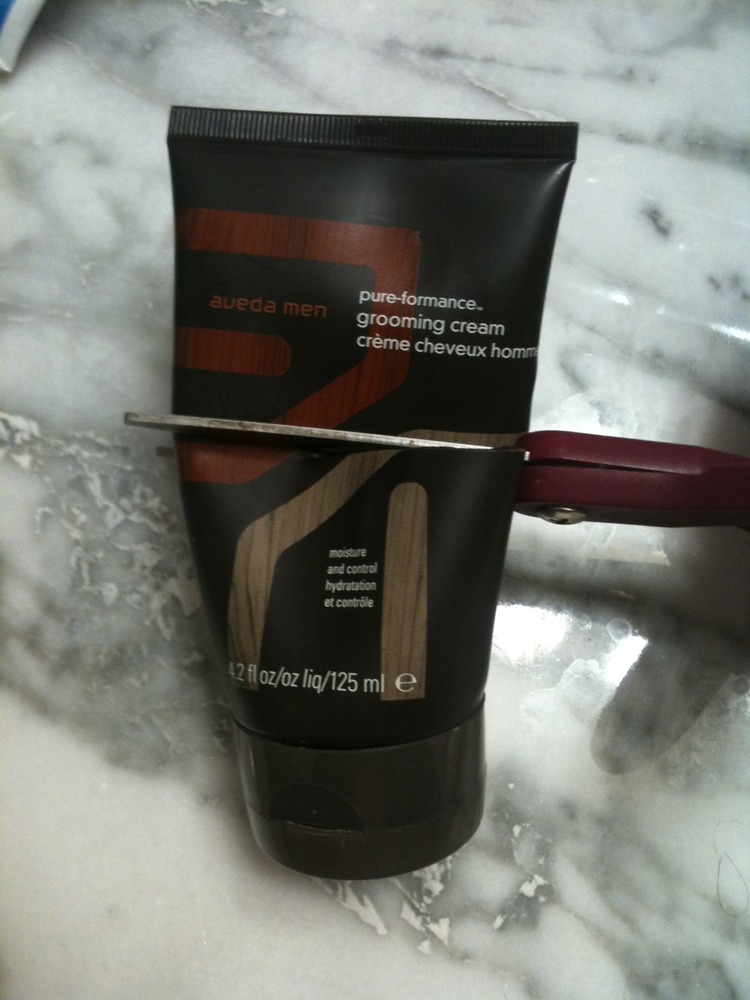
For smaller bottles, just snipping it with a pair of scissors will do:
Once the top is off, you will see that there is a lot product still left inside. Easily enough for another week or two of use (at least for me, as a guy with short hair). Rather than squeezing it out with your hand, you just scoop some out with your finger:
The plastic is generally flexible enough that you can take the top half and slip it over the bottom to create a cover:
The trick works just as well with the harder plastic of a shampoo bottle, but you will need to use a box cutter or razor blade to slice through, so be careful:
When I was a kid, it used to drive me crazy when my Mom would insist we completely get all of the toothpaste out of the container before opening a new one. Now look at me.
With Verizon expected to announce an official launch of the iPhone tomorrow, analysts are prediction that 9-12 million Verizon iPhones will be sold in 2011. The actual number of AT&T escapees is expected to be limited, however, by AT&T’s high early-termination fees and efforts to keep most users in two-year contracts.
Both my contract and my wife’s will expire in the next month or two, but I have no plans to jump ship. Yes, AT&T’s network has had issues, and we certainly have experienced dropped calls and dead zones at times, but this isn’t enough to send me back to Verizon.
While Verizon always receives top marks for their network, they have a track record of lagging the market in phone models. We were once Verizon customers, and while I wanted to upgrade my phone, Verizon was consistently always a generation behind. Who wants to spend money upgrading to the previous generation of technology? It’s like paying top dollar for last year’s car models.
My first smart phone was the very popular Palm Treo 650, which I purchased in 2005. It had a full qwerty-keyboard, a color display, and could run the full gamut of Palm applications. I loved it. I had my phone, contacts, and calendar all integrated into one device, and I could install games, audio books, music and other apps to entertain myself in line, the car, wherever.
In 2007, I was eligible for an upgrade, and I was following advances in Palm technology to see what I might get. Verizon had rolled out the Treo 700, which provided high speed data capabilities to the phone, but this held little value for me. At the time, I didn’t email on the go and used it as a pocket computer. What really caught my eye was the recently announced Treo 755, which had a more stylish look without the stubby antenna.
It was already released on the Sprint network, and I just waiting Verizon to launch it. And I waited… and waited… and waited. Verizon continued to chug along with the Palm 700 as its most advanced Palm offering.
Then, Palm made another leap – the Palm Centro. All the same functionality, but in a smaller, more compact package. Now that was an upgrade worth waiting for! Perhaps the reason that Verizon was dragging its heels was because they were looking to skip the 755 altogether and go straight to the new model.
Soon after, Verizon did announce a new Palm smart phone being added to their lineup. The 755. Alas, if I was going to upgrade, it was going to be to the previous generation of phone.
While I was waiting for Verizon to launch a new Palm, AT&T rolled out the iPhone. I sat there watching as the technology shifted in a while new direction, and Verizon was just sitting on the sidelines. My contract had long since expired, and in the end, I decided to jump ship and get on the iPhone bandwagon. I’ve never regretted it.
Verizon seems poised to continue the same behind-the-times course with the iPhone. While nothing is certain, the consensus is that they are going to be releasing an iPhone 4 with a CDMA chip that will function on their network. While that will bring them up to the latest technology, Apple is widely expected to announce the iPhone 5 in six months. Will Verizon launch the iPhone 5 at the same time, or will there be a waiting game? It seems a little unlikely to me that they are going to roll out a special, just for Verizon CDMA iPhone and then make it obsolete six months later. Based on my experience with Verizon and the Palm platform, I’m guessing that the latest iPhones will always come out on AT&T’s network, and Verizon will launch them six months later.
That, and the fact that Verizon’s network isn’t all it’s cracked up to be (here in my office, AT&T gets better reception), mean that I am going to stick with AT&T.
Sleep has been in short supply in our house this week. A combination of colds, a teething six month old, and prolonged bedtime dramas from our daughter Ayelet, who is going through a “terrible two” stage, has left everyone exhausted.
While bedtime takes forever with Ayelet, she’s at least been sleeping through the night fairly consistently. Months ago, we were having problems where she would want to come into our bed in the middle of the night, but I mostly solved with the “morning light” in her room. It’s a night light on a timer that turns on at 5:00 am, and the rule is that she can’t come into our bed unless the morning light is on. It’s not so much that this stopped her from trying, but it changed my refusals from an arbitrary decision to an explanation that the morning light wasn’t on. Pretty soon she stopped for the most part.
Last night was a brutally timed exception. I had already spent 45 minutes around 1 am trying to get my son to go to sleep, and then at 2:30 Ayelet came running into our room wanting to climb into our bed. Rather than accepting the morning light explanation like usual, she dug in her heels and refused to get back in.
“What if we put some music on the iPod?” I offered. As a result of odd choices on my part for bedtime songs to sing to her, my daughter is a big fan of “Gina Becker”, which is more properly pronounced “Regina Spektor”. Normally, she is very excited about listening to either “Fidelity” or “On the Radio”, and this calms her down enough to go back to sleep. Tonight, however, she was unwilling.
At this point my wife, knowing I had to be up early, took pity on me and came in to try instead. I went back to bed and listened to her coax my daughter into her own bed. Sometimes a fresh face makes all the difference.
A few minutes later, however, my wife was back in my room holding Ayelet’s iPod and looking for my help. Ayelet had decided that she would in fact like to listen Gina Becker after all, but Aviva has never managed to figure out how to use the iPod. The one in Ayelet’s room used to be Aviva’s, but I always set it up for her. I had gotten it when Aviva was first pregnant and unable to sleep so she could listen to podcasts. It was an older generation model that I bought refurbished off the Apple website (which I highly recommend if you are looking for a good deal).
While Aviva has shown some impressive tech savvy at times and can easily play music for Ayelet on her iPhone, the iPod’s control dial is not intuitive to her. It has the touch-sensitive scroll dial with pressure sensitive buttons at the compass points to control playback, but Aviva doesn’t listen to a lot of music and is unfamiliar with the symbols, particularly in the middle of the night. To her credit, she found her way to the Regina Spektor playlist but couldn’t get the music playing. I showed her how to press the center button, and pretty soon Ayelet was listening to music and back to sleep.
Thinking about this has made me realize that Apple really did the right thing when they redesigned the new iPod Nano’s with a touch interface. I recently got to play with one when I was helping set one up for Aviva’s cousin, and it is extremely elegant. It is almost exactly like using the music player on the iPhone, with the exception that there is no home button. Instead, they have introduced a new concept of swiping the screen from left to right to go back to the previous page, kind of like turning the page back in a book.
While the old iPod interface is clearly usable by the masses, there is still something unobvious about it. I can’t imagine trying to explain to Ayelet how to use it. The new Nano, on the other hand, is so simple that I think even Ayelet could figure out how to use it. She can’t read, but she knows enough letters that I could probably explain to her that the playlist that starts with an “R” is the Regina Spektor music.
Wait, what am I saying? If she could manipulate the iPod herself, there would be no negotiating value to offering to play music for her when trying to get her back to bed. Definitely sticking with the classic iPod.
Over the weekend, I found myself in a mall looking for a new camera for my father-in-law. He’s not convinced that he needs a new one, but his daughters have objected to the fact that it requires using a view finder and has just a tiny little screen that only shows a shot after it is taken. The decided to get him a new one for his birthday, and they sent me to pick one out.
I was looking for just a basic point-and-shoot, nothing fancy, but Best Buy had more than 20 cameras in my price range. Sure, you can compare them on core features, like megapixels, battery life, screen size, price, etc., but in general they were pretty similar. I picked up one that looked good – nice packaging, ample screen, simple interface, but what I wanted to know was, is it any good? Do people like this product? Hate it? How is it reviewed.
Amazon is a great source for product reviews, provided you can find your way to the right product. I decided to try using the barcode scanning feature of Amazon’s iPhone app and discovered that it really is all it is cracked up to be. Fast and easy to use.
When you open the Amazon app and hit search, there is an option to scan a barcode:
You are then presented with a very easy-to-use interface. The camera display shows up on the screen with a red line across it, similar to the one that a bar code would have. Just line it up with the barcode on the box. Keep in mind that some boxes have more than one barcode, so make sure to find the “official” one:
Almost instantly, the phone will recognize the barcode and pull up the product in Amazon’s listing:
From here, it is a simple tap to pull up the product reviews:
The whole process takes about 10 seconds. In this case, I found enough reviews to give me confidence. As with any product, some people love it and some hate it, but a quick skim told me that people generally agreed that it was a good point-and-shoot camera, perfect for my father-in-law.
When analyzing performance, looking at 95th percentile response times is one of the most useful metrics. While the average can be a good indicator, it
can be heavily skewed by lots of small requests or a few extremely long ones. Furthermore, when you look at the average number, you know that half your users got a response faster than the average, but half got a response that was worse.
The 95th percentile gives you a much better sense of response time, because it tells you what was seen by 19 out of every 20 users. If you are happy with your 95th percentile response time, you can be confident that it really is representative of the majority of your users’ experience.
The problem I run into is that the 95th percentile is a real pain to compute. Unlike the average (sum all the values and then divide by the count), there is no easy formula that you can compute in one or two lines. Generally, when I needed to compute it, I would have to open it up in Excel and use the percentile function. This is a pain for a bunch of reasons:
·You have to export your data to a machine where excel is installed and then manually load it
·Percentile just takes a range of cells, so if you want to do fine grained calculations (like 95th percentile for each distinct url in the log file), you have to go through real acrobatics like excel array functions to narrow down to just the relevant cells, or else do a lot of copy and pasting
Really what I wanted was a simple script that I could use on the command line to take a web log file (the kind you get from IIS or Tomcat or JBoss) and have it spit out the 95th percentiles for me, so I finally took the time to write one.
For a variety of reasons, I like to use awk for these kinds of tasks. Many people rightly point to the greater power and sophistication of perl, but awk has a key advantage for me – it’s part of the basic linux/cygwin installation. Many times I want to run this kind of analysis straight on the log files in a production environment, and hardened servers often don’t have perl installed at all. I would need to go through the hoops of exporting the data to another machine/environment or getting approval to have perl installed. The purpose of a tool like this to do quick, command line analysis to get pointed in the right direction, so being able to do it even on a basic environment is valuable.
In order to keep the awk script simple, I want to feed it data in an organized fashion. I’d like all the response for a page to come together, and I want them in order of increasing response time. This is best done with a sort command that can pipe the results into the awk script. Most log file lines are space delimited, like this:
·[11/Dec/2010:00:17:16 -0500] 8.8.8.8 GET /site/home ?login=1 200 24141 183
In the example above, url is in position 5 (as delimited by spaces), and the response time is in position 9. What I want to do is sort first by the url, then by the response time, and then cut away all the other columns:
Some of these sort command0line options are not frequently used, so here is what each one does:
·-t ” ” – Tells sort to use the space character as a column delimiter
·-k 5,5 – Sort first by column 5
·-k 9,9n – Next sort by column 9, but treat the value as a number, so 175 should come before 1289
·–ignore-case – Treat text as case-insensitive, since I don’t care about case differences when computing page times
Okay, so now I have my log file sorted by with all urls together, and response time steadily increasing. Now I need to compute the page times.
I am doing this somewhat crudely – for each page, I keep track of all of the response time numbers in an array, and when I hit the last one, I just grab the one that is at the 95th percentile position. The biggest issue here is that it requires keeping the response numbers in memory, but since it is only for one url at a time, you would need an enormous log file on a machine with very limited ram to run into the issue.
Here’s the script:
This file contains hidden or bidirectional Unicode text that may be interpreted or compiled differently than what appears below. To review, open the file in an editor that reveals hidden Unicode characters. Learn more about bidirectional Unicode characters
As I said, it is crude, but effective. It differs from Excel’s numbers in that it doesn’t do fancy things like interpolate a 95th percentile if there are fewer than 100 values. However, this script is more for triage, and numbers at those low traffic levels lack statistical significance anyways.
Putting it all together, you would run this on the log file:
This file contains hidden or bidirectional Unicode text that may be interpreted or compiled differently than what appears below. To review, open the file in an editor that reveals hidden Unicode characters. Learn more about bidirectional Unicode characters
From here, you can sort by hit frequency, 95th percentile time, etc. You can also use it to compute 95th percentiles by other metrics in the log file, such as by hour or by ip address.
I’ve been meaning to get a flu shot. I’m a big believer in vaccination, and if getting a shot gives me a decent change of avoiding a debilitating, multi-day illness, then sign me up! Unfortunately, my doctor’s office is no where near the route between my daughter’s preschool and my office, and I just haven’t managed. So I have to say I was pretty annoyed with myself when what I thought was a basic cold turned into what debilitating chills that left me unable to get up from the couch for the last few days.
By last night, I was able to move around, but I just didn’t have the energy to play with my daughter Ayelet (two years old) and son Rafael (six months old). My wife would be coming home from a long day, and I started casting around for ways to keep the kids engaged without collapsing in the process. I decided to see to call my parents to see if they were available to help babysit. Keep in mind that they live 350 miles away, in Rochester, NY.
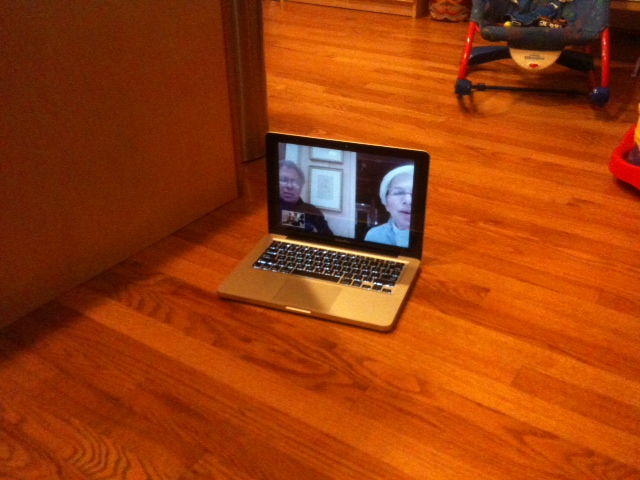
“Do you want to skype with Grandma and Grandpa?” I asked my daughter. “Yes!” she enthusiastically responded. Within a few minutes, we were connected, and my parents were talking to Ayelet about her day at school and watching Rafael show off his new proto-crawling, where with a lot of effort he moves forward a couple of inches towards some object of interest:
My parents are very good at videoconferencing with the kids. They have certain puppets like “Tzippy” and “Triceratops” that make regular appearances, and there are some books we both have so that they can read stories to the kids. They were even able to get down on the floor and play:
My kids loved it, my parents loved it, and I loved being able to just sit on a chair and watch and rest. Ah, babysitting in the 21st century! I’m not saying that I would leave the kids at home alone with a skype video chat to watch over them, but it certainly provides an extra pair of “hands” at critical times.
The funny thing about this conversation to me is that while I asked Ayelet if she wanted to skype, the Skype service was not actually involved. We were using Apple’s FaceTime. We originally used Skype when we started a year and a half ago, but we’ve switched to FaceTime for no clear reason. My Mom started using FaceTime on her iPhone 4 and felt that the quality was better, but I think that has more to do with the small screen. However, the FaceTime interface is just a teensy bit more streamlined, and we’ve gotten into the habit of using it.
Somehow, for us, Skype has become a verb for doing a video chat. Asking Ayelet if she wants to “Facetime with Grandma and Grandpa” just sounds weird.
Both Apple and Skype seem to win and lose in this scenario. On the one hand, it’s bad for skype, since we aren’t using their service, but if they retain the “verb”, they may continue to be the default choice for video conferencing for new users by sheer association. Apple is benefiting in the sense that we are using them, but clearly their hold is tenuous. As soon as an even easier or better quality service comes along, we will be on to the next “skype”.
There is a long history of companies whose brand name product becomes so associated with the concept that it becomes a generic name. For the longest time, xerox was a verb that meant “to make a photocopy of a piece of paper”, regardless of whether it was a Xerox brand photocopier (although this seems to have faded in popular use). I don’t even know what the actual generic name for Aspirin is. You can find a list of many more products who were victims of their own success here.
I’m sure Skype will do fine. Video conferencing is just one example of their broad services, and it’s not how they make their money. And there are many genericized products where the original manufacturer is still going strong; just look at Kleenex and Band-Aid.
Still, their major outage today feels like bad timing.
Last week, I posted about an odd experience I had with the “Live Chat” functionality on Verizon’s plan comparison web page. I was looking at Verizon’s offerings because of an extremely poor experience I had with arranging a Comcast service call, and it was sufficiently frustrated to check out alternative internet providers.
I specifically did not set out to write about my customer service problem with Comcast. I recognize that even the best companies will not have a 100% satisfaction rate, and the internet is full of horror stories about customer service problems for virtually every company; I didn’t see the need to add mine to the mix. Part of annoyance was not what happened, but the lack of acknowledgement of the company’s errors when talking to their customer service manager about whether my $20 credit (that I had to ask for) was sufficient.
To understand the context, the short story is that I stayed home from work to have a service tech come look at my cable modem, which was repeatedly failing. However, the visit was automatically canceled because I did not answer a blocked call from Comcast while I was on my home phone with work. Comcast had not told me to expect any call, and the contact number I had left was my cell phone number, not my home number. I was mad, particularly because after arguing with the customer service manager, they felt it was my fault for not answering the phone call. It made me mad enough to look at Verizon, which in turn led me to post about my suspicions about Verizon’s Live Chat.
To my amazement, the next day I found a comment on the Verizon post from Comcast’s consumer satisfaction group. They wanted to “make it right”:
ComcastMark said…
Hi Jeremy – I work for Comcast. I am truly sorry to learn that the appointment was cancelled. I will definitely share your experience with our local leaders so that this is addressed. We’d like to make this right for you. If you are willing to give us another chance, we’ll make sure that the service appointment is expedited successfully.
You can contact our team at the email provided below. We are here to help! 🙂
Part of what really amazed me about the response was that the post actually had nothing to do with Comcast directly. I made a brief reference about the problem to explain why I was looking at Verizon, but it wasn’t the main topic. Nonetheless, Comcast found the post, recognized that they were in danger of losing a customer, and responded.
I spoke with Comcast the next day, and they offered to send a tech around my schedule to look at the problem. It turns out that they offer Sunday appointments (who knew?) and could send someone to my house in the morning, which was most convenient for me. Most importantly to me, they took the mistake seriously, apologized, and were focused on making sure I was getting good service. They also promised to call me the day after the appointment to make sure everything was working right.
I even got an automated message on my home answering machine that I might receive a call, which I must answer, before a rep would arrive. If only I had been told that originally!
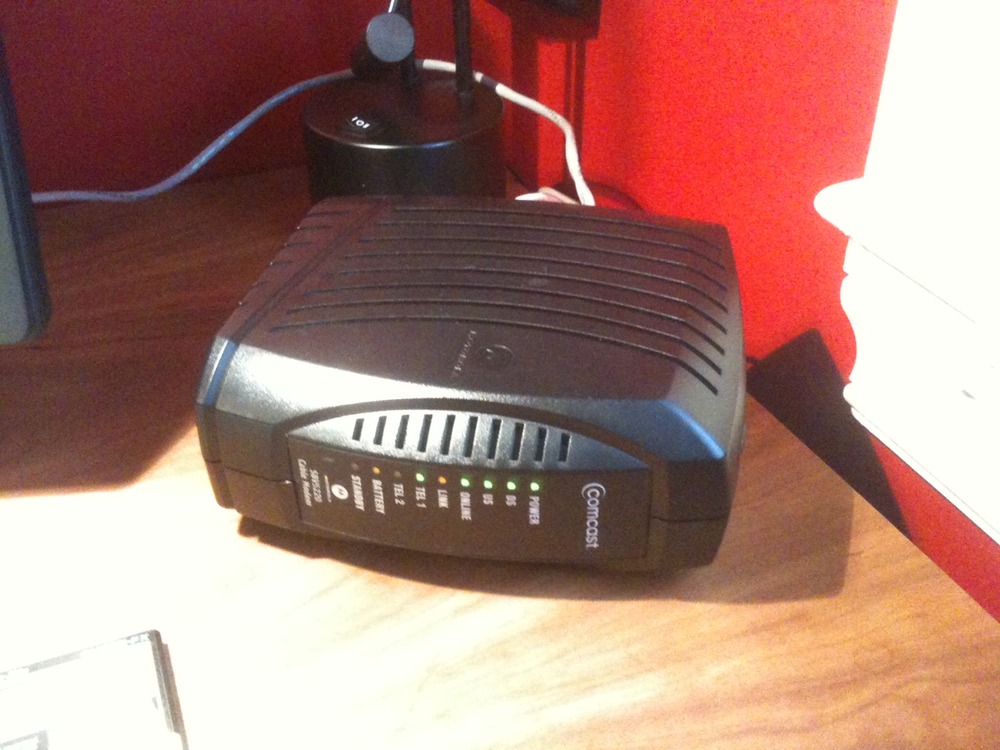
A Comcast representative did indeed show up on Sunday morning as announced (without calling beforehand). With no questions asked, he checked the line on the street and replaced it, saying that it was not in good shape and probably the source of the problem. However, he said that just in case, he would swap out the modem, particularly since it was an older model. He was friendly and chatted with my daughter, who was very interested in watching him work.
Within 45 minutes, our old chunky modem was gone:
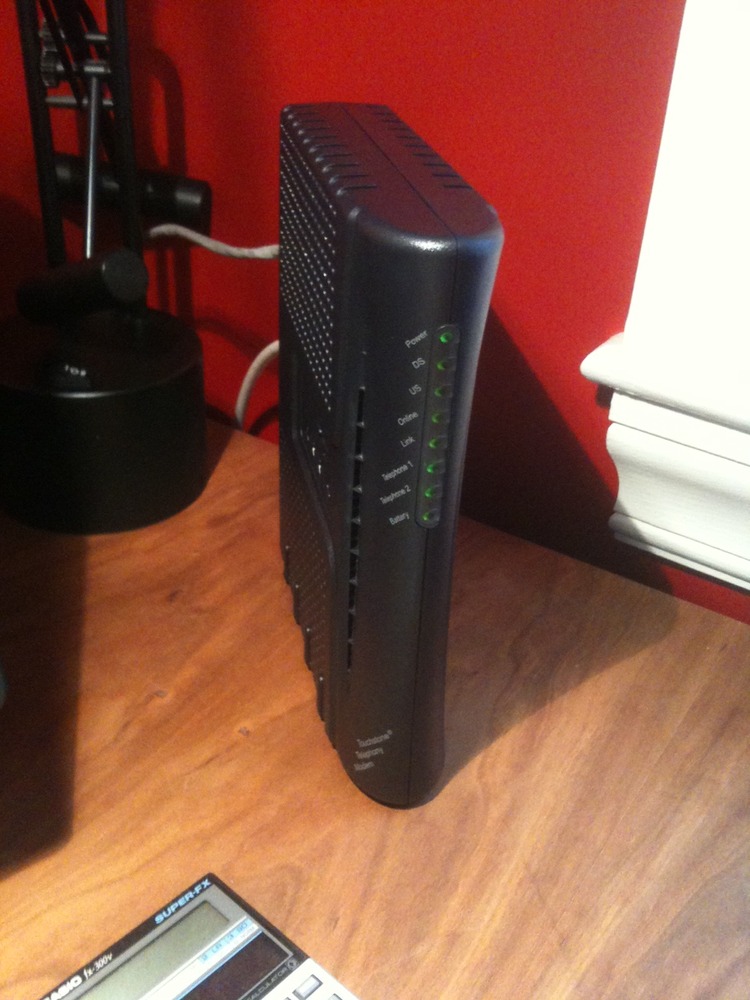
Replaced with a sexier, slimmer model (amazing how technology gets smaller over time):
Our internet has been working flawlessly every since. The service tech’s manager even called later that day to check how everything went, giving us his direct number.
I’ve been pretty down on Comcast lately, between what I feel are anti-competitive practices around Net Neutrality and my service issues, but I feel like they have taken care of me now. I will not be looking for a new internet service provider. I am still planning on cutting my cable TV, but this never had anything to do with dissatisfaction around Comcast’s service; it’s just the reality of changes in our TV viewing habits.
Thank you, Comcast, for taking the time to see what people are saying, and following up. I will still continue to be a (now more loyal) Comcast internet subscriber.
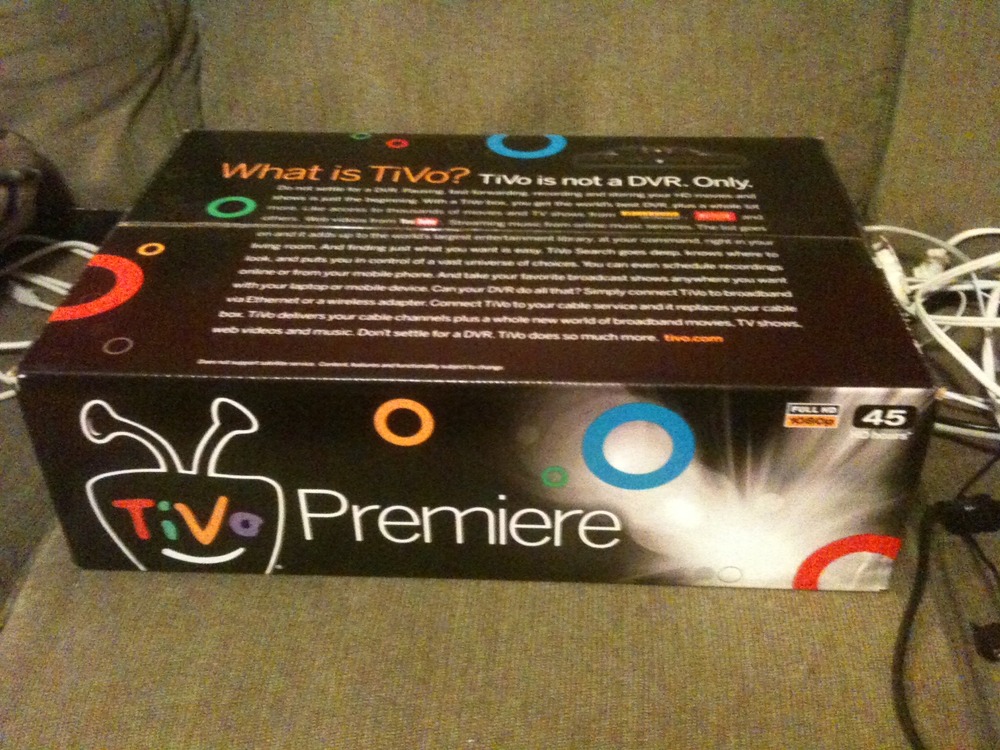
A week ago, I ordered a new TiVo premiere on the hope that it might allow me to actually cut out cable TV. We watch so little television these days, and most of the shows we watch are on the major networks, so it didn’t seem like a good use of money.
The big gamble here was that I had no idea whether I would be able to receive over the air (OTA) channels. Since we have what is probably the last standard definition TV’s in the country, we have no way of pulling in the OTA channels to test what reception is like. We live in Cambridge, MA, and while it should in theory be very close to the towers, it is an urban environment and potentially subject to interference. The only way to find out would be to order the TiVo and see what happens.
TiVo was offering a 30-day money back guarantee, so if it didn’t work out, I could always ship it back. I also got an RCA ANT1600 flat digital antenna to go with it. It was the one sold by TiVo itself, so I figured it was probably the one they recommended for best results. After the 30% discount, free shipping, and taxes, I essentially paid $254 for a digital conversion for my standard definition tv (with TiVo capability). If it works, I will break even in about four months after canceling cable tv service.
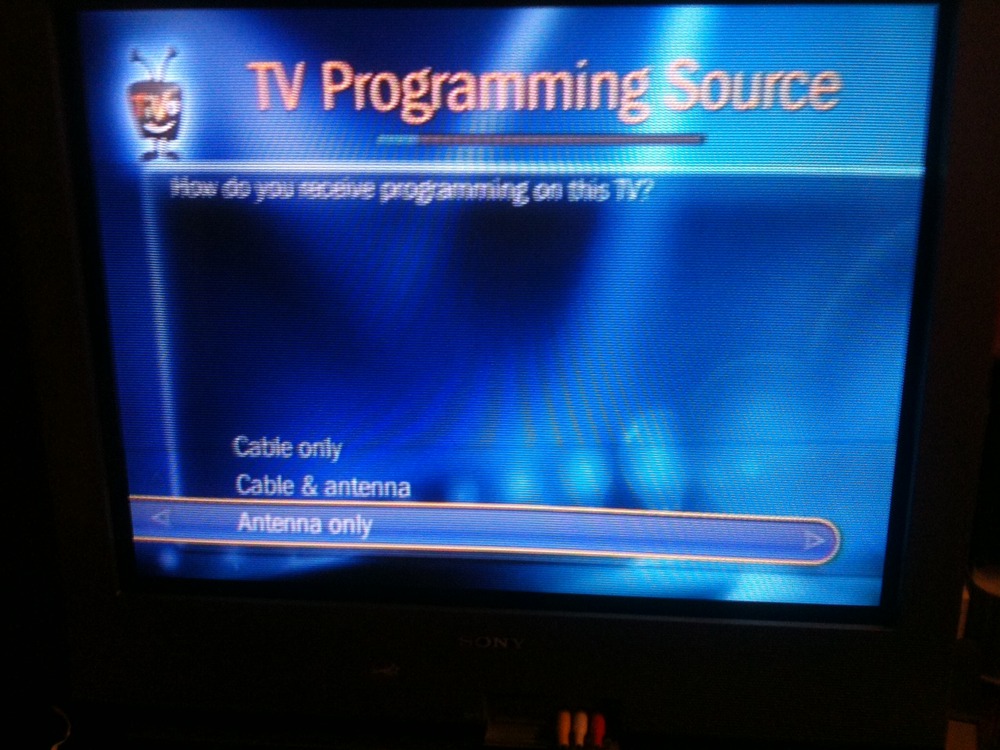
One week later, it arrived. While all the instructions talk about the need to order a cable card, there is an antenna input on the back, and during the guided setup, it did have an “Antenna Only” option:
The TiVo then went through a channel scanning mode, and I knew the moment of truth had arrived. I was about to find out whether it was able to tune the channels… and then the TiVo went through an hour long “Critical Service Update”. I hate waiting.
At long last, it was done, and my hopes were fulfilled. Crisp, clear, free TV. All the major channels were represented (both Boston public tv stations, ABC, CBS, NBC, FOX, WB, and the former UPN, plus a bunch of secondary public tv channels and ION). The gamble paid off!
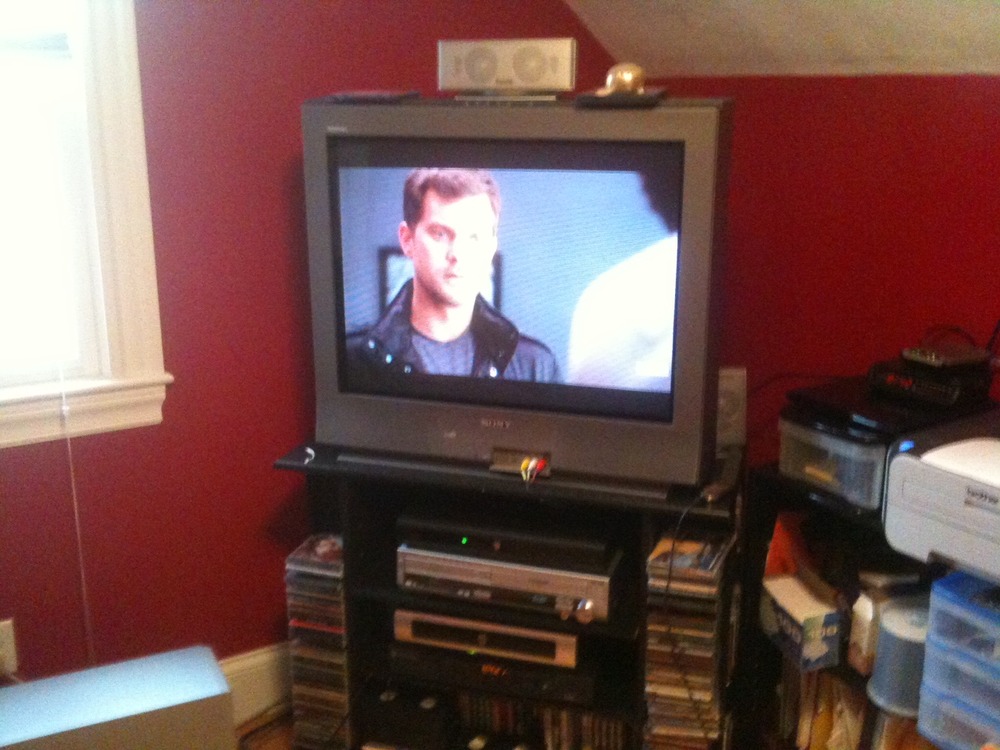
One thing that Aviva noticed immediately was that the picture was clearer. While the images are HD, they are being down-converted to standard by the TiVo, so I wasn’t sure why this would be. Then I realized that our old TiVo had been using some compression algorithms which caused minor signal degrade, but the new HD model was not compressing at all:
The new TiVo has a bunch of other nice features, too. It automatically found the old TiVo on the network and gave me the option to transfer the unwatched recordings. Netflix is also well integrated, so much so that I think Aviva might actually start using it.
So all in all, this is looking like a success. I haven’t actually had enough time to use it for the inevitable glitches to start showing up, and I’ll wait a few days before actually canceling the cable TV (have to wait until tonight’s Robot Chicken Star Wars is recorded by the old TiVo!). The only risk now is that with everything else in high def, I’ll fall into the trap of deciding to upgrade the TV to a high def model, like one of my high school friends did. If I do that, it will take me the better part of two years to break even. I mustn’t… I mustn’t… I mustn’t…
To create rich web applications, it is fairly common to encode data in JSON on the server and then manipulate it using javascript on the client. For example, when creating a rich Datatable in YUI, rather than rendering the data in an HTML table that will be destroyed and replaced, it can be more efficient to encode it in JSON and then let the datatable just render part of it.
To do this, you need to generate the JSON on the server and then get it down to the browser. While you could create a separate AJAX call to do this, it means doing a second roundtrip, so a faster alternative is to hide it inside the webpage itself and retrieve it in Javascript. Of course, you now have the problem of encoding it, making it invisible in the page, and then finding it afterwards.
Hidden input form variables are an obvious choice. There is already logic on most web application platforms including ASP.NET to handle the encoding, and the DOM will unencode it (somehow saying “decode” doesn’t sound right) when you retrieve it using something like document.getElementById("myformvariable").value.
The performance risk here is that while you are simply using the form variable as a convenient way of sending some data from the server down to the browser, the browser doesn’t know that. It thinks that the form data is actually needed for the next request and dutifully sends it back up to the server. If you are sending a lot of data (like the information used in a table), it can really hurt performance. If you look in a tool like HttpWatch, you may see this as an unusually large request size and a long transmission time:
If you look at the example above, you will see that the request actually sent more data than was received. You also see that almost a third of the time was spent just sending up the request to the client (the bright green). Beyond the fact that you are sending unnecessary data up, there are two factors that exacerbate the problem:
1.Many user’s internet connections have much faster download speeds than upload speeds. While it may be quick to send the data down, sending the same data back up is a lot slower
2.Upstream data is not compressed by the browser. While you can gzip the contents sent from the server, requests from the client just come in plain text. This is why in the example above, the postback is actually larger than the subsequent response
The solution is pretty simple. In your javascript, once you have retrieved your data, just wipe it out with document.getElementById("myformvariable").value = "".
Here is the same request with this additional line:
As you can see, the amount of data sent is now tiny, and the bright green of send time is almost invisible. Problem solved!
After a very negative run-in with Comcast’s repair service (they cancelled my appointment after I didn’t answer a phone call listed as “Private Caller” that they didn’t tell me to expect to a different phone number than the one I had given them), I figured it was worth checking out what Verizon is offering these days.
Sadly, I do not live in an area that offers FiOS, but as I was checking out their DSL speeds, I noticed a “Regional Value” option that I could add.
It wasn’t immediately obvious what “Regional Value” referred to, but right then a window popped up asking if I would like to do a “Live Chat” to discuss their plans.
Live chat services have always intrigued me. How can a company keep enough people on hand to respond to live chats, without either having long delays to respond if no one is available or lots of people sitting around waiting for a chat? It doesn’t seem plausible.
Curious, I decided to give it a shot. I accepted the chat and asked “What is “Regional Value”?
After a moment, “Megan” responded, saying:
Megan(11:52:54): I will be happy to assist you with our plans. Just one moment please while I check on that for you.
Megan (11:53:44) Unfortunately, I am not able to access information regarding that plan from my end. I would recommend contact customer care regarding that plan. I apologize for the inconvenience.
There was no request for any clarifying information, so I am guessing that this an automated system that tried to run a search, didn’t find a hit, and sent back an automated response. It then helpfully provided me with the phone number to call:
Megan (11:53:50): You may please call Local Verizon Business Office at 1-800 VERIZON (1-800-837-4966) between 8:00 AM and 6:00 PM EST from Monday to Friday.
In case I might have been in doubt about whether “Megan” is a real person, a few minutes later she said,
Megan (11:56:35): I have not heard from you in a few moments. Would you like to continue this chat session?
Um, didn’t you just tell me to call customer service?











 Jeremy Rothman-Shore Blog