Answered: What’s inside a Crest “Neat Squeeze” kids toothpaste tube

Have you seen the “Neat Squeeze” kids toothpaste tubes from Crest? Rather than being a flexible tube that crumples as you use it, they are a more rigid tube that always stands nicely on the sink counter.

The "Neat Squeeze" bottle always stands straight up on the counter and claims to reduce mess

The “Neat Squeeze” bottle always stands straight up on the counter and claims to reduce mess

They claim that they eliminate the mess of a regular toothpaste tube with a “unique inner bag that empties itself as you use squeeze in the middle.”

How do you know when it’s used up? The package goes on to say “When the package gets lighter and is harder to squeeze, it’s time to buy more Crest.”

Hmm… it doesn’t say when the package is “empty”, and this makes me suspicious.

Brushing the kids teeth has gotten increasingly frustrating over the last few weeks as I have tried to get more toothpaste out of that bottle.  I’d squeeze and press and crush, but only air would come out.  I could still feel that the bottle was pretty heavy, so I was sure there was a lot more in there, but the rigid packaging made it impossible to get out.

For some reason I am obsessed with getting the last drop out of containers and have been known to cut them open when necessary to get my money’s worth. So, the idea that this toothpaste tube was wasting large amounts of toothpaste really bothers me. I had to know – what was in there? Was it really close to empty?

Time for a dissection.

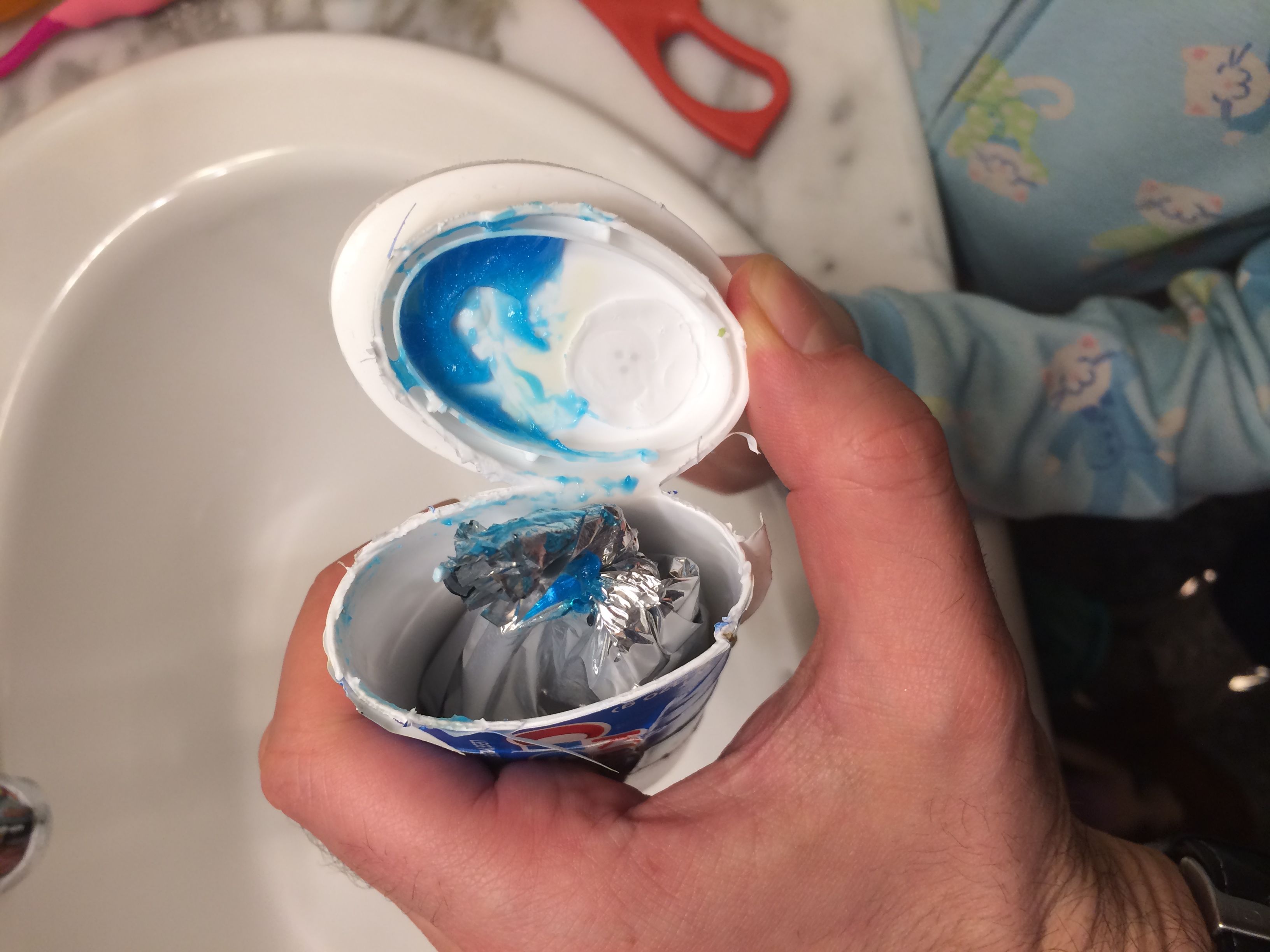
There is an inner bag that holds the toothpaste, surrounded by a big pocket of air.

There is an inner bag that holds the toothpaste, surrounded by a big pocket of air.

I pulled out the kitchen shears and cut off the bottom.  Sure enough, there was an inner bag.  It was surrounded by a pocket of air and seemed to be based on the “Drop-Ins” bag-style baby bottles from Playtex. The idea is that the bag should slowly collapse as the toothpaste is squeezed out.

That fit the description, but how effective was it at getting the toothpaste out? I continued cutting.  I sliced open the side of the tub to expose the full bag, and then I opened up the bag itself.

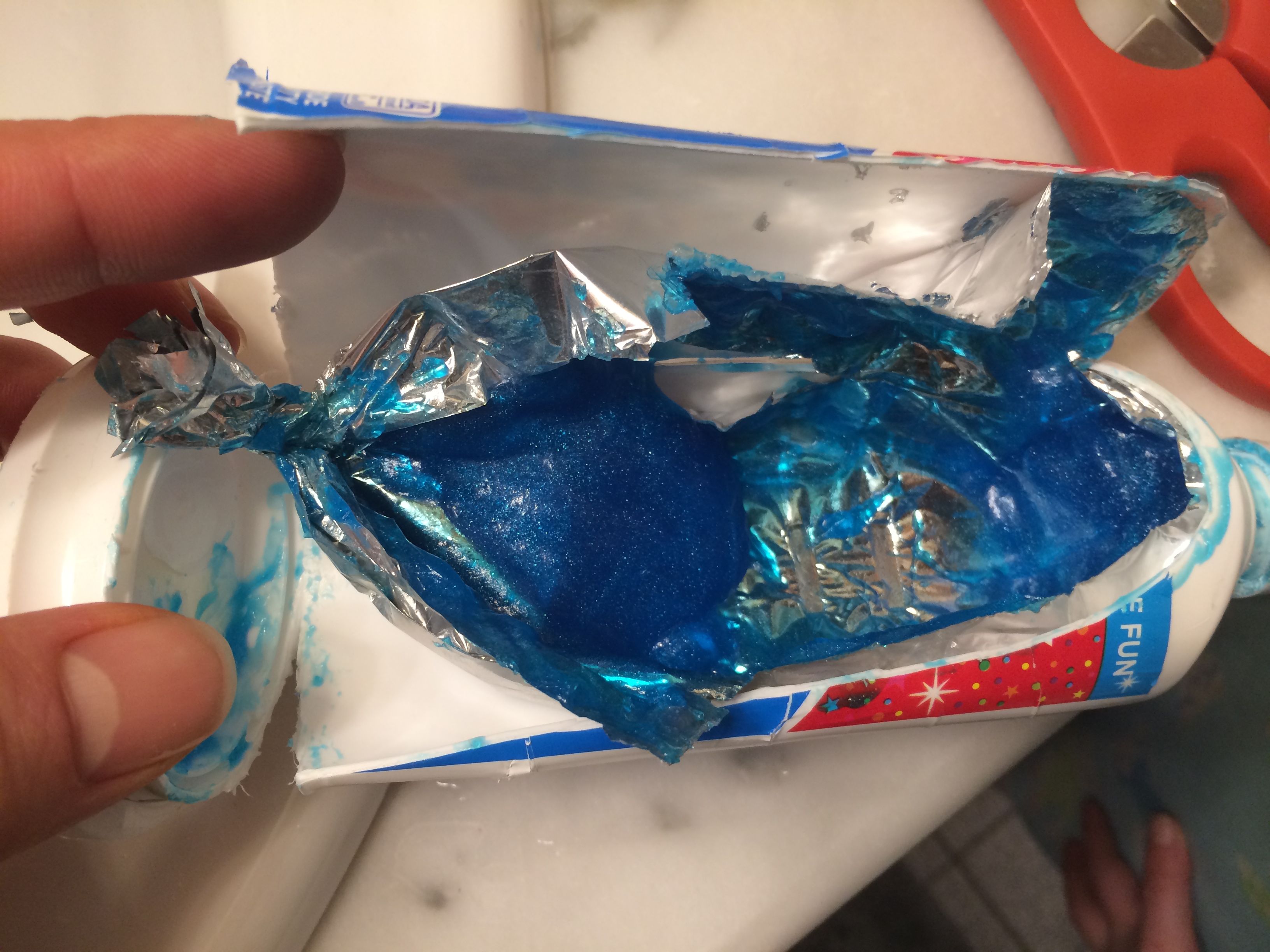
There was still an enormous amount of toothpaste in that package

There was still an enormous amount of toothpaste in that package

As I suspected, not very effective.  There was at least a few weeks more toothpaste worth of product still in that bag.

Sadly, I’m still going to throw it out. It’s not worth trying to get the kids to swipe toothpaste out of it, and I am certainly not using the sweetened toothpaste myself.

But it definitely not a bargain. From now on, just regular old tubes for us.

Posted in Uncategorized | Tagged , , , | Leave a comment

Parenting Milestone: An independent child is a safer child

Milestones come in all shapes and sizes, and we had another one this past Sunday. I sent my six year old daughter Ayelet into the women’s locker room to change by herself. This may not seem like much, but to me it represents an important step in keeping her safe in the world.

Kids over five years of age are forbidden to enter the locker room of the opposite gender

Kids over five years of age are forbidden to enter the locker room of the opposite gender

There are a lot of things I don’t worry about for my kids. I don’t worry about them getting hit by lightning, and I don’t worry about them contracting anthrax. While these things do happen, they are so rare and there is so little I can do to protect them that I don’t need to worry.

There are other things I don’t worry about. I don’t worry about them getting abducted, and I don’t worry about them choking while my back is turned. Child abductions by total strangers are rarer than people getting hit by lightning. My kids know how to chew, and the fact of the matter is that I don’t know the Heimlich maneuver, so watching them all the time won’t make them safer.

So what do I worry about? I worry that at some point my kid will be alone and will do something foolish. That they will get lost and not know what to do. That they will run across a street and headlong into a car. That they will jump into a pool and drown.

The best way I know to deal with this fear is to teach my kids to be independent. At some point, inevitably, they will find themselves alone. We will get accidentally separated. There will be a miscommunication in a pickup schedule and they will find themselves the last kid waiting to go home. They will be playing in the basement and somehow manage to climb up and reach my toolset.

The best way I can think of to protect them in these situations is to “world-proof” them. Prepare them to make independent decisions, think for themselves, and show good judgement. They can solve most problems if they have a good head on their shoulders and know when to ask for help.

And this brings me to the locker room at swimming lessons.

My wife had a morning meeting, so I had both kids on my own. My son can go with me into the men’s locker room, but my daughter is now 6 and is too old . Kids over five years of age are forbidden to enter the locker room of the opposite gender. Recognizing that many kids will not be able to navigate the locker room on their own, the pool helpfully refers parents to the “family changing room”, a small room with four lockers, a shower, and a toilet. We stopped in to find about a dozen parents and children trying to crowd in there. It was hopeless.

I saw this as an opportunity.  Ayelet had been in the women’s locker room before, and she knew how to dress herself. Once her lesson was complete, I said to her, “Ayelet, now that you are six, I think you can go get dressed on your own in the women’s locker room.”

She was nervous at first, but I assured her she would be fine. I told her I would wait by the pool entrance door, and she should change and then come back out and meet me.

While I had every confidence in her ability to do this, it is a little complicated. I’ve never seen the women’s locker room, but if it is anything like the men’s, it is a warren of different sub-rooms. One door leads to the bathrooms, another to the showers, another back to the pool area, and another to the gym. If she went out the wrong door, she wouldn’t be able to get back in and would find herself in a different part of the building.

And so I followed up with the most important piece of advice. I said, “If you need help or get confused or aren’t sure which way to go, ask somebody for help.”

Most people are nice, kind, caring, and only too happy to help. I hate to think of the message that parents send when they discourage their kids from talking to strangers for fear of abduction. This is incredibly unlikely. I want my kinds to understand that when they need help, they should not be afraid to ask for it. It’s much safer than trying to do everything on their own.

And so my daughter trotted into the locker room and I wanted by the door. And waited… and waited… and waited.

I figured it shouldn’t take her more than five minutes to change, but she also had to go to the bathroom. I was confident Ayelet knew what to do, but was I making her do something she wasn’t ready for?

On the other side of the pool area I saw a friend of ours waiting with her daughter for their swimming lesson to start.  I figured that if she went past 15 minutes, I would go over and ask her to check on Ayelet. At 12 minutes, our friend walked over on her own volition with her daughter, who needed to go the bathroom.

She quickly read the anxious look on my face and asked, “Would you like me to go and check on Ayelet?”

With relief I said, “Yes, that would be great!”

They walked into the locker room, and less than 10 seconds later, Ayelet walked out.

“Was everything okay?” I asked her.

“Yes!” she said. “I was just finishing putting on my shoes.”

Posted in Uncategorized | Tagged , , | Leave a comment

The vanishing art of handwriting

As a child I spent years practicing how to write words on a sheet of paper. Aside from English and history classes, every homework assignment through college was done with a pencil in my hand.

Now, just about the only time I hold a writing implement is when I need to draw something on a whiteboard. This usually consists of some boxes and arrows to illustrate how data flows through computer systems and some hastily scratched out letters to annotate what each box does.

These bits of handwritten words often brings smirks to the faces of my colleagues, since they are illegible, even to me. It’s been suggested that my handwriting would be a great form of cryptography.

To be fair, my handwriting was never that great. I remember in 7th grade when my English teacher Mr. DeFusto walked over to me, handed me my graded homework assignment and said, “Jeremy, if your handwriting doesn’t improve, I will fail you.”

I did work on my handwriting and passed the class, but I’ve never found it an effective way to get my ideas onto paper. Freshman year of high school, I took a touch-typing class and found my preferred medium. A few months in I had already cracked 70 words per minute (you had to reach 40 words per minute by the end of the year to get an A), so they just let me finish early.

Thankfully, the world has moved to electronic communication, so I have had to rely less and less on writing. Virtually everything I do involves a keyboard. While mobile devices have shed their physical keyboards, the stylus-handwriting method used by the old Palm Pilot never took off. Auto-correct has kept virtual keyboards alive.

Sure, I do still use a pen here and there. On the rare occasion I need to address an envelope, I pick one up. And I’ve been known to write a physical check on rare occasions. But mostly, handwriting is relegated to the whiteboard.

That is, until a few weeks ago, when I started writing a daily note to my daughter, Ayelet.

She’s in kindergarten, and she was going through a phase of difficult drop-offs. She was happy in the classroom, but she never wanted me to leave and would clutch tightly to my arm. The teachers assured me that she was fine as soon I left, but it was a huge battle to get her to let go and engage in the classroom activities.

One day, I asked her what would help her have a good drop-off.  She thought about it a moment and then said, “I want you to write me a note.”

This was a puzzling choice, since she is just at the very beginning of learning to read, but I figured I would try it. I wrote a little note about how she likes mermaids and drew a crude mermaid picture (my artwork is even worse than my handwriting). I gave it to her in the classroom, and true to her word, she let me go without a fuss.

So, we started doing notes every day. I would write something silly that happened that morning or the previous evening and a silly little stick-figure to go with it. Each day I give it to her as she walks into the classroom and tell her what it says.  She smiles, shows it to her teachers, and runs off.

Yesterday, we were running late, and I didn’t have time to write one before we left. I promised her I would write it in the classroom, so once inside I grabbed a marker and started to write as she watched.

And then Ayelet started to criticize.

“You can write better than that!”

“Take your time! Do a good job!”

“Why are writing so fast? Slow down.”

I looked at her, baffled. Yes, I was rushing because I needed to get to work, but I wasn’t going *that fast*. This was just how my letters look. Sure, I don’t have the best handwriting, but this was a step up from my usual whiteboard chicken scratch.  I really was doing the best I could.

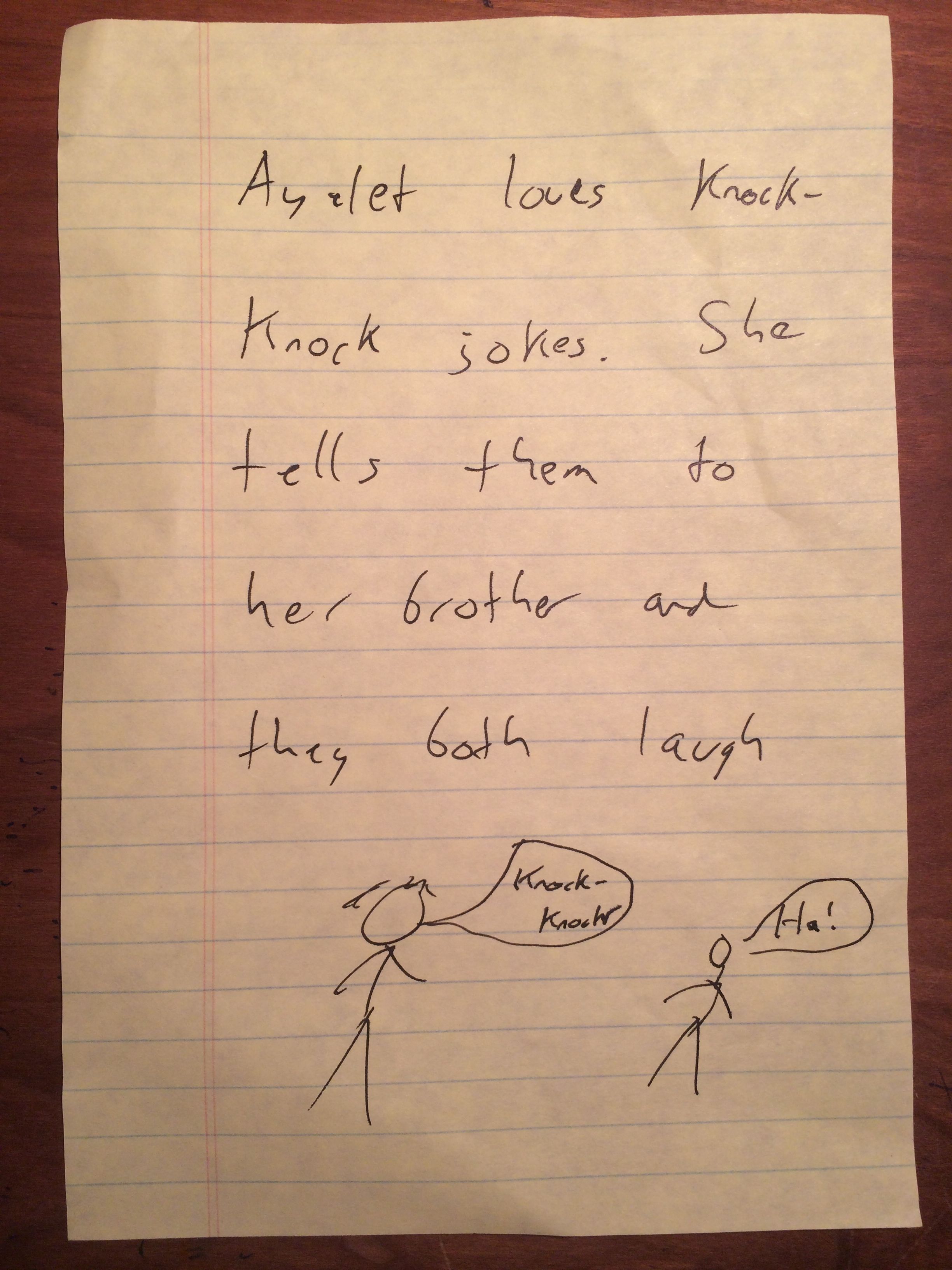
One of my handwritten notes for Ayelet. As my handwriting goes, this is a pretty good example.

One of my handwritten notes for Ayelet. As my handwriting goes, this is a pretty good example.

I’m sure these “suggestions” are what she has heard from me and her mother and her teachers about showing good work, and she was echoing it back to me. Here I was at the age of 38, back in an elementary school, with someone criticizing my handwriting.

Ayelet is already learning handwriting, but I suspect that her reliance on it will be even less than mine. I doubt she’ll ever learn cursive, and iPads are already at use in the classroom.

Handwriting seems to be headed down the path of other lost skills, like memorizing phone numbers or reading maps.

With my poor handwriting, that’s probably a good thing.

Posted in Uncategorized | Tagged , , , | 6 Comments

Today’s Legos have too many specialty pieces, and how I’m fixing it for my own kids

Like many parents, I want my kids to experience some of the memories I cherish most from my own childhood, and this means having a great Lego collection in the house.

I spent thousands of hours as a kid building with Legos, and over the years I built all kinds of things  – planes, trucks, castles, spaceships – wherever my imagination could carry me. Over the past year, my kids have gotten old enough to start building with Legos, and I’ve purchases several sets to try to engage them, with some success.

Legos have evolved a bit since I was a kid, and I can’t help but feel they have lost some of the creativity. I remember that my Lego sets of my childhood came with instructions on how to build the object on the cover, but that was just the beginning. Sometimes I would follow them, and sometimes not. Before long the pieces were just mixed in with the ones from all the rest of the sets and were used for my own creations.

Today’s kits are different. They are much more focused on building a particular vehicle or structure, without much of an eye towards reuse. They seem to consist mostly of “specialty pieces” – windows, cranks, wheels, seats, brooms, and other accoutrements designed to make the vehicles more lifelike. They don’t come with that many generic bricks. If all you have are the pieces of a fire truck and a garbage truck, it’s hard to build anything else other than some sort of truck.

When I was at home visiting my parents for a few days this past summer, I pulled out my old Lego set (the one toy from my childhood my parents saved) and played with my three-year-old son. I was immediately struck by the difference. While there were plenty of specialty pieces, there were tons and tons of red bricks in various shapes and sizes. We were able to build a much bigger, sturdier moon rover that had some real “oomph”.  My son could actually play with it.

I wanted to recreate this at home, so I went to E-Bay to see if I could buy random lego pieces.  Sure enough, there is a reseller called BlockPartyBricks, selling bags of Legos by lot.  For $25, I bought a bag of 300 pieces.

All these pieces certainly added volume and helped tremendously, but they didn’t really solve the problem. The vast majority of the pieces inside were “specialty pieces”. Having greater variety helped, but we still couldn’t build bigger objects. Worse, most of the pieces were mismatched – there would be two airplane wings for the “right side”, but none for the “left side”.

Last weekend, I decided to fix the problem. While my wife and kids shopped at the mall for new fleeces, I snuck into the Lego store and made my way to the back wall. I’d heard rumors that Lego stores had a pick your own section, and sure enough it was real.  Separated by size and color were small bins of various utility pieces.

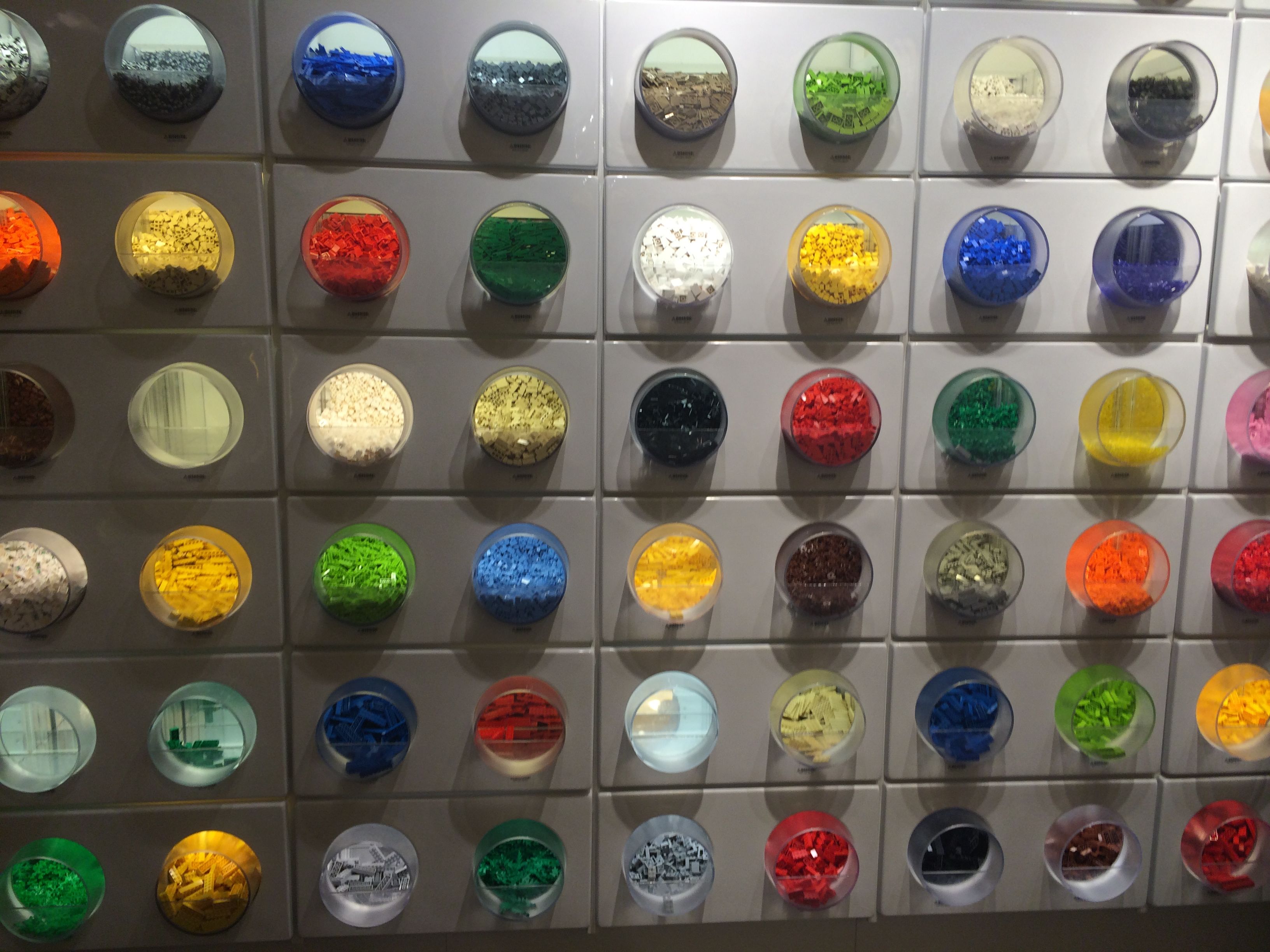
At the back of the Lego store are pick-you-own bins

At the back of the Lego store are pick-you-own bins

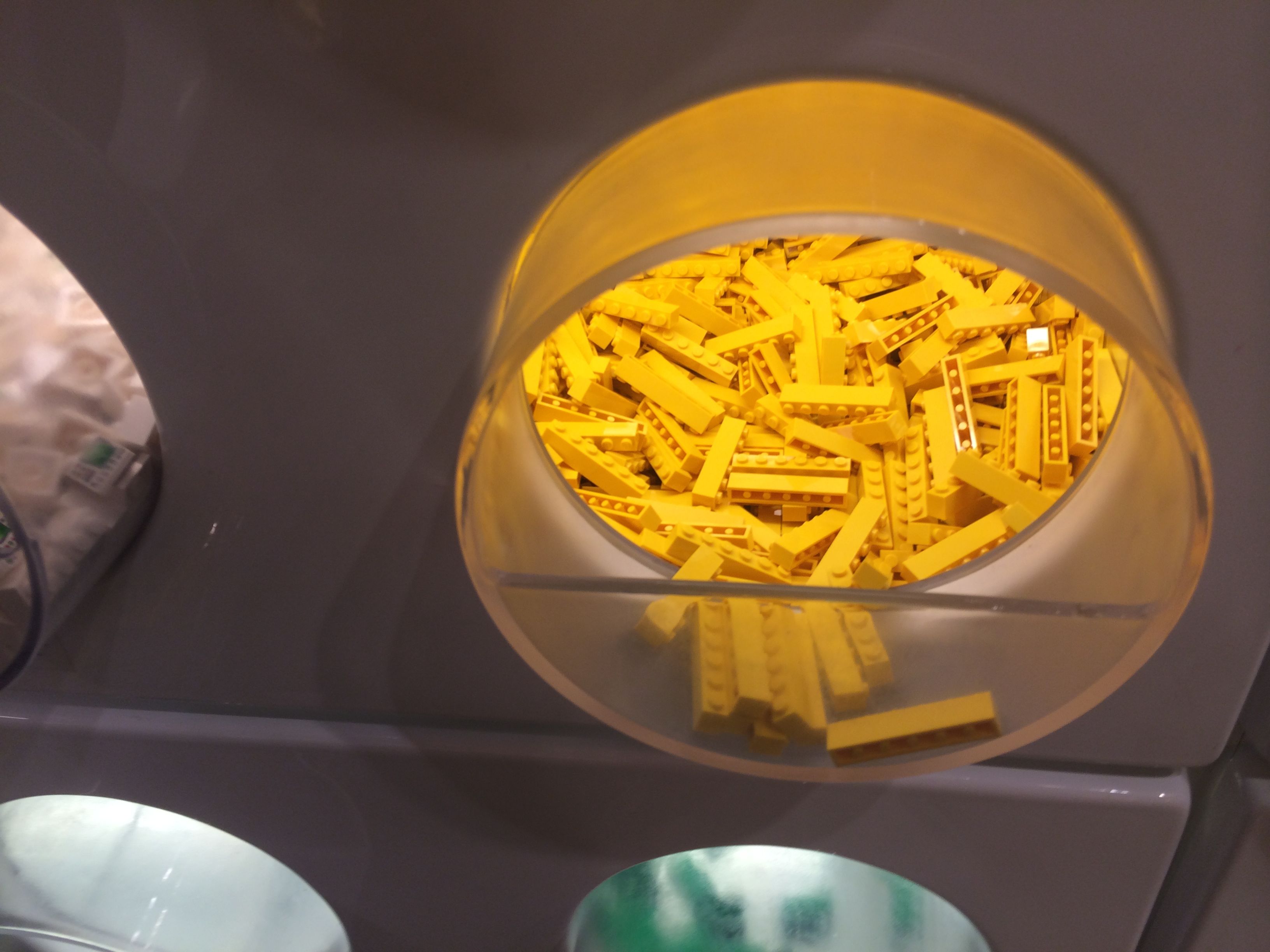
For $14.99, you could take a cup the size of a big-gulp and fill it with assorted lego pieces. I grabbed two of them and started scooping handfuls of blocks. While they did have specialty pieces, I chose just the ones that would be useful for building bigger structures: (1×2, 1×4, 1×6, 2×2, 2×3, 2×4).

The sizes are useful, but you have to go with whatever colors are available

The sizes are useful, but you have to go with whatever colors are available

As a kid, lego bricks seemed to come mostly in red, but color is now required. 1×6 only came in yellow, 1×4 was just gray, pink or orange…. I was forced to adopt a wider variety of colors, including yellow, orange, pink, gray, and blue.

Once I had filled up two buckets, I also grabbed two large flat square boards to build on for $4.99 each. After shelling out $40, I rejoined my family.

The kids loved the new legos.  Initially, we started by using nothing but the bricks to build structures. Then, they let their imagination run wild as we mixed in the rest of the “specialty pieces” from our regular set. For the first time, they didn’t try to build a particular car or truck. They could build big.

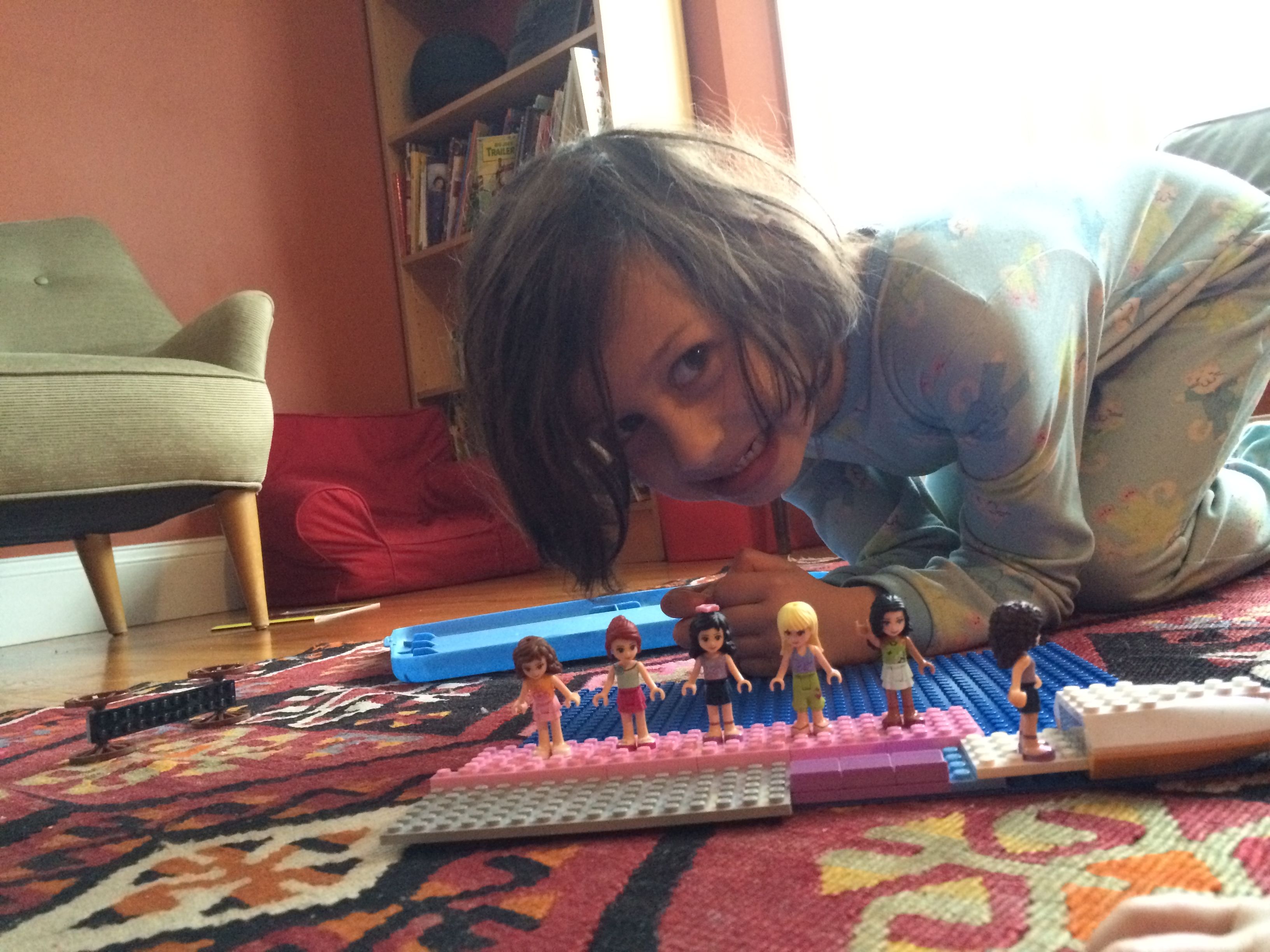
My daughter had enough pieces to build a dock for her Lego Friends to board a boat

My daughter had enough pieces to build a dock for her Lego Friends to board a boat

My five-year-old daughter built a ferry boat dock and ferry so that her Lego Friends characters could go on a trip.

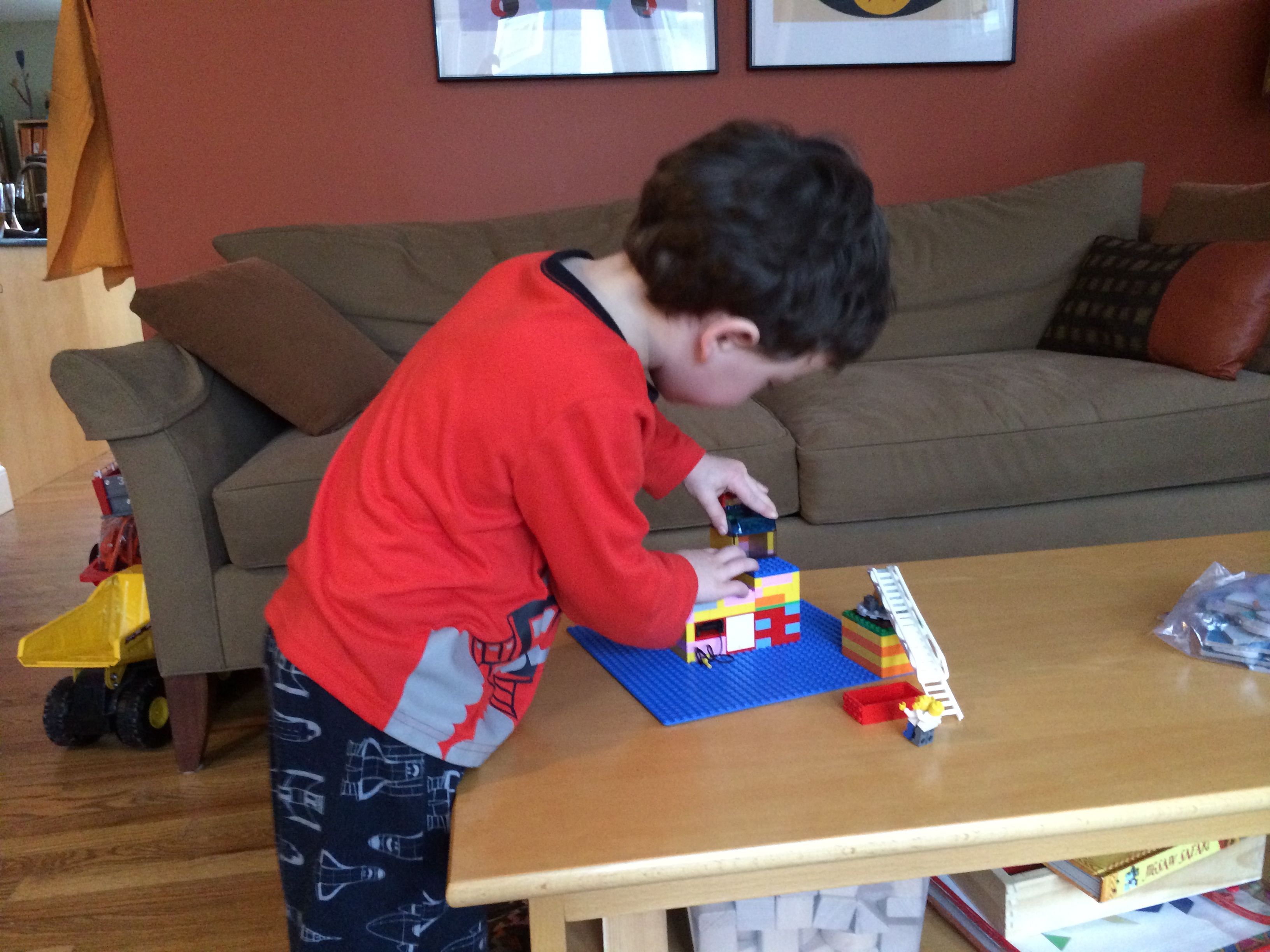
My son built a multi-room house

My son built a multi-room house (with a little help)

My son needed some guidance, but he soon got very into building a large house with multiple rooms.

A fire engine ladder becomes a boarding ramp to a larger building

A fire engine ladder becomes a boarding ramp to a larger building

Then, they put their sets together. My son’s building became the island destination that my daughter’s Lego Friends were visiting. After boarding the boat at her dock, they sailed over to his house and used the ladder (co-opted from an old fire truck set) as the ramp to disembark.

These sets are a little more colorful than the ones I built as a kid, but at least now I feel like I am giving my kids the opportunity to use their imagination.

Posted in Uncategorized | Tagged , , , , | 1 Comment

An Office 365 Home Premium subscription is not a bad deal, actually

I remember reacting with skepticism when I heard that Microsoft was rolling out their famous Microsoft Office suite as a monthly subscription for $9.99 a month. Why pay an endless subscription when you could get the same product for a one-time fee? I viewed it as just another attempt for Microsoft to line its pockets.

So I must say that I am a little surprised to now find myself a subscriber. There is more to the service than I originally thought.

When you have just shelled out $1000 or more for a new computer, there is something pretty painful about spending another $200 or more for Microsoft Office. Everyone uses the software, and having to pay such a hefty fee feels akin to taxes or those hefty extra fees that the airport and city tack on when you rent a car.

I could see how a fee of just $9.99 upfront might ease the sting, and my assumption was that Microsoft figured that they could win customers over with a low up-front fee while secretly turning on a lifetime source of revenue. And this is probably true, but I’ve learned that Microsoft has sweetened the deal in ways that make it much more compelling.

Office 365 comes more compelling if you are installing it on multiple computers

Office 365 comes more compelling if you are installing it on multiple computers

The benefit of the Office 365 Home Premium service is that it includes the full suite (including Outlook and Access), and it covers FIVE computers, not just one. So if you are using this for your family, you can get a lot more mileage for your dollar.

Over the holidays, I decided to finally upgrade my home Mac Book Pro. I had completely maxed out the 256 GB hard drive on my old laptop with photos and video, and the computer had slowed down to molasses with drive filled with family photos/videos and three OS upgrades. I sprang for one of the new 13″ Retina models with twice as much storage on a super-fast solid state drive. I’m secretly hoping that the high speed drive will mean the computer won’t slow down as much even as the drive fills up (check in again three years to find out).

Purchasing a new computer meant it was time to pay the Microsoft Office tax. Somehow, up until this year I have managed to never need to purchase a full-priced Microsoft office license directly. I’ve always had access to an installation option through my work in one way or another. But no longer.

Now, having a new Mac does mean that I have a free alternative to Office: Mac’s productivity suite of Pages, Numbers, and KeyNote. I’m sure that there are some people who will argue very passionately that these products are just as good or better than Microsoft’s. I have looked briefly at Numbers, but my sense is that these are the same people who will tell you that Dvorak is a much more sensible keyboard layout – it may be true, but Office is the product that I know. The secret of using Excel is all the tricks and techniques, and I’m not interested in learning them all over again for a different tool.

To buy the office suite, I could pay $140 for the Home & Student edition, or $220 for Home & Business. I didn’t really need Outlook, so $140 for Home & Student would be fine. Why bother with an Office 365 subscription at $10 a month? I would have the computer for much longer than the 14 months it would take to recoup the costs.

The key came to the fact that I wasn’t planning on throwing the old Mac laptop away. My wife’s Windows laptop was pushing four years old and was also running slow as molasses. I have been trying to convince her to switch to a Mac, and I suspected that if I actually completely wiped my old Mac and installed the OS fresh, it would speed up significantly. However, wiping it meant I would need a new Office installation, and I no longer had access to an installation through work.

My wife was open to trying out the Mac, but I knew that if I gave it to her with anything other than the Microsoft Word and Excel programs she was familiar with, I was going to get the “What the hell is this?” look.

So now I was about to pay a double tax. At $280 for two computers, the Office 365 subscription plan starts to look more compelling. It would now take two years to recoup the savings if I went with the monthly subscription, and that timeline would be closer to three years if I went with the annual subscription pricing ($100 for one year).

And purchasing an MS Office subscription has other benefits. One of the biggest is that it also comes with Access for PC installations. Now, I am the first to admit that Access is a truly awful program. However, one of the Jewish institutions I do volunteer work for uses it to manage its donor database, and a few times a year I need to be able to open it up and edit it. Office 365 would allow me to install Access for no extra cost onto Parallels (this would count as a third of my five computers) rather than paying the $110 for it individually.

There are other benefits, too.  It has 20GB of free storage on SkyDrive, which could be quite useful if I need to send someone some very large files that would overfill my Dropbox account. It also includes 60 Skype world minutes, although personally that doesn’t hold much value for me.

And, each time Microsoft rolls out an update, you get upgraded automatically.

The best part of it is frankly that the software becomes managed on the web. Microsoft’s product keys always annoy me. You have to keep track of them if you ever want to move the installation to another computer. With Office 365, you can manage the installations centrally on the web, deactivating one computer and then installing it on another one.

So, I payed $100 up front for a yearly subscription and installed Office onto two computers.  Three years is a long enough break-even timeline that I am willing to take the plunge.

Posted in Uncategorized | Tagged , , , , , , , , | 1 Comment

Turning a trip to IKEA into a rainy day activity for kids

The mere mention of the word IKEA can cause PTSD in some people – a long, overwhelming shopping trek through a crowded maze, stressful decisions about what furniture to buy, purchasing a dozen things you never realized you needed in the marketplace, and then when you bring all home, trying to follow the bewildering wordless instructions.

But, if you can manage to handle that, IKEA actually makes a pretty good rainy day activity for kids. It provides a great space to run around, and many of the smaller utility items actually make great constructions projects for small hands when you get home.

We decided to make a visit last Sunday with our 3- and 5-year-olds in tow. It was cold and rainy, and we needed a fresh indoor space besides our usual destinations like the Boston Science Museum.

Our main goal was to research some options for future purchases, not to actually buy any larger furniture. Our younger son is going to soon outgrow his toddler bed, and we are considering a bunk bed. We wanted to see what IKEA had and get a sense of the size. Also, our 15-year-old dining room chairs have not held up well against the children, and we are in the market for some cheap alternatives to last for a couple of years until the kids are older (and neater).

The showroom on the upper level made a great space for the kids to run around. We had them sit in each dining room chair we passed and give us an opinion as to whether it was “comfortable”.  It’s a huge space, and no one minds the kids climbing onto the the beds, couches, and other furniture.

The kids tried out all the beds and argued that they needed just one big one for them to share

The kids tried out all the beds and argued that they needed just one big one for them to share

At the end of the furniture section is the kids furniture area, which is stuffed with small toys and decorations for their rooms.

Before we went in, we made an agreement with the kids – they would each be allowed to purchase ONE item under $15. We knew that it wouldn’t be possible to get out without buying something for them, so making a deal before walking into the store avoided lots of whining and created a fun decision process.

Ayelet chose one of the stuffed rats for just $2.99.

Ayelet chose one of the stuffed rats for just $2.99.

To my amazement, my daughter chose a stuffed rat for just $2.99. She named it Cindy. My son chose a toy animal barn.

Down in the marketplace, I bought a small standing mirror for each of the kids. They always want to climb up onto the bathroom sink counter so that they can see themselves in the mirror as they brush their teeth, and these free-standing adjustable models would allow them to keep their feet on the floor.

This small free standing mirror is easy to assemble

This small free standing mirror is easy to assemble

Inevitably, we also bought a few things for ourselves, including a small shelf for our bedroom and a few storage bins.

After about an hour and a half of running around IKEA, it was time to go home.  The kids had fun, and we were able to scope out some chair options and a possible bunk bed.

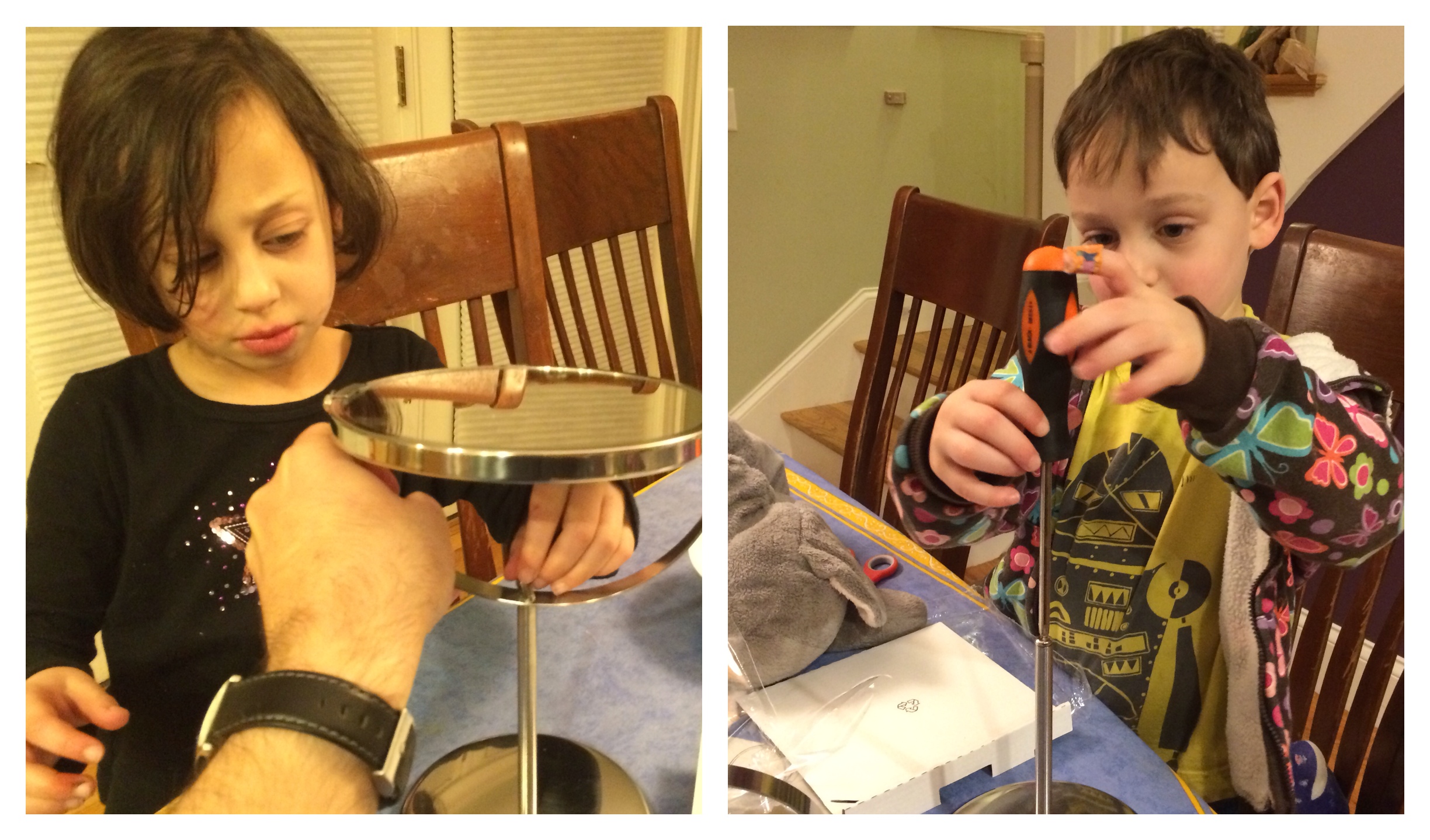
Back at the house, those small mirrors made a perfect small project for each of the kids. Assembly was quite simple, but it made a great introductory project.  There was a neck that needed to be attached to the base using a nut, and then a screwdriver was required to connect the mirror.

Perfect introductory assembling tasks for small hands

Perfect introductory assembling tasks for small hands

It took each of them a few minutes to assemble their mirrors, and they actually learned a little bit about how objects are put together.

In the meantime, I assembled the shelves I had purchased, and they were able to help as well. Most IKEA projects use just a simple allen wrench, which is within their range. Not as fast as putting it together myself, but they can do it.

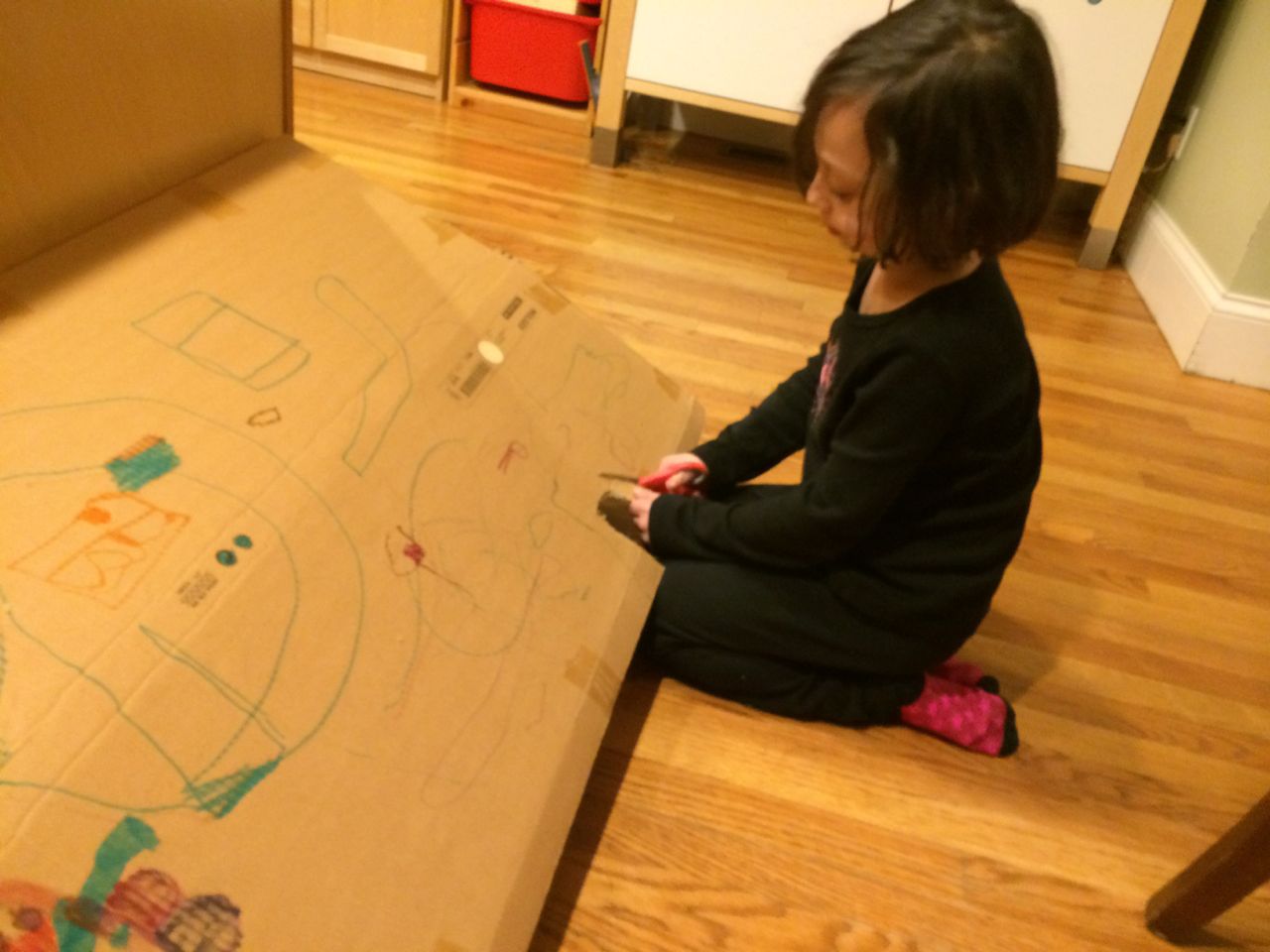
Of course, my daughter got most excited about the box the shelves came in. She decided that they would make a great home for her new stuffed rat, Cindy. She got some markers and colored it in, and she used a pair of scissors to cut out a door.

My daughter used the shelving box to make a house for her new stuffed animal

My daughter used the shelving box to make a house for her new stuffed animal

Overall, it made for a fun afternoon on a rainy winter day. And like the famous Calvin and Hobbes cartoon, the best part ended up being the box.

Posted in Uncategorized | Tagged , | 1 Comment

Shortcut: Generate realistically distributed randomized data in Excel

I recently wanted to create some randomized data for use in a simple proof-of-concept experiment.  I was creating a simulated population of users in various locations around the world, and so I needed to take a few hundred rows and randomly assign them one of a dozen different regions.

The trick was that to make the data realistic, I didn’t want to a truly random distribution. I wanted a “headquarters” that would have a very large population of users, a few regional locations that would have smaller but still significant numbers, and then a bunch of “satellite” locations that would have just a handful.

If you just use a combination of the “CHOOSE” and “RANDBETWEEN” functions in Excel, you get an even distribution across all the options.  This would make my data look funny – rows tagged for my made-up headquarters in “New York City” would have roughly the same number of rows as the ones tagged with my made-up satellite office in “Quito, Ecuador”.  How could I get a more realistic distribution but still have it be randomly generated?

I found a solution by using VLOOKUP to specify ranges for each location, with larger ranges for locations that should have more rows, and then using RANDBETWEEN to drive the lookups.

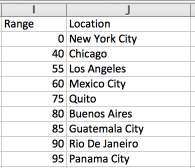
First, I set up a distribution.  I chose a range of 0-99, and then allocated chunks of it to various locations as follows:

The data in the left column specifies the range

The data in the left column specifies the range

The way to read this is that 40% of the data will be in my headquarters in New York City (i.e. 0-39). My regional locations of Chicago and Mexico City will each get 15% (hence sequential values of 55, and 75), and then my satellite offices of Los Angeles, Quito, Buenos Aires, Guatemala City, Rio de Janeiro, and Panama City will each get 5%.  The only confusing thing about it is that each row has its starting number, not its ending number, so to get a sense of the size of a range, you need to compare the values of the each row and the one after it.

Now, I can use the VLOOKUP function to specify lookups into that table.  Using the optional “range lookup” option, I can specify that excel should choose the row that falls into the range if there is no exact match.

The notation is “=VLOOKUP(30,$I$2:$J$10, 2, 1)”.  The options are as follows:

  • The first option (30) specifies that the value “30” should be looked up.  I’ve hardcoded the value, but this can reference another cell
  • The second option ($I$2:$J$10) represents the array of cells that hold my location mappings.  Column I has the ranges, and column J has the values
  • The third option (2) specifies the output column.  So, I am looking up values in column 1 (I), but I want it to return the value in column 2 (J)
  • The fourth option (1) instructs excel to use range lookups.  In this example, there is no row with a “30” in it, so Excel should assume these are ranges and use the closest smaller match, which will be the row 0

So, if I put the value “30” into the first argument, it will give me “New York City”, but if I put “41”, it will give me “Chicago”.

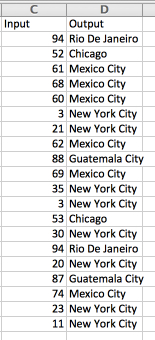
I can now pair this up with a whole bunch of RANDBETWEEN(0,99) values and generate a sample set that follows my specified distribution, giving more rows with the headquarters of New York City, some rows to the regional locations, and just a few rows to the satellite offices:

Using VLOOKUP, I can use the RANDBETWEEN generated values in Column C to fill in the correct matching locations in column D

Using VLOOKUP, I can use the RANDBETWEEN generated values in Column C to fill in the correct matching locations in column D

I’ve shown just 20 examples above, so as with any small random distribution there are fluctuations (a little more Mexico City than I would expect and no Los Angeles), but if you generate a few hundred the distribution will become closer and closer to the ranges I have specified.

Okay, so far, so good.  But now I want to take it a step further.

What if I want a second column that will specify region (North American, Central America, or South America)?  The data is all random, so I could create a second randomized column for the region.  However, if I just replicate what I did above, the data won’t make sense.  Since each random value is generated independently, I will get non-sensical combinations like a location of “New York City” but a region of “Central America”.

The solution is to have a second VLOOKUP based on the original randomized location value to choose an appropriate region.

So, I start by adding a column to the distribution data to associate a region with each location:

To avoid mismatches, I add a region for each location

To avoid mismatches, I add a region for each location

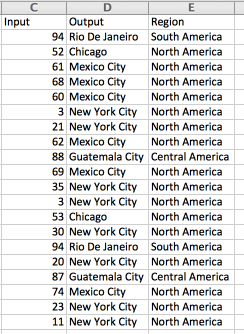
Then, I add a new VLOOKUP column to my dataset, where the new column is a VLOOKUP of the randomly generated value into the location/region list. This time, I turn the “range lookup” option to 0, since I don’t expect the data to be sorted and I will always have an exact match [VLOOKUP(D2,$J$1:$K$10,2,0)]:

VLOOKUPs are chained. The Output column was randomly generated, and the Region column does a VLOOKUP with whatever value was chosen.

VLOOKUPs are chained. The Output column was randomly generated, and the Region column does a VLOOKUP with whatever value was chosen.

Now, my randomized data makes sense; the selection of locations follows a meaningful distribution, and the “dependent” columns are properly selected rather than just being separate random decisions.

None of this is rocket science, obviously, and I am sure there are a hundred other ways to do this as well using some of the more advanced tools hidden inside Excel. However, this way is a quick and easy, so I figured I would document the recipe in case someone wants to follow it…

… and also so that I can refer back to it at some point down the road without having to recreate it from scratch.

Posted in Uncategorized | Tagged , | 4 Comments

Diet Coke or Coke Zero? Turns out I am a marketing statistic

I like to think of myself as a reasonable well educated, critical thinker.  I like data and facts.  I like to look at problems from many different angles.

So nothing drives me crazier than when I discover that a marketer knows me (or my kids) better than I do. It really irritated me that Lego’s marketers knew that girl-targeted “Lego Friends” would be a hit with my daughter, since I was convinced that Lego’s are perfectly gender neutral.

Well, it turns out that Coca-Cola’s soda marketers have me figured out too.

I know I really shouldn’t drink soda. It’s terrible for my teeth, and if I drink it too late in the day, it keeps me up at night. Still, on many afternoons I find myself needing a little bit of a boost, and nothing quite hits the spot like a soda.  Especially a nice, 12-ounce can of Pepsi.

I’m relatively trim, but I don’t get much exercise, and drinking 150 calories of empty calories just seemed wasteful to me. I knew I should switch to zero-calorie soda, but I had always hated the taste of diet soda.

Then, I came across commercials for Coke Zero. The radio advertisements touted that it tasted more like regular Coca-Cola, so I figured I would give it a try. It still was a far cry from what I thought of us a regular soda, but I got used to it. I didn’t like it as much as the Pepsi, but I figured it was better for me.

That was a couple of months ago.

Then, to my horror, I discovered the truth behind the invention of Coke Zero – it was designed to appeal to men! It seems that the marketers behind Coca-Cola had discovered that men don’t like the idea of drinking “diet” soda, and the majority of the people who drink it are women. In an effort to reach more men, they created a “new” soda that they claimed tasted more like regular Coca-Cola.

And that was me. I had a negative association in my mind with drinking diet soda, but somehow Coke Zero was okay. And they had successfully switched me from Pepsi to Coca-Cola. It was an all around win for the marketing team.

So, how much is this purely marketing? Is Coke Zero actually different than Diet Coke, or is it exactly the same? I was pondering this with some of my colleagues, and one of them recommended a taste test.  We poured cups of Diet Coke and Coke Zero blindly and compared the tastes.

The Diet Coke / Coke Zero taste test

The Diet Coke / Coke Zero taste test

It turns out there is a difference in the taste, but it is pretty minor. Both clearly taste like “diet” soda, but the Coke Zero has a sweeter flavor. So there is something to the claim that it is more like real Coca-Cola, but it is still mostly branding.

And the kicker? I discovered that I actually prefer the less sweet flavor of Diet Coke.

Damn marketers.

Posted in Uncategorized | Tagged , | Leave a comment

With a pacifier, letting nature take its course

When you give a child a pacifier, you know you are making a devil’s bargain. You gain some desperately needed peace and quiet, but you know at some point in the distant future you are setting yourself up for a major battle when the time comes to take it away.

Well, this past week our day of reckoning came. We are a pacifier-free household. And it has been a very rough week.


I remember reading a parenting book before my first child was born. In general, I tried to avoid these books, which I feel often carry a judgmental tone on proper parenting techniques that I don’t necessarily agree with. But I figured I should read at least one, so I found the least judgmental one I could find (Baby 411).

The author made a strong argument about why pacifiers were terrible things, since the baby would quickly come to depend on it to settle down and fall asleep and would have a hard time learning to do without it. Better to teach the kid to “self-soothe” from the get-go.

This made logical sense and as a naive parent I initially thought that would be great idea. However, after weeks of sleep deprivation and a baby girl who turned out to have a tough time at night, I changed my mind about the pacifier in a heartbeat. It was salvation to two exhausted parents who were desperate for rest. I knew there would be a tough battle in the future, but I willingly made the compromise. Everyone was better off.

A few years later, when my daughter turned two and her baby brother was just a few months away from being born, I decided the time had come to take the pacifier away. I figured better to do it then as opposed to waiting for the new baby to arrive, and the baby sitter had already gotten her to nap a few times without it.  So, we just went cold turkey and took the pacifier away

She was mad the first day or two, but then stopped asking for the pacifier. But the next two weeks were hell – she just refused to go to sleep, constantly insisting on getting out of bed or wanting a song or music. She had to learn to fall asleep all over again. I still did not regret giving it to her as a baby, but it took a while for life to return to normal.

Things followed a different path with my son, however. Unlike his sister, who is generally willing to go with the flow, my son is much harder to redirect. When he gets his heart set on something, it is extremely difficult to dissuade him.

He loved his pacifier, and when he turned two, it was very clear that going “cold turkey” the way his sister did was not going to be effective. We kept finding reasons to delay taking it away, since it never seemed like a good time to have such a major battle.

We did start putting restrictions on it, however. First, the pacifier was no longer allowed downstairs. Then, when he turned three, I took a lanyard and strapped it to the edge of his bed. This was actually more related to me being sick and tired of having him wake me up and find it in the middle of the night when he would lose it, but the lanyard severely limited its range. He could only use it while sitting on his bed. But he was just as devoted to it as ever.

A few months ago, I thought about puncturing it. The idea behind puncturing the pacifier is that it will not have the satisfying sucking effect that babies like so much. I resisted doing this with my daughter (I can’t help feeling like there is something underhanded about this technique), but my son was so attached to it that I was willing to consider it.

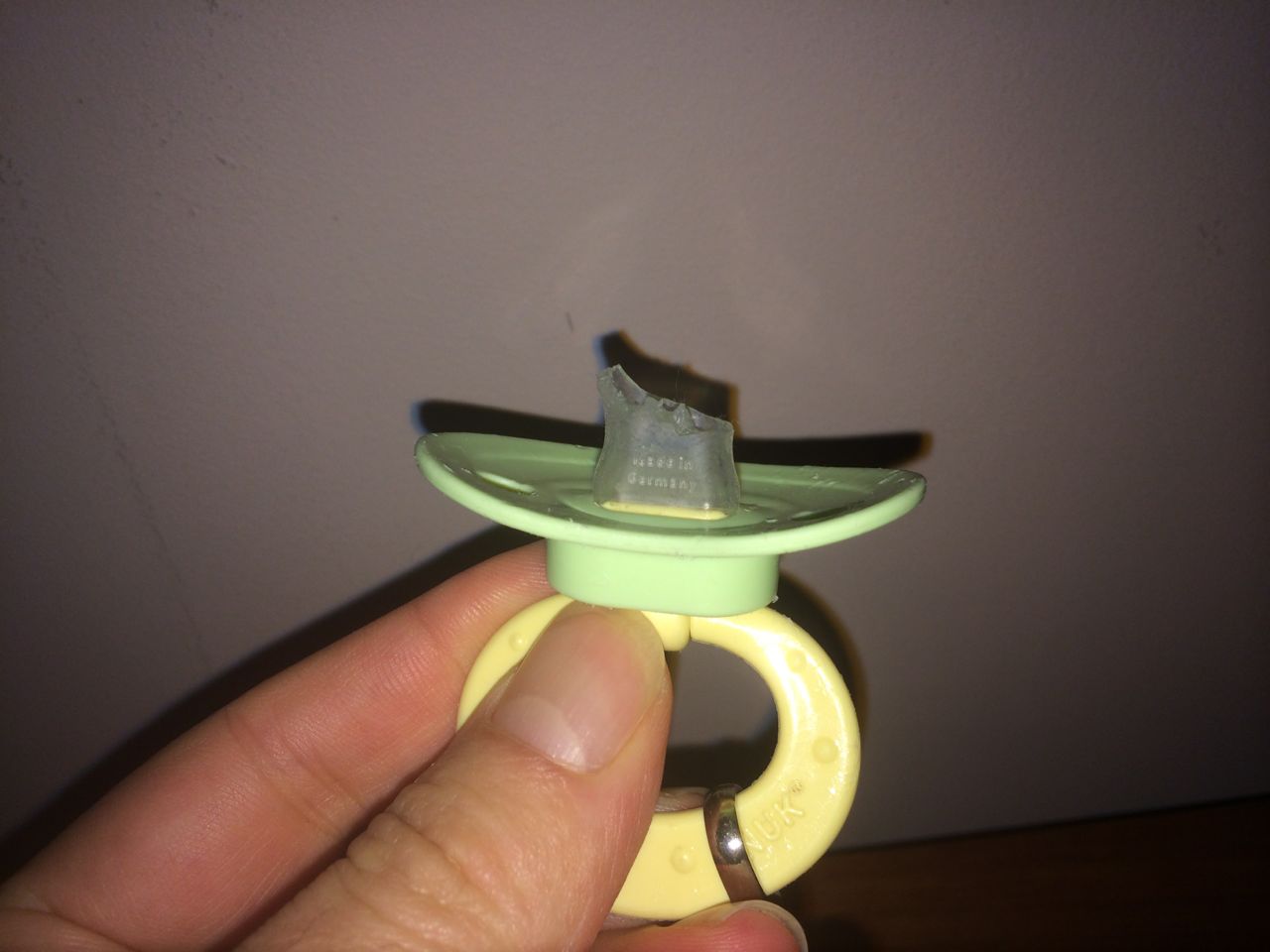
However, to my surprise, I discovered that he had already chewed a hole in it. It had become punctured long ago, but there had been no diminishment of his attachment to it. I became even more convinced that trying to take it away was going to be a nightmare.

My wife and I agreed that the only other option left was to let nature simply take its course – he would eventually chew it off, and that would be that. It meant we would have no control over its timing, but it seemed like the best.

Over the next few months, I would remind him that at some point the pacifier would break, and he would not have it anymore. He would look at me, nod, and say, “I know.” And then suck carefully on it.

Well, last Sunday, the inevitable happened – it broke.

The pacifier had finally broken

The pacifier had finally broken

It happened in the morning, and I looked at him and said, “That’s it.  It’s broken now.” He looked at me, said “Okay. I know,” and then went downstairs to get ready for swimming lessons.

Obviously, it wasn’t going to be that easy. That night at bedtime, he ran into his room, grabbed the pacifier and stuck it in his mouth. He then turned and looked at me, horrorstruck. The reality was setting in.

But to my amazement, he didn’t cry. He didn’t get mad at me. He asked once or twice if we could “buy a new one tomorrow,” but I explained to him that no, it was broken, and he was a big boy now.

Bed time this week was awful. He was constantly getting out of bed, claiming he wasn’t tired, wanting to go downstairs, saying he was hungry. There were tantrums and yelling. Bedtime has ranged from 45 minutes to an hour and a half every night.

But there hasn’t been one word about the pacifier.

He knew the pacifier was going to break some day. He saw it tearing, and we had conversations that when it was gone, that would be it. The key thing here is that I wasn’t the enemy. He wasn’t blaming me for taking the pacifier away. It broke, and sometimes unfortunate things happen, and that is life.

Sure, he still needed to learn to go to bed, and that was hard, but it has been much easier to help him through where I can be on his side and not the person who took his precious pacifier away. It’s like the neutral third party technique of toddler negotiation, but in this case, I really was a third party.

Today is one week since the pacifier broke. It’s also the first night that he didn’t keep getting out of bed. It was a long Sunday, he didn’t nap, and he was exhausted. He got into bed, briefly asked for music, and was asleep 10 minutes later.

I’m sure we will still have some rough bed times in the coming weeks, but overall, I’m happy with how it had played out. Every child – and every parent – is different. For him, I think this was the way to go.


Posted in Uncategorized | Tagged , , | Leave a comment

Script to extract all applications installed on a Mac

Recently, I needed to extract a full list of programs installed on a couple of Macs.  What I wanted to do was get an inventory of all of the software installed on each one and then load it into Excel and identify differences.

I initially assumed that would be simple, and I would just use a shell script to look in a couple of directories and compile a list. Unfortunately, it turns out not to be so simple, with applications scattered across a wide range of locations.

I spent a little while looking for programs that could export a list, but none of them quite fit my needs and price range. They tended to be expensive auditing tools that cost more than I wanted to spend.

After poking around for a while further, I found that Apple does have a built-in tool to audit what is on a Mac.  If you select “About This Mac” from the Apple menu and choose “More Info…”, there is an option to pull a “System Report”, which opens a complex screen with detailed information about the computer. It contains hardware information, network data, and an extensive report of all the installed software and packages.

The system report had all the information I wanted, but I needed to extract the data

The system report had all the information I wanted, but I needed to extract the data

Everything I needed was here, but I needed some way to load it into Excel so that I could compare a couple of machines at once.  I did manage to find a “Save…” option in the menu bar, and this had me save a “.spx” file.  I’m assuming that this file allows users to send a report to Apple tech support (or other support organizations) with detailed information about the computer.

I tried opening up the file in a text editor, and thankfully the data was in text form, so I knew I would be able to extract it. Unfortunately, the data was in XML. In order to get it into a format that I could analyze in Excel, I would have some work to do.

XML is a very flexible format, but unfortunately the main tool for transforming it is just awful – XSLT (Extensible Stylesheet Language Transformations).  It’s kind of like a programming language, but not really. Every time I have had to use it, I have felt like I was wading through a pit of mud.

Still, I was determined to have a go at it. As I looked at the format, I saw that Apple wasn’t exactly making it easy. Rather than using attributes and node types, the data was encoded into alternating name/value pairs, where each <key> tag told you the meaning of the data in the tag that comes after:

<dict>
<key>_name</key>
<string>Google Chrome</string>
<key>has64BitIntelCode</key>
<string>no</string>
<key>lastModified</key>
<date>2013-10-08T20:16:20Z</date>
<key>obtained_from</key>
<string>identified_developer</string>
<key>path</key>
<string>/Applications/Google Chrome.app</string>
<key>runtime_environment</key>
<string>arch_x86</string>
<key>signed_by</key>
<array>
<string>Developer ID Application: Google Inc.</string>
<string>Developer ID Certification Authority</string>
<string>Apple Root CA</string>
</array>
<key>version</key>
<string>30.0.1599.101</string>
</dict>

What a pain! Instead of being able to look for specific node / attribute name combinations, you needed to focus on the order of the data. XSLT doesn’t have variables in the normal sense of the word (XSLT variables can only be set once!), so logic where you need to keep track of the previous/next node values is tricky. As I did some research, I found that the XSLT actually provides a special “following-sibling” reference that allows you to automatically grab values from the node after the current one, which ended up making the task quite simple.

My XSLT looks at two specific sections and then outputs tab-delimited values for certain keys.  Specifically, it grabs each of the sections and then outputs the data for the keys below:

  • Applications (SPApplicationsDataType)
    • _name
    • obtained_from
    • version
    • info
    • path
  • Installations (SPInstallHistoryDataType)
    • _name
    • package_source
    • install_version

I’m sharing it here in case anyone else needs to do something similar, in which case they can work from my script.


<?xml version="1.0" encoding="UTF-8"?>

<xsl:stylesheet version="1.0"
xmlns:xsl="http://www.w3.org/1999/XSL/Transform">

<xsl:output method="text" indent="yes" encoding="utf-8" standalone="yes"/>

<xsl:template match="plist/array/dict[string='SPApplicationsDataType']/array/dict">
 <xsl:value-of select="normalize-space(key[text() = '_name']/following-sibling::string)"/>
 <xsl:text>	</xsl:text>
 <xsl:value-of select="normalize-space(key[text() = 'obtained_from']/following-sibling::string)"/>
 <xsl:text>	</xsl:text>
 <xsl:value-of select="normalize-space(key[text() = 'version']/following-sibling::string)"/>
 <xsl:text>	</xsl:text>
 <xsl:value-of select="normalize-space(key[text() = 'info']/following-sibling::string)"/>
 <xsl:text>	</xsl:text>
 <xsl:value-of select="normalize-space(key[text() = 'path']/following-sibling::string)"/>
 <xsl:text>
</xsl:text>
</xsl:template>

<xsl:template match="plist/array/dict[string='SPInstallHistoryDataType']/array/dict">
 <xsl:value-of select="normalize-space(key[text() = '_name']/following-sibling::string)"/>
 <xsl:text>	</xsl:text>
 <xsl:value-of select="normalize-space(key[text() = 'package_source']/following-sibling::string)"/>
 <xsl:text>	</xsl:text>
 <xsl:value-of select="normalize-space(key[text() = 'install_version']/following-sibling::string)"/>
 <xsl:text>	</xsl:text>
 <xsl:text>	</xsl:text>
 <xsl:text>
</xsl:text>
</xsl:template>

&nbsp;

<xsl:template match="text()">
</xsl:template>

<xsl:template match="/">
 <xsl:apply-templates/>
</xsl:template>
</xsl:stylesheet>

To use it, save the code above into an xslt file (e.g. application_extract.xslt).  Then, use the System Report to save a .xsd file.  Finally, run the following command:

xsltproc application_extract.xslt computer_info.xsd > tab_delimited_results.txt


Posted in Uncategorized | Tagged , , , , | 3 Comments